

CRM Sales Cloud Overview
In this chapter, the system is divided into multiple modules based on business functions. Each module's core functionalities and corresponding data structures are described in detail. This solution not only prioritizes smooth business processes but also considers rational data storage and system scalability.
1. Lead Management
Function Overview
The Lead Management module is responsible for capturing and managing prospective customer information. The system supports capturing leads through various channels—such as websites, telephone, and email—and provides functionalities for status updates, follow-up tracking, and adding remarks. During the lead conversion process, the system automatically checks for duplicate entries to ensure that appropriate leads are transformed into customers, contacts, and opportunities.
Relevant Data Tables
- Leads (Lead Table) Stores basic lead information, including name, contact details, source, current status, and remarks. It also records the creation time and update logs for each lead to facilitate later analysis and statistics.
2. Account & Contact Management
Function Overview
This module is designed to help users build and maintain customer profiles. Enterprises can record key information such as company name, industry, address, and other crucial details, while also managing related contact information (e.g., name, position, phone number, and email). The system supports one-to-many or many-to-many relationships between customers and contacts, ensuring complete and synchronized data.
Relevant Data Tables
- Accounts (Customer Table) Stores detailed customer profiles, including basic company information and other business-related data.
- Contacts (Contact Table) Stores personal information associated with customers and establishes a foreign key relationship with the customer table to ensure data consistency.
Lead Conversion Flowchart
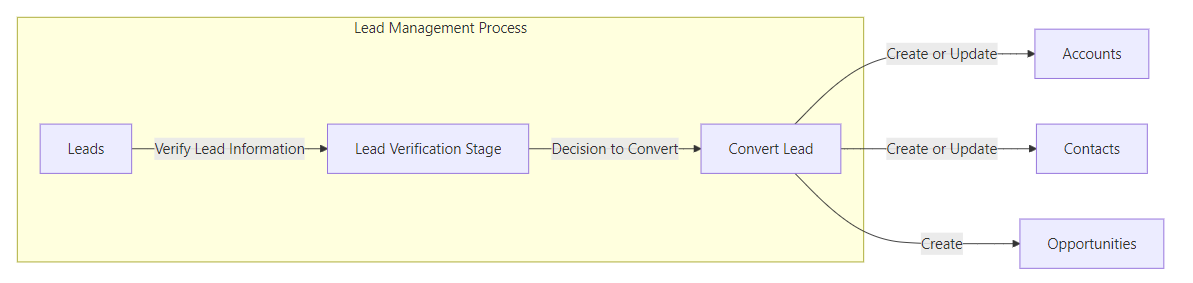
- Lead capture → Lead follow-up (status update) → Lead verification → Conversion into accounts, contacts, and opportunities
3. Opportunity Management
Function Overview
The Opportunity Management module focuses on converting leads or existing customer information into sales opportunities. Users can record details such as the expected closing date, current stage, estimated amount, and success probability. The system supports dynamic management of sales stages and records detailed reasons when an opportunity fails, facilitating future sales strategy optimization. Additionally, the module allows multiple products to be associated with a single opportunity, automatically calculating the total amount.
Relevant Data Tables
- Opportunities (Opportunity Table) Records detailed information for each sales opportunity, such as closing dates, sales stages, and estimated amounts.
- OpportunityLineItem (Opportunity Line Item Table) Stores specific product details related to opportunities, including product ID, quantity, unit price, and discount, with support for automatic amount calculation.
Conversion Steps
- Opportunity creation → Opportunity management (stage update) → Quote generation → Customer approval → Sales order creation → Order execution and status update
4. Product & Price Book Management
Function Overview
This module is responsible for managing product information and pricing strategies. The system can capture basic product details such as product code, name, description, inventory, and price, and supports the establishment of multiple pricing models. By associating products with price books, users can flexibly manage pricing requirements for different markets and customer segments.
Relevant Data Tables
- Products (Product Table) Stores detailed information for all products, providing foundational data for generating quotes and orders.
- PriceBooks (Price Book Table) Manages various pricing models and their associated products, supporting dynamic adjustments to pricing strategies based on business needs.
5. Quote Management
Function Overview
The Quote Management module generates formal quotes from existing opportunities, recording details such as the validity period, discounts, tax rates, and total amounts. The system incorporates an internal approval process, allowing management to review and adjust quotes; each quote may include multiple product line items to ensure accurate calculations.
Relevant Data Tables
- Quotes (Quote Table) Records basic information for quotes, including the associated opportunity, validity period, discount, tax rate, and overall status.
- QuoteLineItems (Quote Line Item Table) Stores detailed data for each product line item in a quote, automatically calculating individual product amounts as well as the total quote amount.
6. Sales Order Management
Function Overview
The Sales Order Management module converts approved quotes into sales orders and tracks the entire lifecycle from creation to completion. Users can view order status, approval records, as well as logistics and shipping details in real time, thereby better managing the order execution process.
Relevant Data Tables
- SalesOrders (Sales Order Table) Records detailed information for sales orders, including the associated quote, order status, approval records, shipping status, and creation time.
7. Activity Management
Function Overview
The Activity Management module assists the sales team in managing daily schedules, including tasks, meetings, and phone calls. The system allows the recording of activity details, participants, and related remarks, and provides scheduling and reminder functionalities to ensure that all activities proceed as planned.
Relevant Data Tables
- Activities (Activity Record Table) Stores records for tasks, meetings, and calls, including activity type, date, participants, and related customer or opportunity information.
8. Data Reporting and Analytics
Function Overview
This module leverages multidimensional data analysis and graphical presentations to help enterprises gain real-time insights into sales performance and business conversions. The system supports the generation of sales funnels, conversion rate analysis, and performance reports, thereby providing decision-making support for management.
Note
Although there is no dedicated data table for reporting and analytics, this module relies on the data stored across the aforementioned modules, enabling real-time feedback and trend forecasting through data aggregation and analysis.
9. Marketing Campaign Management (Optional Module)
Function Overview
As an auxiliary function, the Marketing Campaign Management module is primarily used for planning and tracking marketing activities. The system can record campaign planning, budgeting, execution processes, and performance evaluations, tracking lead conversion rates and return on investment (ROI) to provide data support for marketing initiatives.
Note
The data structure for this module can be expanded based on actual requirements; currently, it primarily records the execution details of marketing campaigns, complementing the data from the Lead Management module.