

Mở rộng tab cấu hình quyền

Kiểm soát quyền hạnCommunity Edition+

Dưới đây lấy mục cấu hình "Menu mobile" làm ví dụ để minh họa cách mở rộng một tab cấu hình quyền mới. Hiệu quả như hình bên dưới:
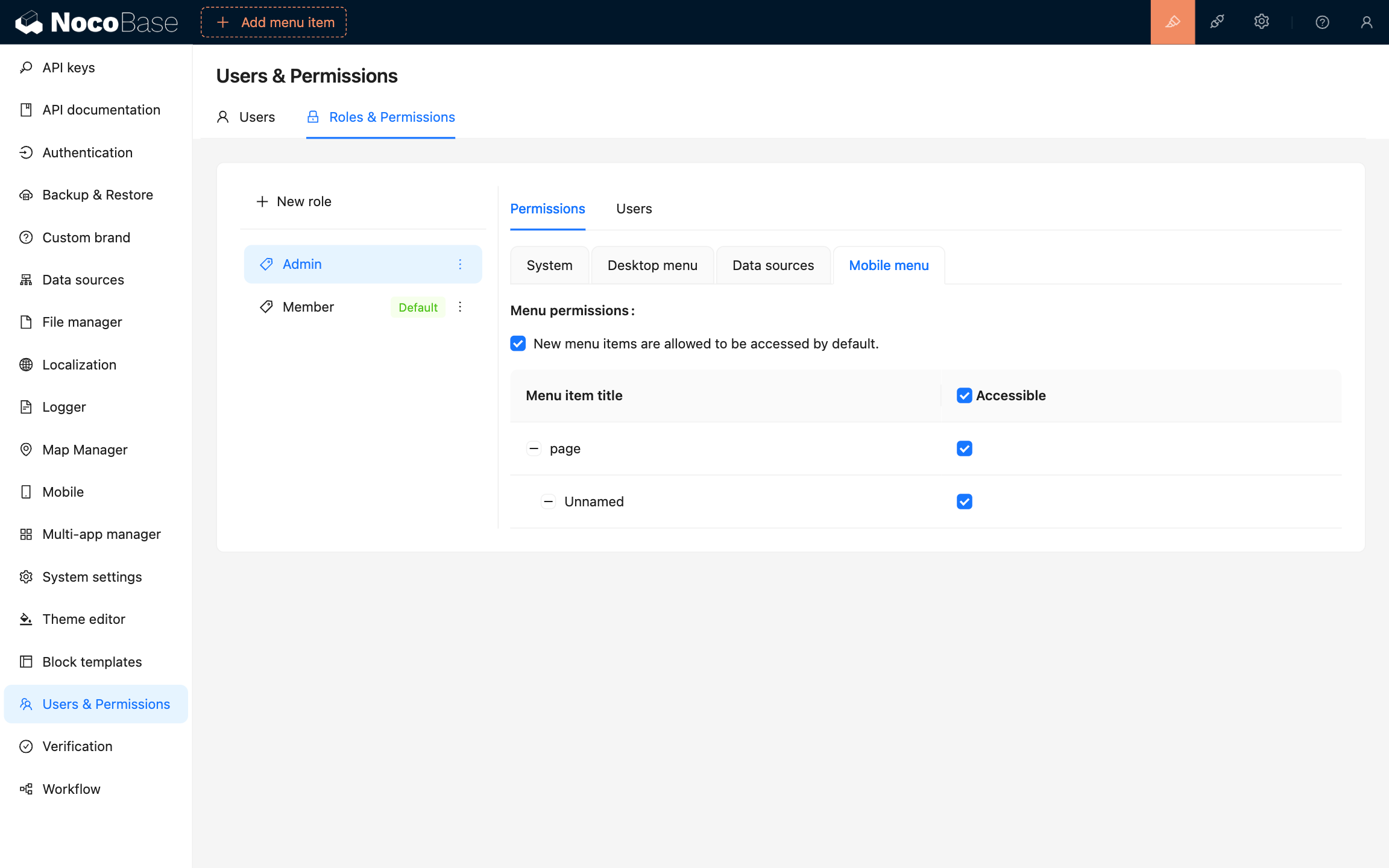
20240903210248

Code như sau:

import { Plugin } from '@nocobase/client';
import PluginACLClient from '@nocobase/plugin-acl/client';

class PluginMobileClient extends Plugin {
  async load() {
    const aclInstance = this.app.pm.get(PluginACLClient);

    aclInstance?.settingsUI.addPermissionsTab(({ t, TabLayout, activeKey }) => ({
      key: 'mobile-menu',
      label: t('Mobile menu', {
        ns: 'plugin-mobile',
      }),
      children: (
        <TabLayout>
          <MenuPermissions />
        </TabLayout>
      ),
    }));
  }
}

Đầu tiên, chúng ta cần lấy instance của plugin PluginACLClient (các phương thức khác để lấy plugin instance), thông qua phương thức settingsUI.addPermissionsTab để thêm một tab cấu hình quyền mới. Trong ví dụ này, chúng ta đã thêm một tab cấu hình quyền có tên là "Menu mobile".

Giá trị của thuộc tính settingsUI là một instance của lớp có tên ACLSettingsUI, thông tin kiểu của nó như sau:

import { TabsProps } from 'antd/es/tabs/index';

interface ACLSettingsUI {
  addPermissionsTab(tab: Tab | TabCallback): void;
  getPermissionsTabs(props: PermissionsTabsProps): Tab[];
}

type Tab = TabsProps['items'][0];

type TabCallback = (props: PermissionsTabsProps) => Tab;

interface PermissionsTabsProps {
  /**
   * the key of the currently active tab panel
   */
  activeKey: string;
  /**
   * the currently selected role
   */
  role: Role;
  /**
   * translation function
   */
  t: TFunction;
  /**
   * used to constrain the size of the container in the Tab
   */
  TabLayout: React.FC;
}