

Workflow + AI for employees to complete company background research automation
In NocoBase, you can turn company background research into a trackable automated task flow. Business staff still work in the familiar company information page, while workflow and AI staff are responsible for completing background information, recording the processing process, and saving each generated report.
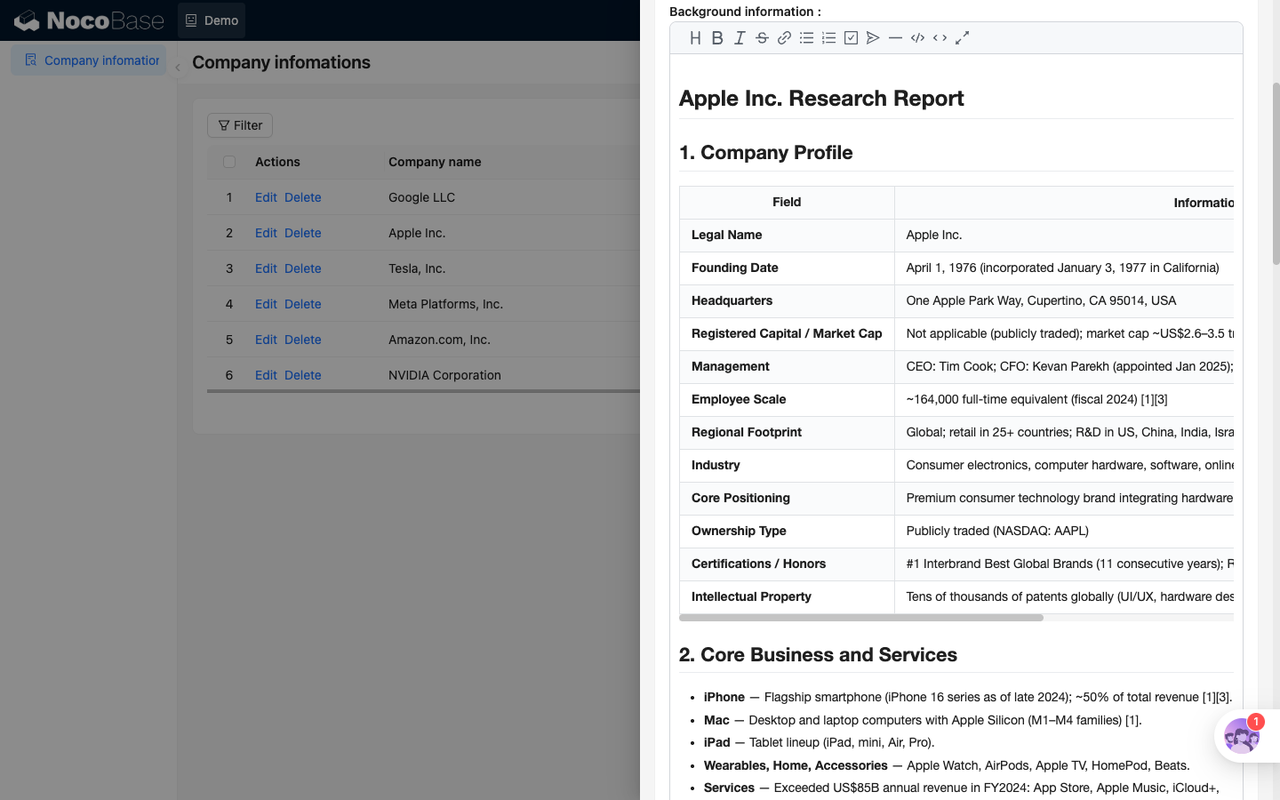
This scenario is suitable for dealing with a common problem: company background information is not a static field that ends after being entered once. Public information will change, regulatory events will occur, and the status of cooperation will be constantly adjusted as business progresses. If you only rely on manual supplementary recording on a regular basis, it will be easy to miss; if you directly let AI cover company information, it will be difficult to explain "how this judgment came about." The approach here is to separate and save the current data and the research process - the company record saves the version being used by the business personnel, and the background check record saves the status, output and history of each AI survey.
Let’s look at the two tables first
The company information form provides the basic information of the research object, and the background investigation record form is responsible for undertaking each research task. One saves the currently available information, and the other saves the processing process and historical results.
companies: Company information table
background_check_tasks: Background check record form
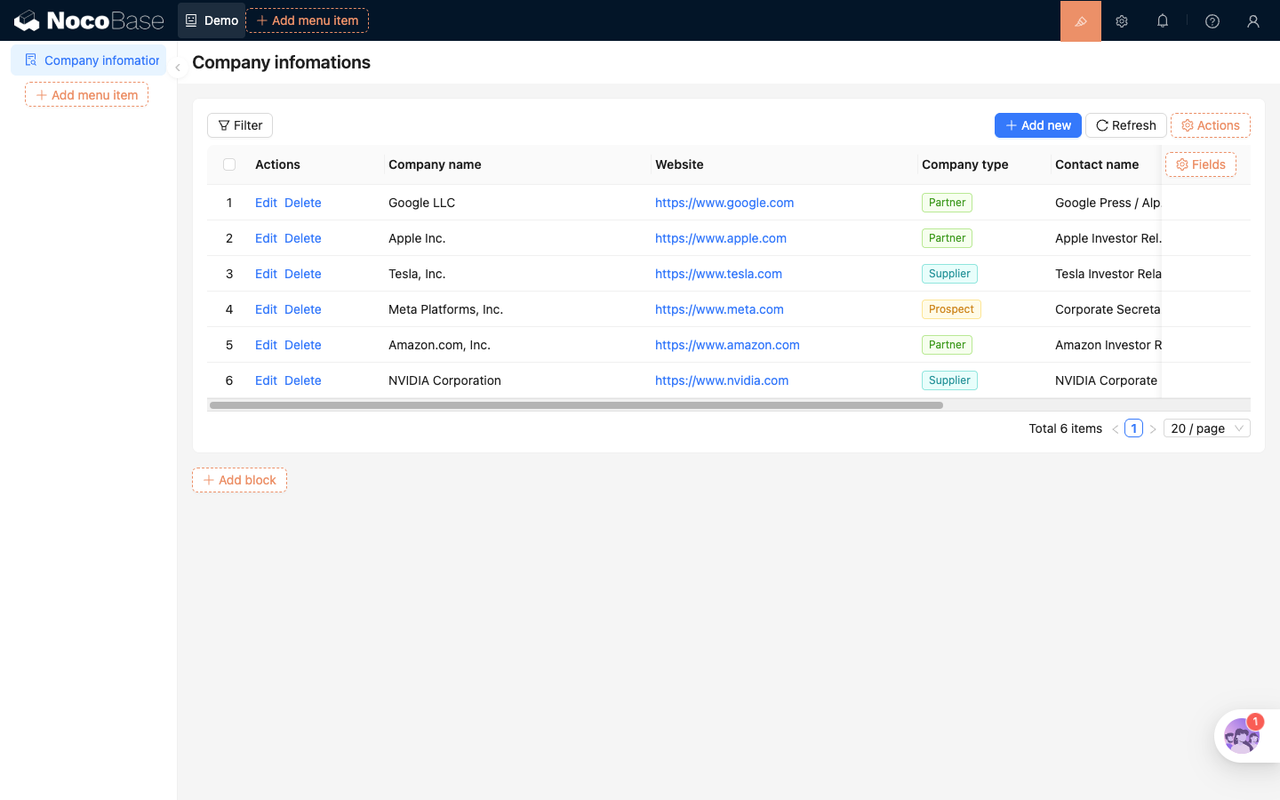
Enter the research process from company information
The company list is the most familiar entrance for business people. You can see the company name, official website, company type, contact person, email and other information on the page. After entering a company, business personnel can view the current background report or initiate a new background investigation.
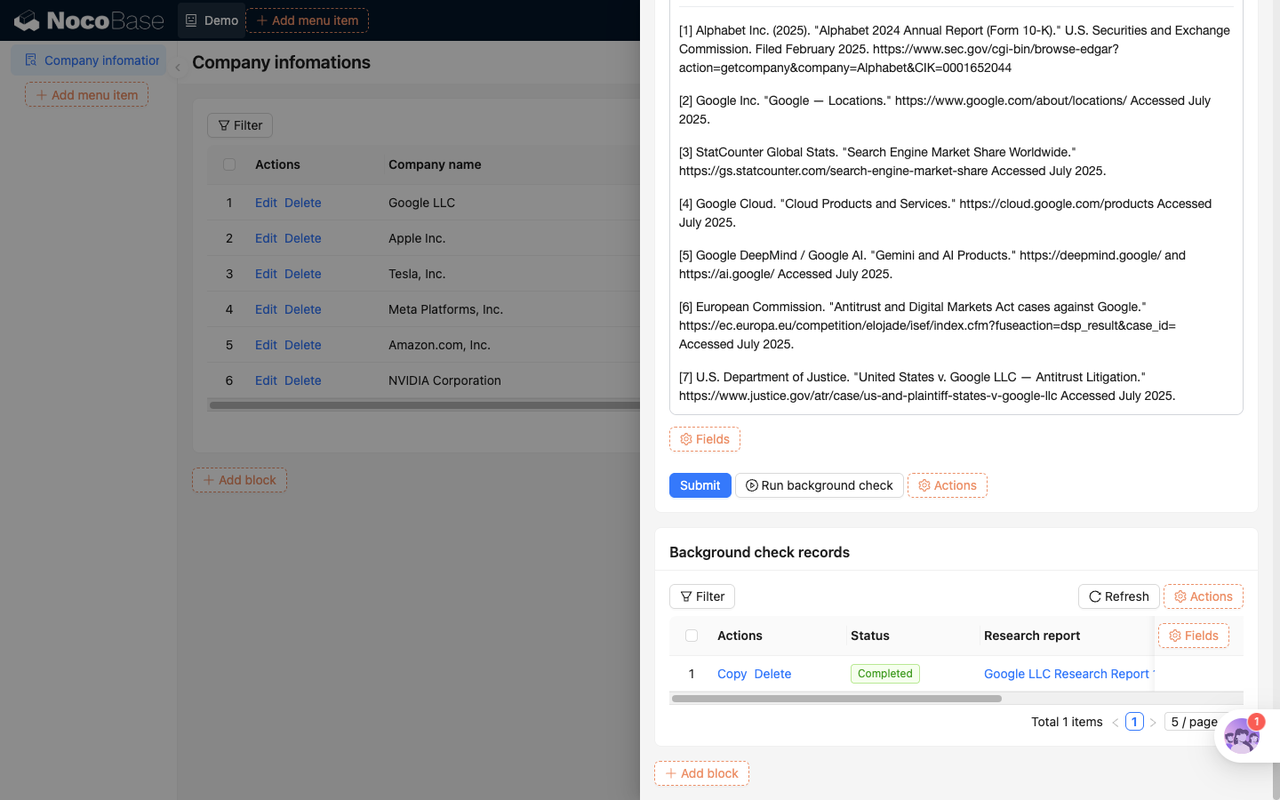
After entering the editing page, "Background information" is displayed using the Markdown editing component. The AI-generated content is not a short summary, but a structured report that can be read, copied, and continued to be maintained. Business personnel can still modify it manually, but each result generated by AI will leave a corresponding history in the background check record.
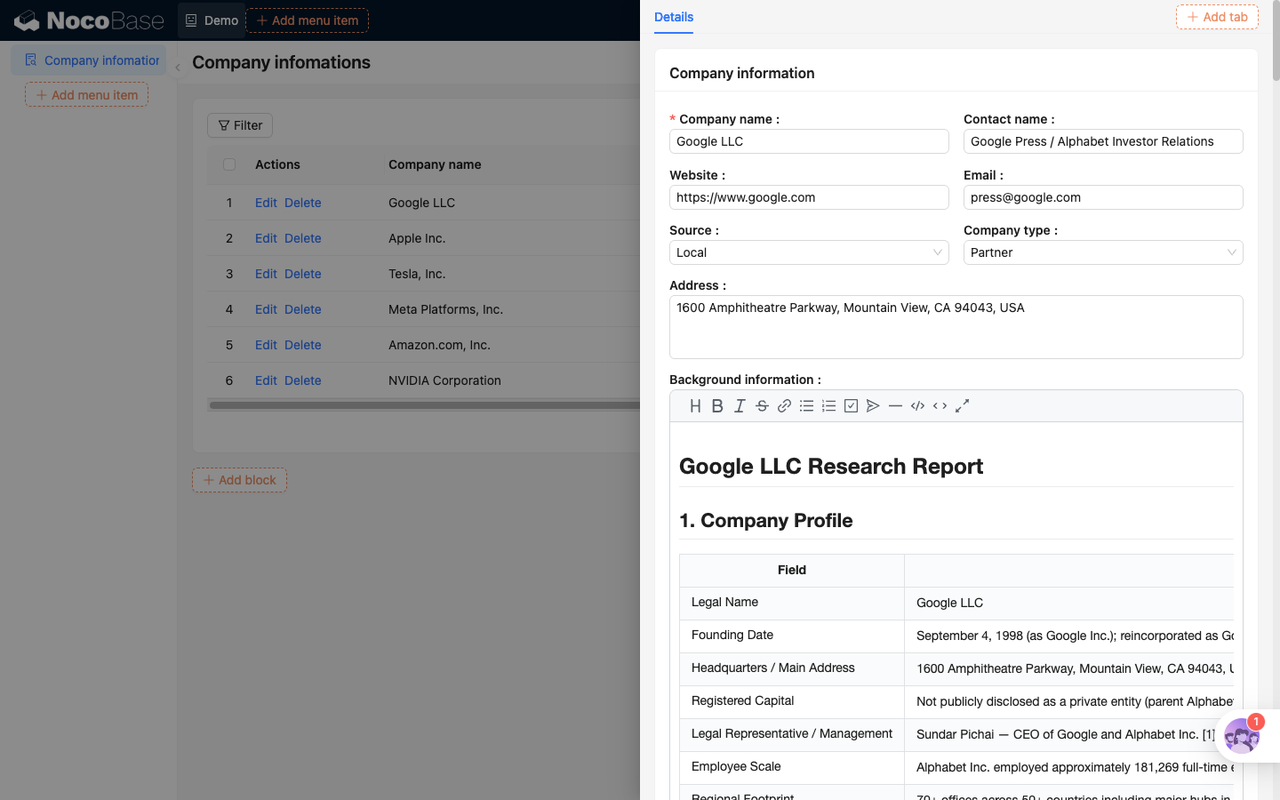
In this way, the page still looks like an ordinary company data maintenance interface, and the underlying processing method has become "current data + research history". The company table saves the current version, and the task table saves the process and evidence chain.
Three triggering methods
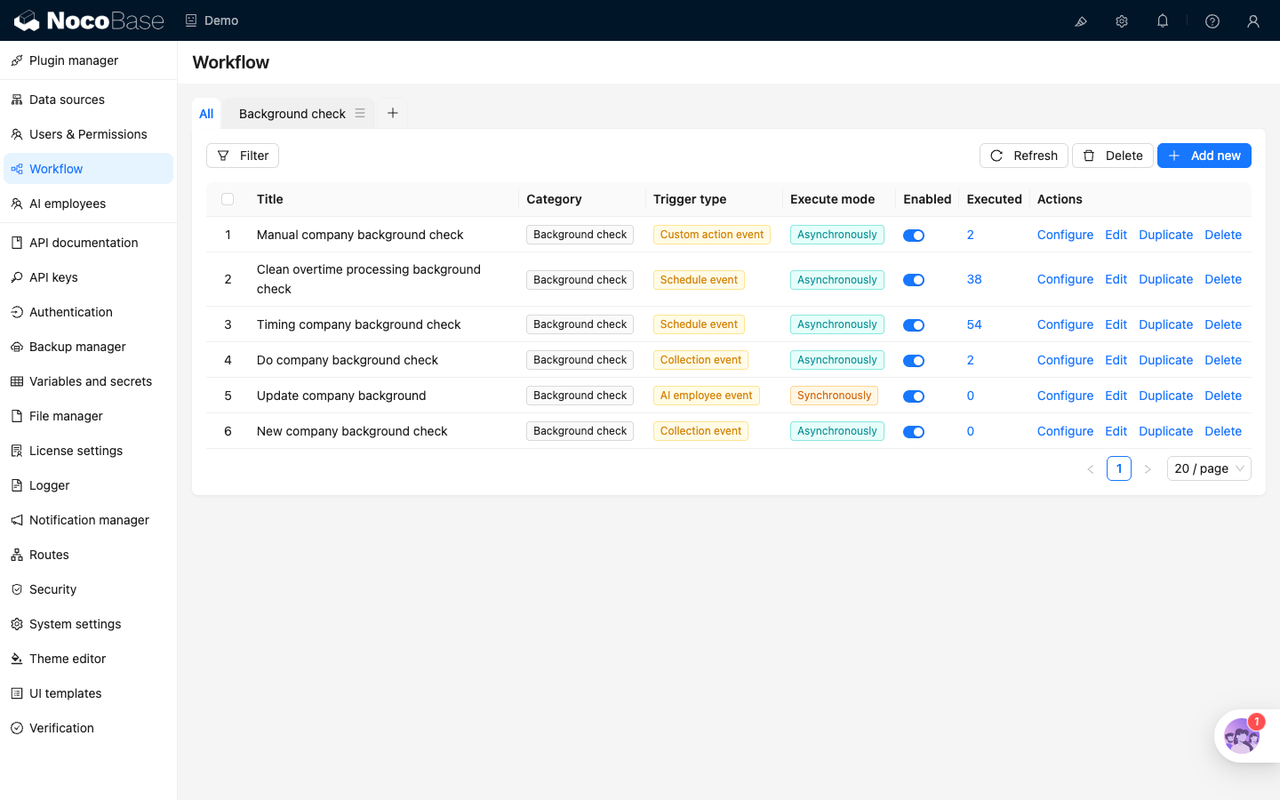
Background research shouldn’t just rely on a manual button. In real business, you may want to automatically complete the information after adding a new company, you may also need to make up historical records regularly, and you may also take the initiative to re-investigate before signing a contract or reviewing.
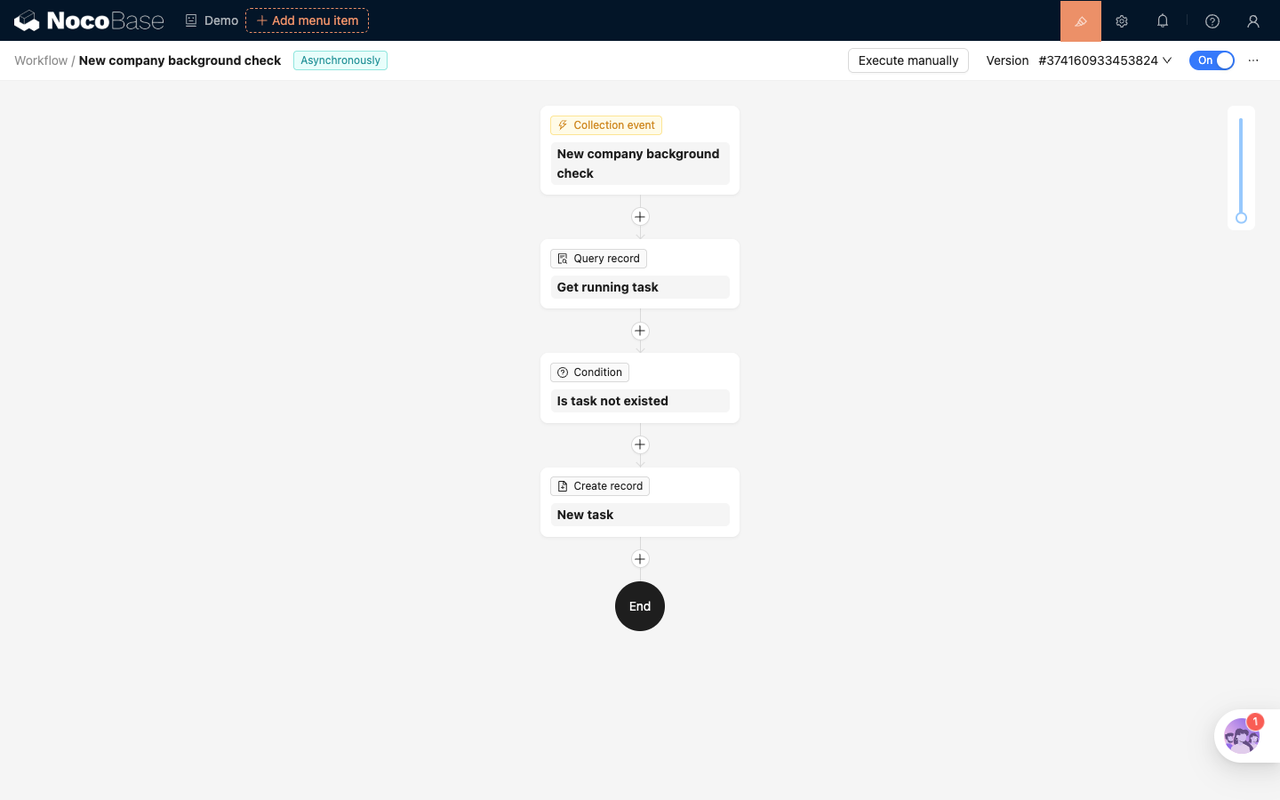
The New company background check workflow handles automatic research after adding or updating a company. It listens to the data events of the company table and is triggered when the company name exists and the background information is empty. The AI will not be called immediately after triggering, but will first check whether there are any unfinished tasks for the same company; if not, a new background check record will be created.
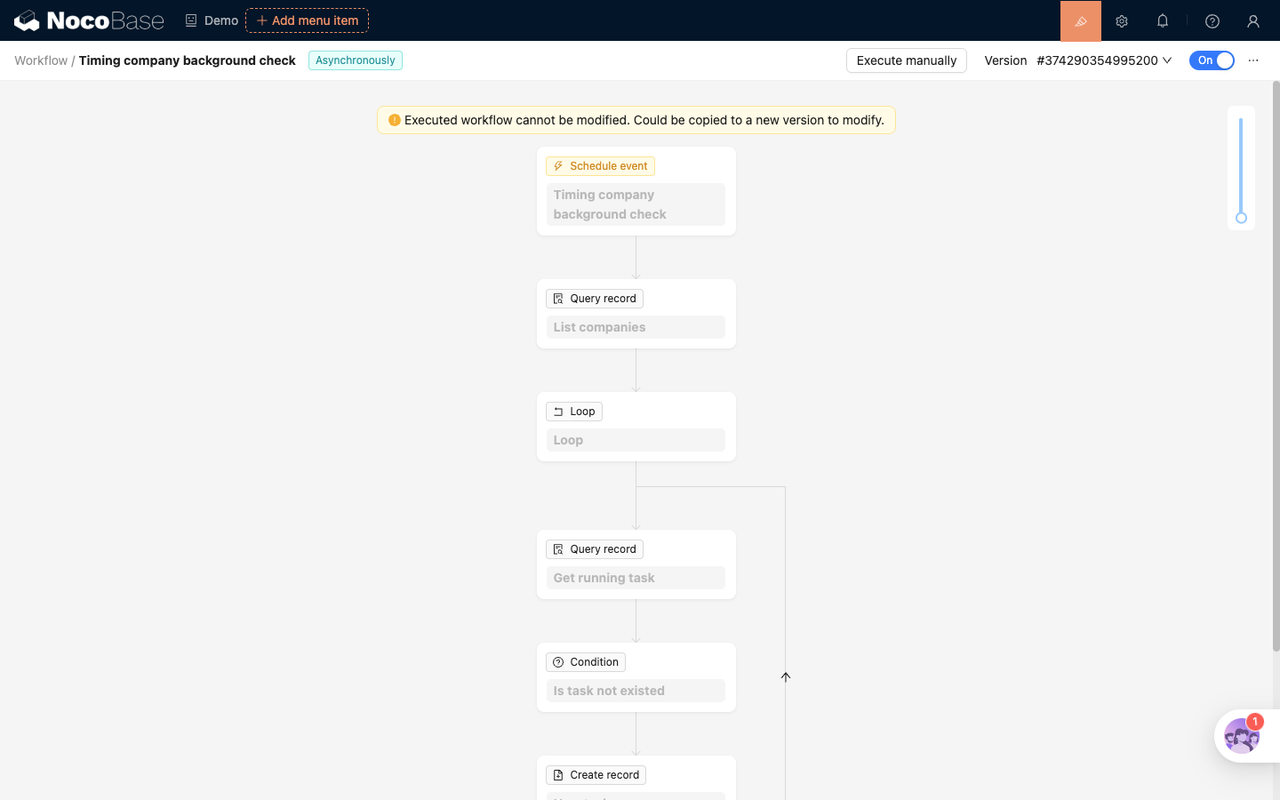
The Timing company background check workflow is responsible for the continuous completion of historical data. It runs every 30 minutes, queries companies whose background information is still empty, and loops through batches. Inside the loop, we also check whether the task already exists, and then decide whether to create a new task. In this way, the scheduled task can be run repeatedly without creating multiple concurrently processed records due to repeated scanning.
The Manual company background check workflow is bound to the "Run background check" button on the company details page, which is suitable for business personnel to proactively initiate a survey before visiting, signing a contract, or reviewing. Manual triggering and automatic triggering use the same set of follow-up links: a background check record is created first, and then the task execution workflow takes over the AI investigation.
These three entrances solve problems at different points in time, and are ultimately merged into the same background investigation record form. New triggers, scheduled triggers, and manual triggers are only responsible for recording the "need to investigate", and the specific execution, status management, and result writing back are handed over to subsequent workflows for unified processing.
Turn AI research into tasks
Do company background check is the workflow that actually performs research. It listens for the pending record in the background check record table. Once the previous automatic, scheduled or manual process creates a task, this workflow will be triggered asynchronously.
When executed, the workflow first queries whether the company still exists. If the company does not exist, the task will be closed and the description will be written; if the company exists, the task status will be switched to processing, and then the AI employee will be called to generate the report. The prompt word of the AI employee requires the output of two parts: a Markdown report that can be written directly into the company background field, and a summary for manual review.
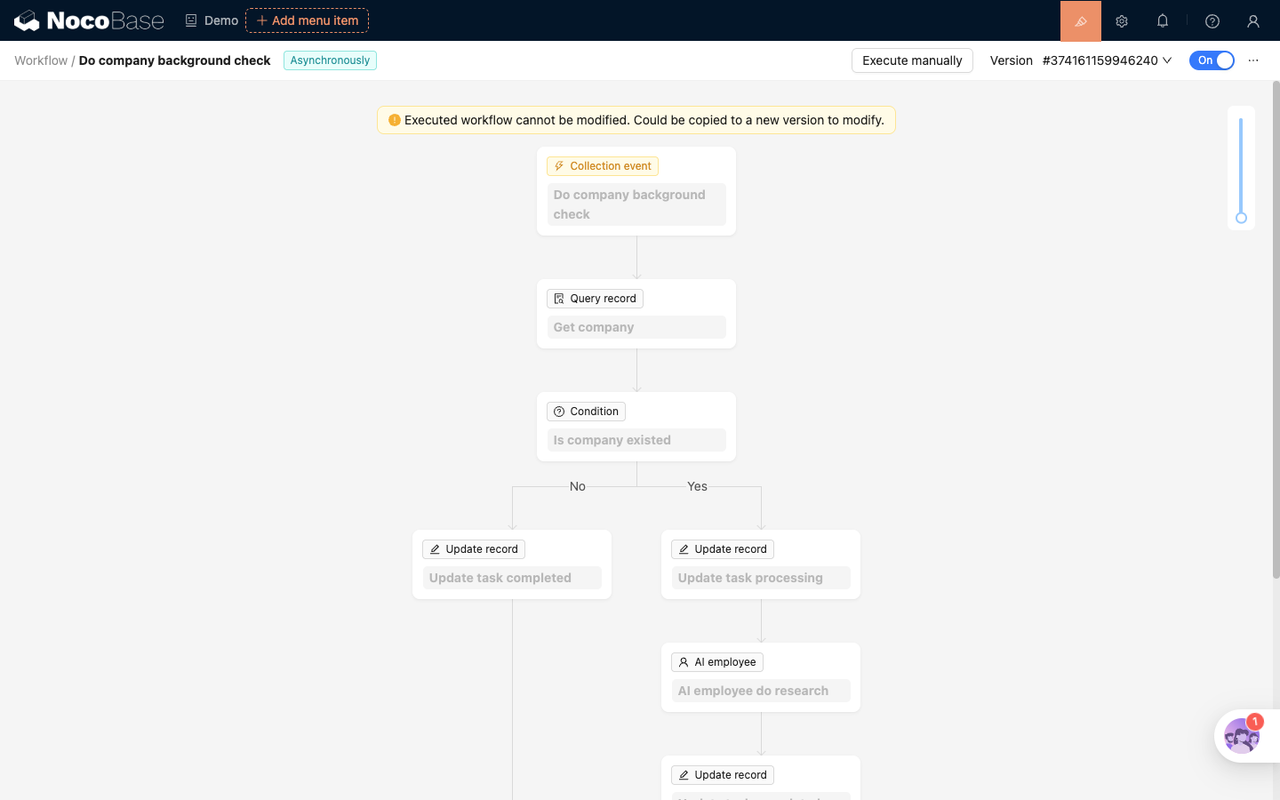
After AI returns structured results, the workflow first writes the report, summary, and old background content into the background check record, and then writes the new report back to the company record. This order avoids the problem of "only the latest results, no process records": the company page keeps the latest available content, and the task records retain the context before this generation and writing back.
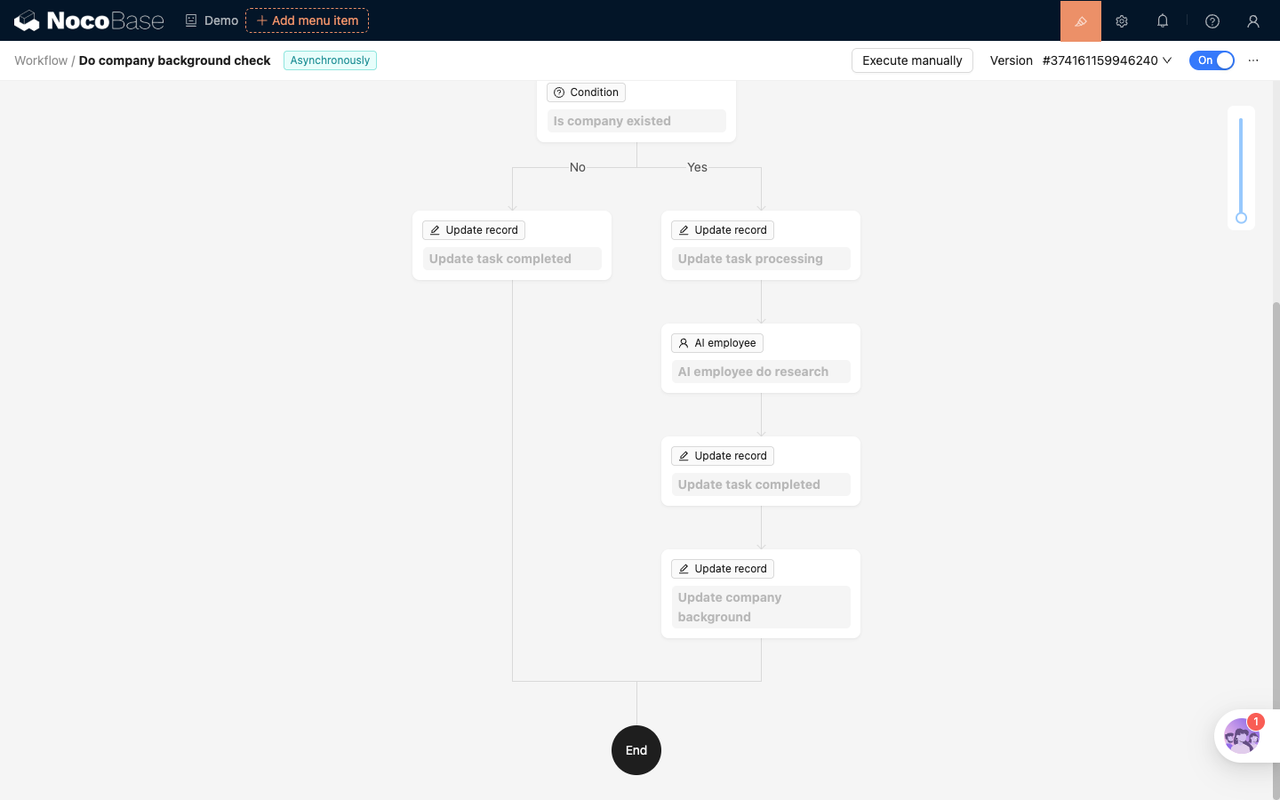
After tasking, batch processing will also become more natural. The scheduled workflow does not need to wait for each company's research to be completed, but is only responsible for creating multiple records to be processed; each record independently triggers the AI survey. Multiple companies can advance in parallel, and if a certain task fails or times out, other companies will not be blocked.
Make AI results reviewable
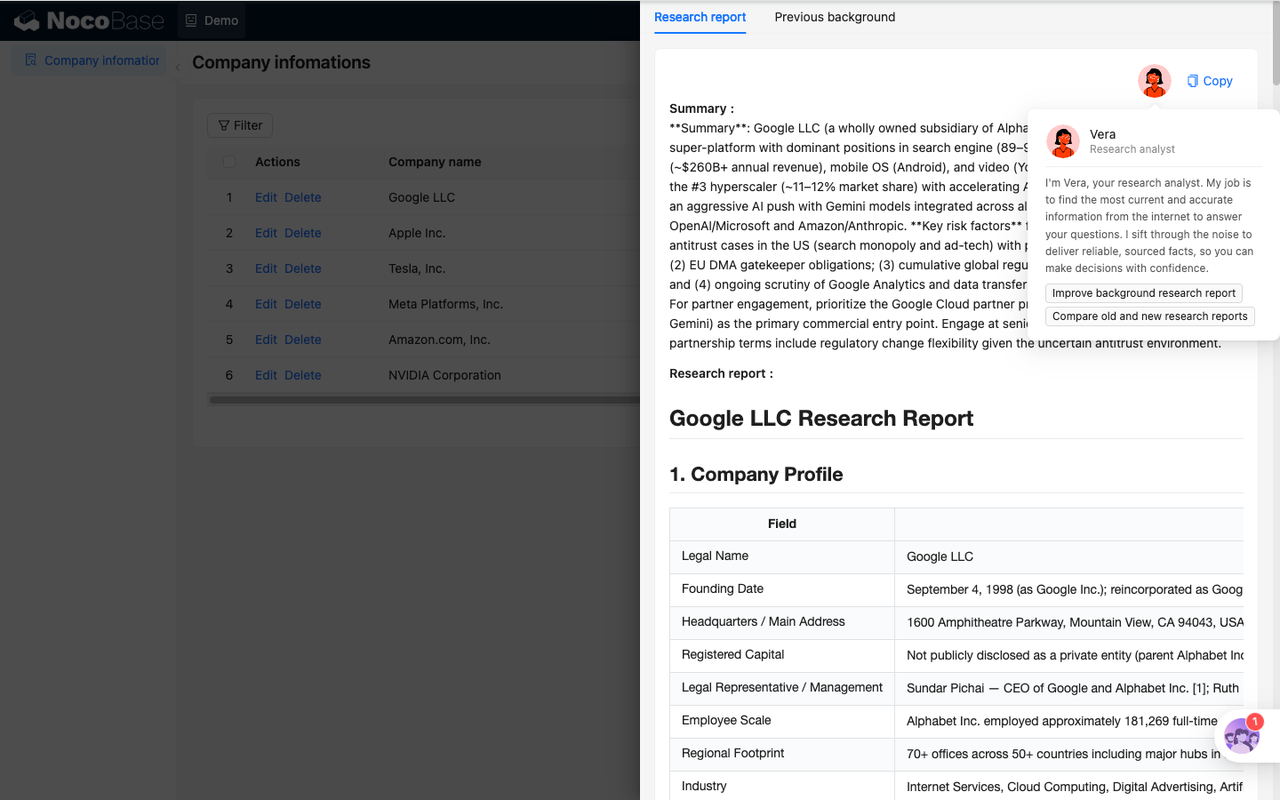
AI-generated reports are organized according to a fixed structure: company profile, core business, development history and capital background, market position and competitive perspective, sales follow-up judgment, and citation links. Business personnel can see not only the "conclusion", but also the risk tips and additional information given by AI in the summary.
The background investigation record details page displays "Research report" and "Previous background" in tabs, and provides a "Copy" operation. In this way, you can quickly copy this report during discussion, review, or external communication, and you can also check changes against the old version.
The record details also configure two AI worker tasks. in:
- Improve the background research report: regenerate the report after adding information through dialogue, and write the results back to the company records
- Compare the old and new background research reports: Read the old and new reports and let AI explain the substantial differences brought about by this update
This allows AI not to stop at “generating text once” but to participate in the process of continuous maintenance, review and version comparison.
How to combine workflow
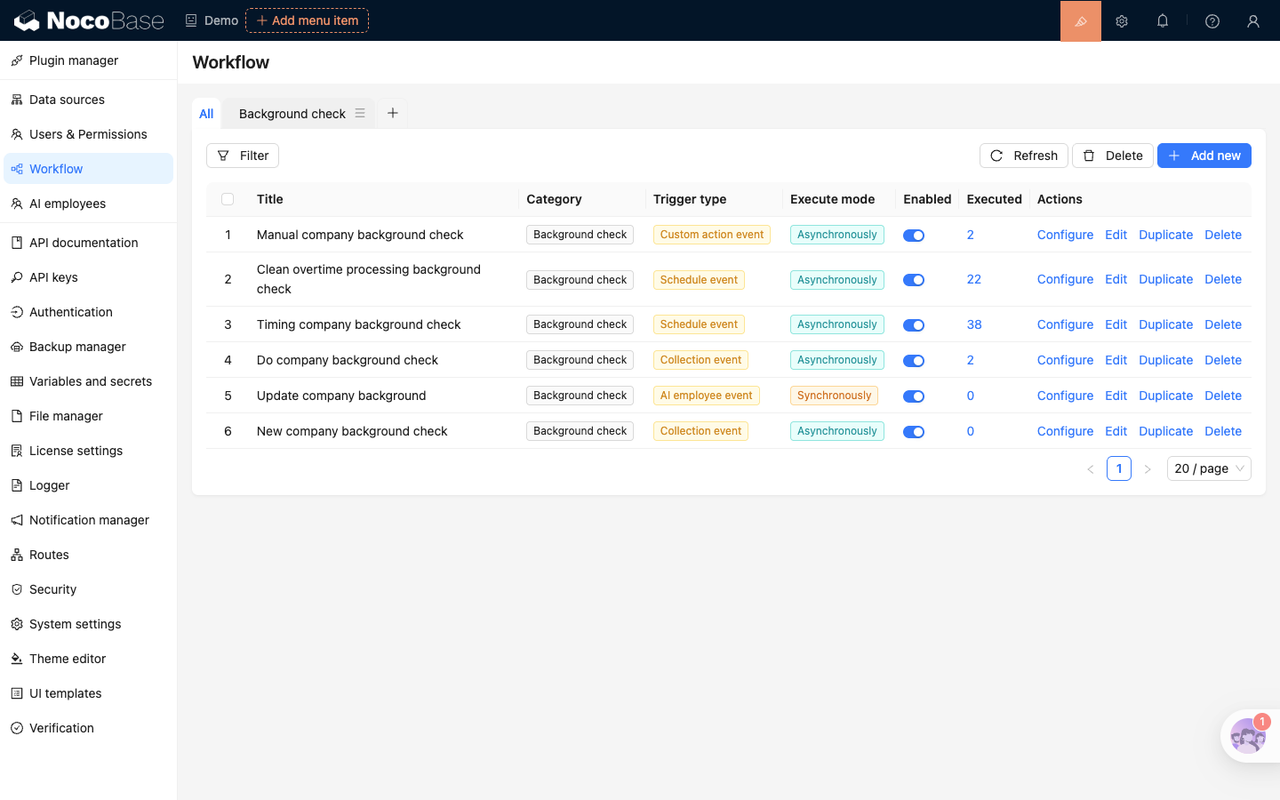
Overall, this set of workflows can be divided into four layers.
The first layer is responsible for creating tasks. New company background check is for newly added or updated companies, Timing company background check is for historical data completion, and Manual company background check is for manual initiative. They will all check whether there are any unfinished records before creating a task, reducing duplicate processing from the source.
The second layer is responsible for performing tasks. Do company background check listens to the background check record, advances the pending task to processing, calls the AI employee, and writes the report, summary, and company's current background fields upon completion.
The third layer is responsible for providing controlled writeback capabilities to AI employees. As a tool-based workflow, Update company background restricts AI to only write specified records according to clear parameters to avoid over-exerting data modification permissions.
The fourth layer is responsible for exception cleaning. Clean overtime processing background check runs every 30 minutes to clean up non-completed tasks that have not been completed for more than 15 minutes to avoid long-term processing of tasks after abnormal interruption.
What scenarios can be migrated to?
What this scene shows is not an isolated form or a separate AI button, but a combination of several capabilities in NocoBase: the data table is responsible for carrying business objects and historical records, the page is responsible for viewing and triggering by business personnel, the workflow is responsible for scheduling and writing back, and the AI staff is responsible for generating reviewable structured results.
Similar models can be migrated to scenarios such as supplier admission, customer due diligence, contract risk preliminary review, lead quality scoring, public opinion tracking, and preliminary screening of investment and financing targets. As long as there are several requirements in the business such as "data needs to be continuously completed", "AI results need to be left behind" and "historical versions cannot be overwritten", a runnable, trackable and scalable automated process can be built in a similar way.