
Build a usable team task app with titles, descriptions, assignees, due dates, and progress. The result supports creating, viewing, editing, deleting, searching, filtering, and paging through tasks.
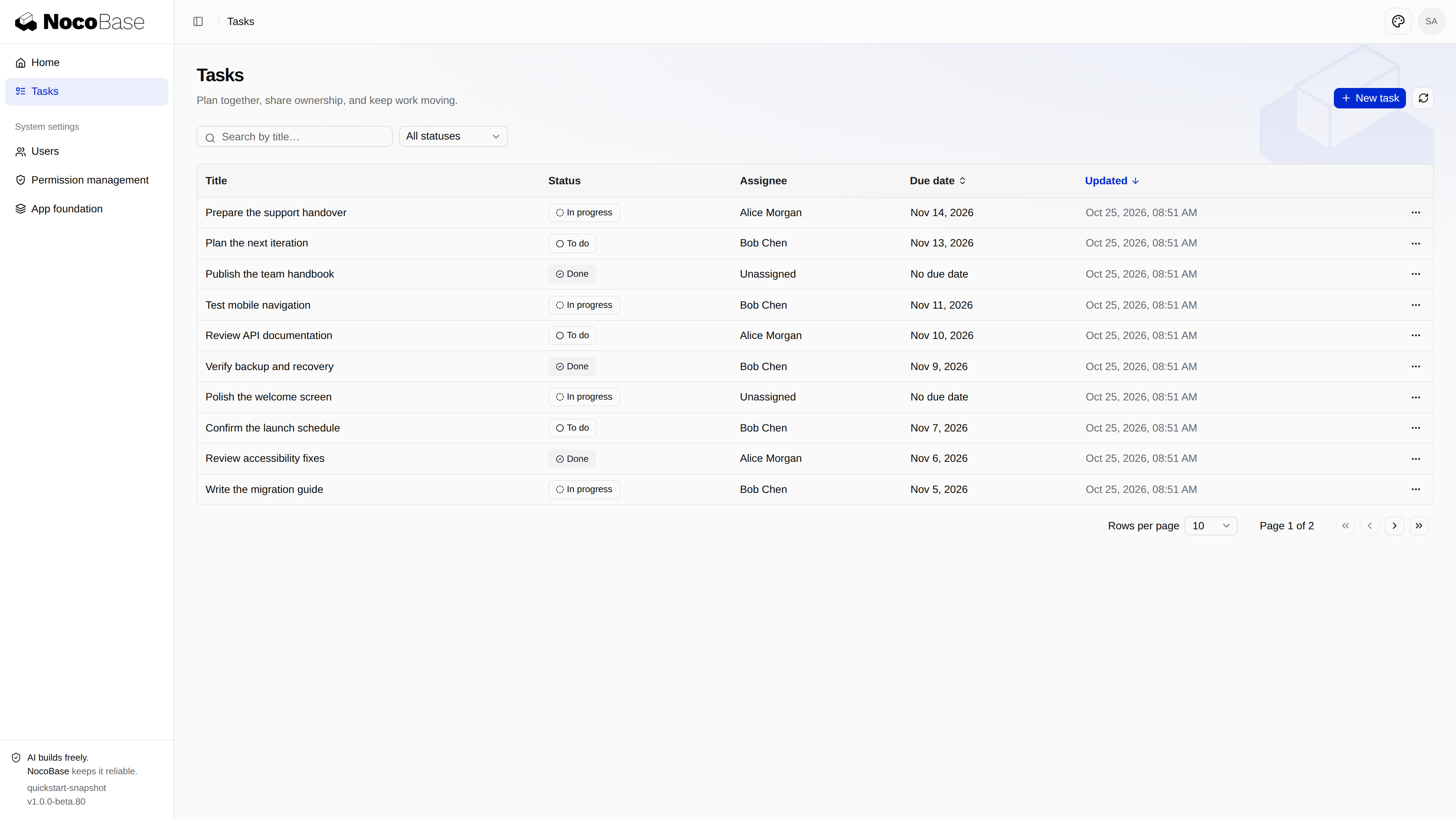
Prepare a project with Create an app. Choose either path below to reach the same result.
With an agent
Open your agent in the application directory and ask:
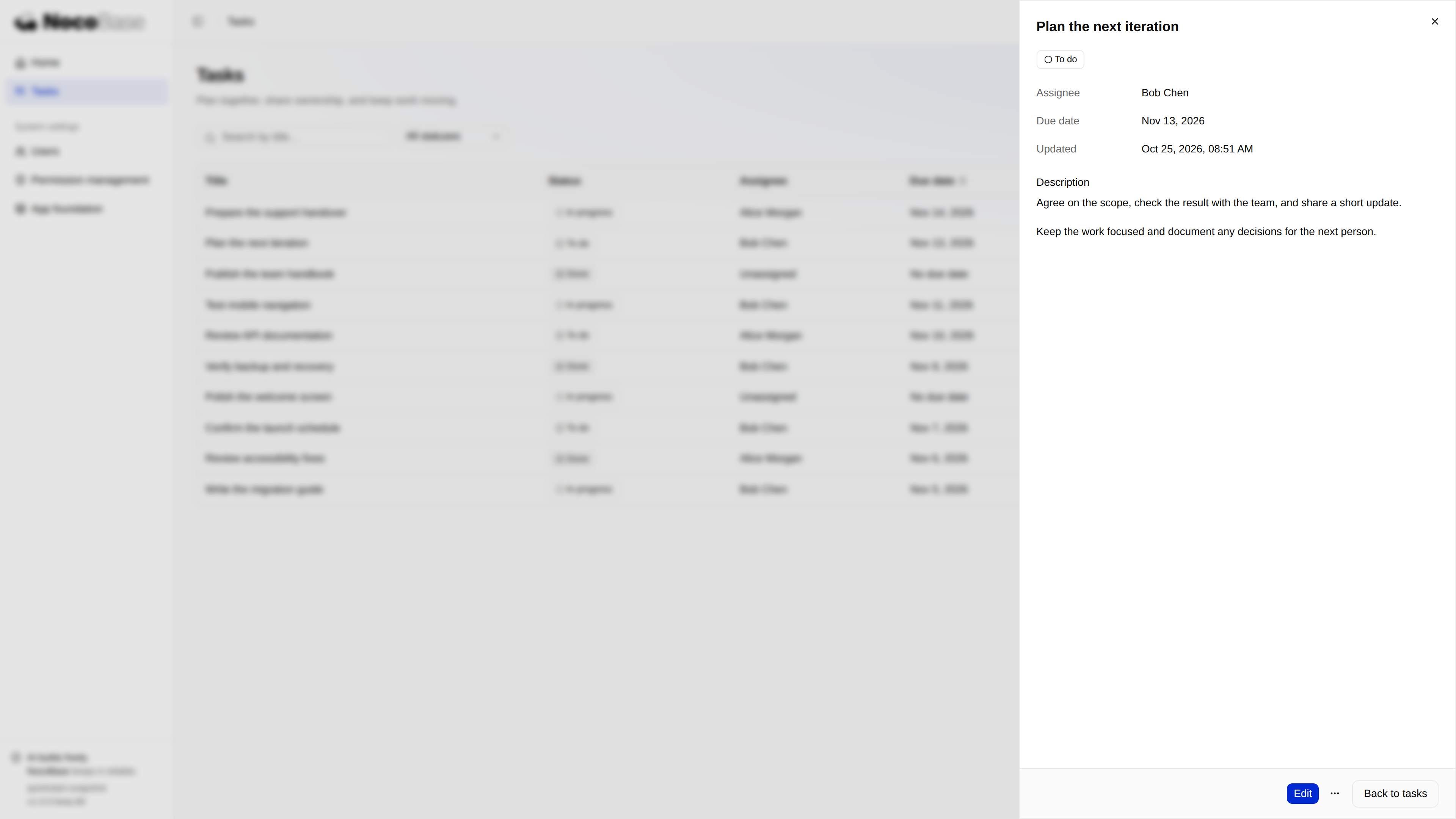
Build me a team task management app where we can assign people, set due dates, and track progress. Run it so I can try it.The agent follows the project’s AGENTS.md and Skills to build the schema, API, pages, permissions, and checks. Try the result: create a task, assign someone, change its progress, and reload to confirm persistence. Describe refinements naturally, such as “Open task details when I click the title, then let me choose whether to edit.”
The screenshots show this run’s result. The same request may produce different layouts and code; implementation details do not need to become a long prompt.
Without an agent
This path explains the work behind the agent’s result: create the table, implement the backend and frontend, connect permissions, then verify it. Each step includes key code. Excerpts belong in their linked source files; GitHub links point to a fixed revision of the complete implementation.
1. Create the task table
Add one business table, tasks. Reuse the built-in users, authentication, and authorization capabilities.
| Field | Purpose |
|---|---|
id |
Task ID |
title |
Required, trimmed title of up to 120 characters |
description |
Description of up to 2,000 characters |
status |
todo, inProgress, or done |
assigneeId |
Existing user ID, nullable |
dueDate |
Calendar date in YYYY-MM-DD format, nullable |
createdAt, updatedAt |
Creation and update timestamps |
Declare fields and indexes in database/main/migrations/202610250101_create_tasks.ts:
Expand the complete migration
import { defineMigration } from '@nocobase/db';

export default defineMigration({
  name: '202610250101_create_tasks',
  async up({ builder }) {
    await builder.createCollection('tasks', (c) => {
      c.string('id', { length: 36, primaryKey: true, nullable: false });
      c.string('title', { length: 120, nullable: false });
      c.text('description', { nullable: false, defaultValue: '' });
      c.string('status', { length: 16, nullable: false, defaultValue: 'todo' });
      c.string('assigneeId', { length: 255, nullable: true });
      c.string('dueDate', { length: 10, nullable: true });
      c.datetime('createdAt', { nullable: false });
      c.datetime('updatedAt', { nullable: false });
      c.index(['assigneeId', 'status']);
      c.index('dueDate');
      c.index('updatedAt');
    });
  },
  async down({ builder }) {
    await builder.dropCollection('tasks');
  },
});
The migration owns the schema; the backend validates business input. Resolve assignees through the user service rather than accessing the authentication plugin’s internal tables. Applying the migration also generates Collection files:
pnpm nocobase db apply --dry-run
pnpm nocobase db apply
pnpm nocobase collections doctor
Inspect database/main/collections/tasks/; do not edit generated files. Sample tasks are runtime data, separate from required initialization seeds.
2. Implement the backend
Separate input schemas, business services, and HTTP routes. After authentication and authorization, the route validates input and calls the service.
Validate input. server/tasks/schemas.ts separates create, edit, and progress inputs so editing details cannot accidentally overwrite status:
Expand input validation
export const taskStatus = z.enum(['todo', 'inProgress', 'done']);
export const taskDetails = z.strictObject({
  title: z.string().trim().min(1).max(120),
  description: z.string().trim().max(2000).default(''),
  assigneeId: z.string().min(1).max(255).nullable().default(null),
  dueDate: z
    .string()
    .regex(/^\d{4}-\d{2}-\d{2}$/)
    .refine((value) => {
      const date = new Date(`${value}T00:00:00Z`);
      return (
        !Number.isNaN(date.valueOf()) &&
        date.toISOString().slice(0, 10) === value
      );
    })
    .nullable()
    .default(null),
});
export const createTask = taskDetails.extend({
  status: taskStatus.default('todo'),
});
export const editTask = taskDetails.extend({
  expectedUpdatedAt: z.iso.datetime(),
});
export const progressTask = z.strictObject({
  status: taskStatus,
  expectedUpdatedAt: z.iso.datetime(),
});
Persist tasks. server/tasks/service.ts uses a Repository with an authorization policy. This is TaskService.create; validateOwner uses the user service to reject missing or disabled assignees:
async create(policy: RepositoryPolicy, input: TaskInput) {
  await this.validateOwner(input.assigneeId);
  const now = new Date();
  const result = await this.db
    .repository('tasks')
    .withPolicy(policy)
    .createOne({
      values: { ...input, id: randomUUID(), createdAt: now, updatedAt: now },
    });
  return rowSchema.parse(result.record);
}
The service also handles listing, details, editing, progress, and deletion. Filtering, sorting, pagination, and counting happen in the database. Updates and deletion check expectedUpdatedAt and return 409 when the record changed, preventing silent overwrites.
Register endpoints. server/routes/tasks.ts installs authentication and authorization middleware inside the task subrouter. Its gate resolves the action’s policy before input validation. The create endpoint is:
tasks.post(
  '/',
  gate('create'),
  describeRoute({
    tags: ['Tasks'],
    operationId: 'createTask',
    summary: 'Create a task',
    responses: { '201': dataResponse(taskSchema), ...errors },
  }),
  apiValidator('json', createTask),
  async (c) => {
    const row = await service.create(c.get('taskPolicy'), c.req.valid('json'));
    return c.json(
      { data: (await service.present([row], c.get('authz')))[0] },
      201,
    );
  },
);
describeRoute declares API documentation; apiValidator validates requests. Success uses { data }, and errors use the standard ApiError. Register the contribution and service provider through the application’s existing entry points:
server/routes/index.ts
import { taskRoutes } from './tasks.js';
import type { Application } from '@nocobase/app-server/application';
import type { AppRouteContribution } from '@nocobase/app-server/router';

const routes: readonly AppRouteContribution<Application>[] = [taskRoutes];

export default routes;
server/providers/index.ts
import TasksProvider from './tasks.js';
import type { ApplicationServiceProviderConstructor } from '@nocobase/app-server/application';

const serviceProviders: readonly ApplicationServiceProviderConstructor[] = [
  TasksProvider,
];

export default serviceProviders;
See server/providers/tasks.ts for service registration. Once signed in, inspect the Tasks operations at the application’s /api/swagger endpoint.
3. Implement the frontend
Add the task list, detail drawer, and create/edit dialogs using the template’s layout, table, form, and feedback components.
Pages and navigation. Register routes in client/routes.ts; navigation adds the sidebar entry. Details and dialogs have URLs, preserving list conditions when opening, refreshing, and closing them:
Expand the task route excerpt
{
  name: 'tasks',
  path: '/tasks',
  auth: 'required',
  authz: { resource: { type: 'page', id: 'tasks' }, action: 'access' },
  navigation: { title: 'tasks.title', icon: ListTodo, order: 10 },
  componentLoader: () => import('./pages/tasks/index.js'),
  children: [
    { name: 'taskCreate', path: 'new', componentLoader: () => import('./pages/tasks/form.js') },
    { name: 'taskEdit', path: 'edit/:taskId', componentLoader: () => import('./pages/tasks/form.js') },
    {
      name: 'taskDetail', path: ':taskId',
      componentLoader: () => import('./pages/tasks/detail.js'),
      children: [{ name: 'taskDetailEdit', path: 'edit', componentLoader: () => import('./pages/tasks/form.js') }],
    },
  ],
}
The list. client/pages/tasks/index.tsx stores search, status, sorting, and pagination in the URL, requests data through useApiClient, and supplies DataTable. Key configuration:
<DataTable
  columns={columns}
  data={result.data}
  getRowId={(row) => row.id}
  manualPagination
  rowCount={result.meta.total}
  paginationState={pagination}
  pageSizeOptions={[10, 20, 50]}
  manualSorting
  sortingState={sorting}
  loading={loading}
/>
In the complete file, onPaginationChange and onSortingChange update the URL and trigger new queries. It also distinguishes an empty app, no matches, loading, and failures. Titles use RecordLink to open details.
Forms and saving. client/pages/tasks/form.tsx reloads a task when its edit dialog opens. The save request includes initial status for creation, or details plus a version for editing:
const values = {
  title: fields.title.trim(),
  description: fields.description.trim(),
  assigneeId: fields.assignee?.id ?? null,
  dueDate: fields.dueDate,
  ...(creating ? { status: fields.status } : { expectedUpdatedAt: version }),
};
const { data } = await api.request<{ data: Task }>({
  path: creating ? 'tasks' : `tasks/${taskId}`,
  method: creating ? 'POST' : 'PATCH',
  json: values,
});
The form validates on submit and associates errors with fields. It retains drafts on failure and prevents duplicate submission or closing during a save. On success, it updates the UI from the returned task before refreshing the list. A failed refresh is reported separately from the successful save.
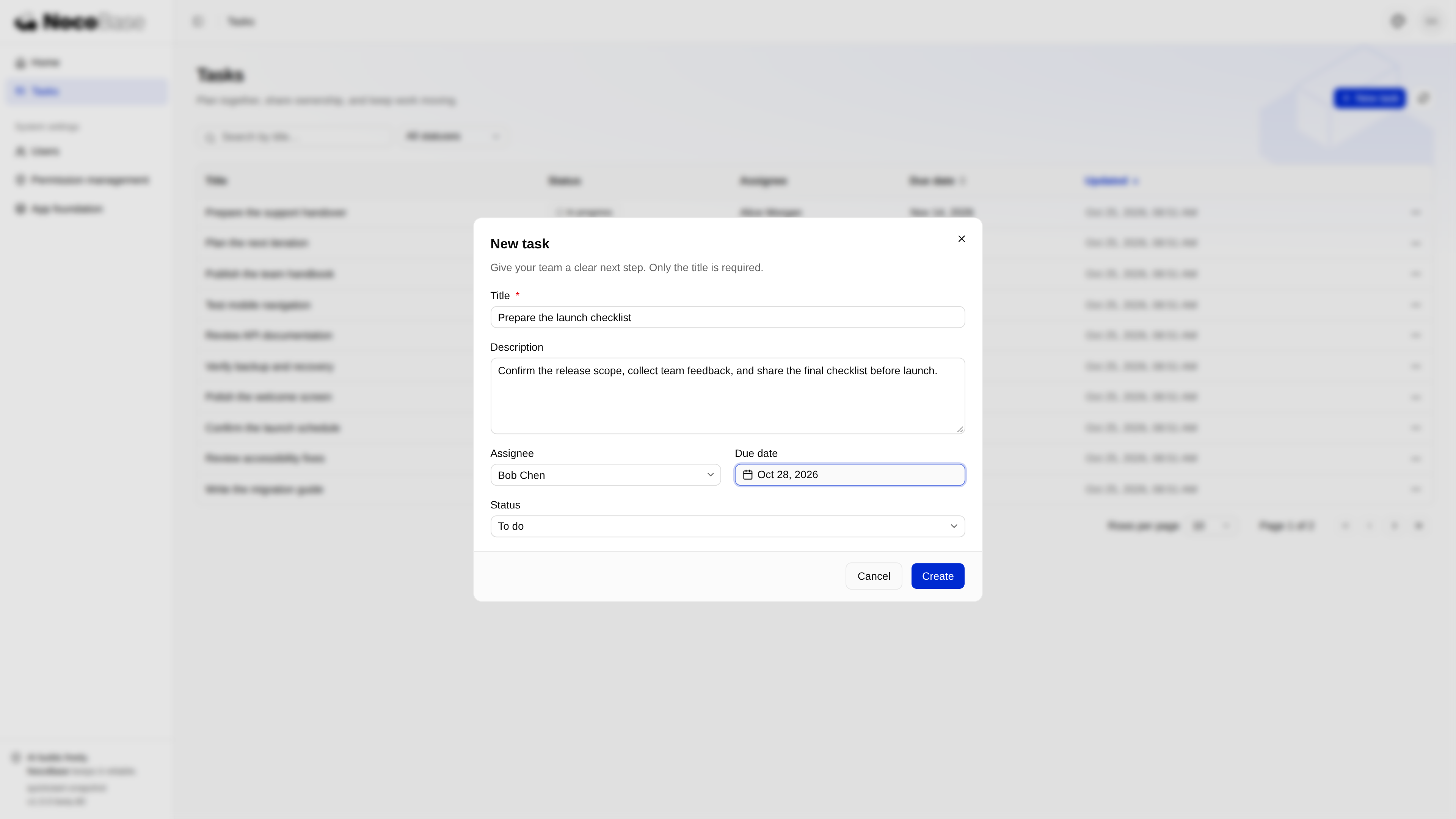
Assignee selection lives in client/pages/tasks/assignee-picker.tsx; dates use Calendar with Popover. See client/pages/tasks/detail.tsx for details and client/pages/tasks/task-actions.tsx for editing, progress, and deletion. Delete confirmation names the task and explains that it cannot be undone.
English and Chinese copy. Keep copy in client/locales/tasks.ts and add it to both locale resources. Components use translation keys:
// client/locales/en-US.ts
import { tasksEn } from './tasks.js';
const enUS = { ...systemEnUS, tasks: tasksEn };

// client/locales/zh-CN.ts
import { tasksZh } from './tasks.js';
const zhCN: AppResource = { ...systemZhCN, tasks: tasksZh };
4. Connect permissions
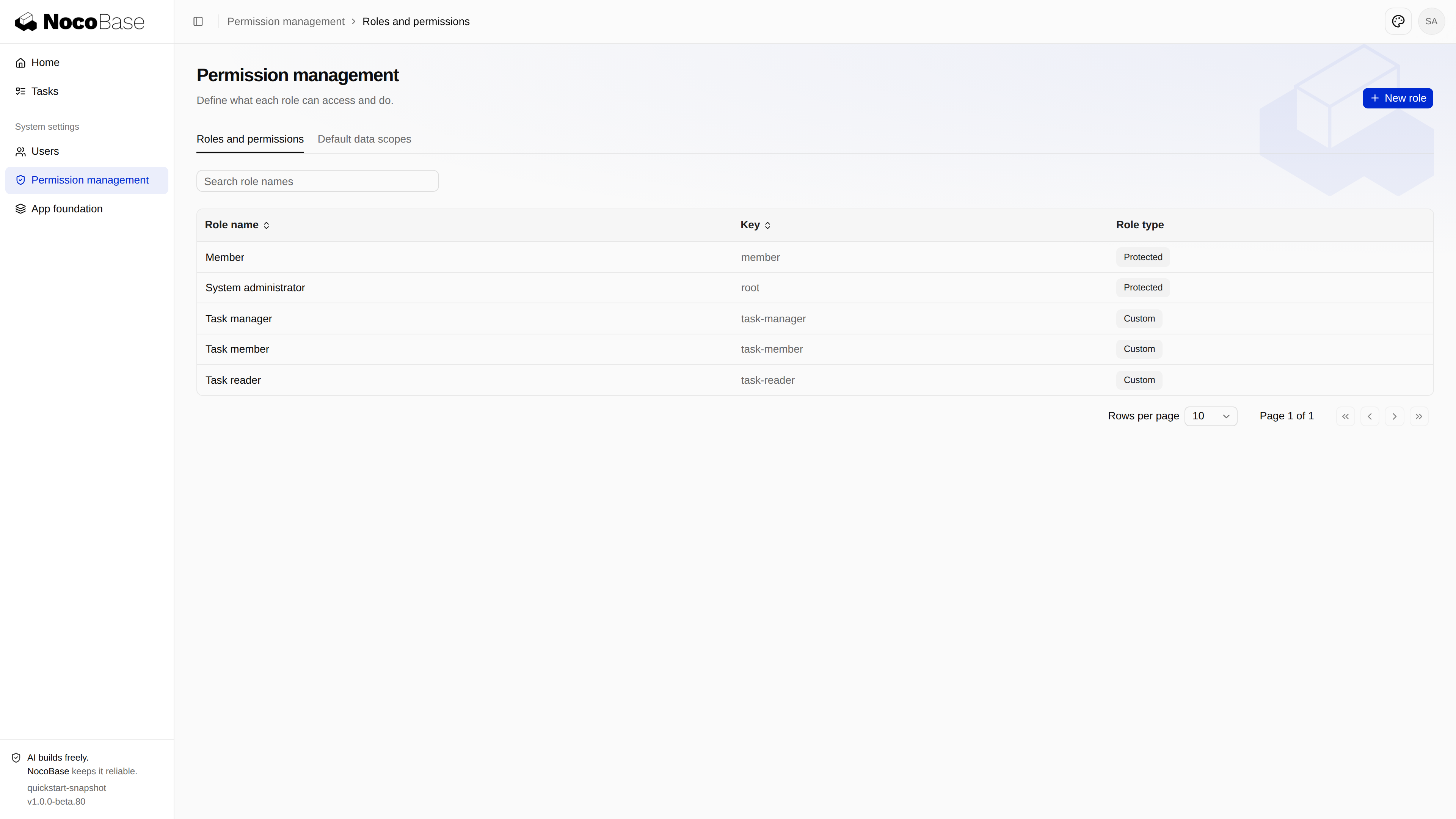
Authorize page access separately from data operations. Hiding a button is presentation; the backend must still check each request and its record scope.
server/tasks/permissions.ts declares five actions and an “assigned to me” record scope:
Expand permission declarations
import {
  defineCompositeResource,
  defineRecordAccess,
} from '@nocobase/authorization/core';
import { defineDatabasePermission } from '@nocobase/app-plugin-authorization/server';
import { buildFilter } from '@nocobase/repository-input';
import metadata from '../../package.json' with { type: 'json' };
import type { TaskRow } from './schemas.js';
export const label = (key: string) => ({
  ns: metadata.name,
  key: `tasks.${key}`,
});
const fields = [
  'id',
  'title',
  'description',
  'status',
  'assigneeId',
  'dueDate',
  'createdAt',
  'updatedAt',
] as const;
const data = defineDatabasePermission((p) =>
  p.collection<TaskRow>('tasks').title(label('title')).read(fields),
);
export const assignedTasks = defineRecordAccess('tasks.assigned', (access) =>
  access
    .title(label('assignedScope'))
    .collections('tasks')
    .resolver(({ principal }) =>
      principal.type === 'user'
        ? buildFilter((f) => f.string('assigneeId').eq(principal.id))
        : false,
    ),
);
export const taskPermissions = defineCompositeResource('tasks', (r) =>
  r
    .title(label('title'))
    .action('read', (a) =>
      a.title(label('readPermission')).grant('tasks', data),
    )
    .action('create', (a) =>
      a.title(label('createPermission')).grant('tasks', data.create(fields)),
    )
    .action('edit', (a) =>
      a
        .title(label('editPermission'))
        .grant(
          'tasks',
          data.update([
            'title',
            'description',
            'assigneeId',
            'dueDate',
            'updatedAt',
          ]),
        ),
    )
    .action('progress', (a) =>
      a
        .title(label('progressPermission'))
        .grant('tasks', data.update(['status', 'updatedAt'])),
    )
    .action('delete', (a) =>
      a.title(label('deletePermission')).grant('tasks', data.delete()),
    ),
);
export type TaskAction = 'read' | 'create' | 'edit' | 'progress' | 'delete';
The route gets its policy through this service method; all reads and writes use withPolicy(policy):
async policy(
  authz: AuthorizationContext,
  action: TaskAction,
): Promise<RepositoryPolicy> {
  const decision = await authz.authorize({
    resource: { type: 'composite', id: 'tasks' },
    action,
  });
  const policy = decision.conditions?.database?.tasks;
  if (decision.effect === 'deny' || !policy)
    throw taskError('PERMISSION_DENIED', 'TASK_ACTION_DENIED');
  return policy;
}
A one-time seed initializes three roles that administrators can edit. It provides initial configuration without overwriting later administrator changes:
| Role | Initial access |
|---|---|
| Task manager | View, create, edit, progress, and delete all tasks |
| Task member | View and update progress on assigned tasks |
| Task reader | View all tasks, without writes |
Expand role initialization
const taskRoles = [
  {
    key: 'task-manager',
    title: 'managerRole',
    actions: ['read', 'create', 'edit', 'progress', 'delete'],
    scope: 'allRecords',
  },
  {
    key: 'task-member',
    title: 'memberRole',
    actions: ['read', 'progress'],
    scope: 'tasks.assigned',
  },
  {
    key: 'task-reader',
    title: 'readerRole',
    actions: ['read'],
    scope: 'allRecords',
  },
].map(({ key, title, actions, scope }) =>
  definePermissionSet(key)
    .title({ ns: metadata.name, key: `tasks.${title}` })
    .grant({
      resource: { type: 'page', id: 'tasks' },
      actions: [{ action: 'access' }],
    })
    .grant({
      resource: { type: 'composite', id: 'tasks' },
      actions: actions.map((action) => ({
        action,
        policy: { type: 'composite', scopes: { tasks: scope } },
      })),
    })
    .build(),
);
// Inside the transactional seed run callback:
for (const role of taskRoles) {
  const existing = await query
    .selectFrom('authorizationPermissionSets')
    .select('id')
    .where('key', '=', role.key)
    .executeTakeFirst();
  if (existing) continue;
  const now = new Date();
  await query
    .insertInto('authorizationPermissionSets')
    .values({
      id: role.key,
      key: role.key,
      title: encodeAuthorizationTitle(role.title),
      grants: JSON.stringify(role.grants),
      createdAt: now,
      updatedAt: now,
    })
    .execute();
}
The complete seed is database/main/seeds/202610250102_task_roles.ts. Register the prepared system settings contribution in client/routes.ts and expose task actions in the permission editor:
// client/routes.ts
import systemSettingsRoutes from './pages/settings/routes.js';
const routes = [appRoutes, systemSettingsRoutes];

// client/pages/settings/permission-workspace.ts: business entry
{
  type: 'composite',
  id: 'tasks',
  actions: ['read', 'create', 'edit', 'progress', 'delete'],
  hiddenActionScopes: { create: ['tasks'] },
}
Assign roles to specific people in System settings → Users. Do not give business roles to every signed-in user or broaden the platform’s member role. Edit actions and record scopes in Permission management.
5. Write tests
After implementing the feature, add its automated tests under tests/. Reuse the project's test configuration and helpers, and verify business behavior with a real application and test database. The example implements the following tests. See the tests directory for the complete code:
tests/
├── database/
│   └── tasks-migration.test.ts                  # Create, roll back, and reapply the task table
├── server/
│   ├── tasks.test.ts                            # CRUD, validation, filters, pagination, and permissions
│   └── authorization-assignment-safety.test.ts  # Prevent automatic business role grants to all users
├── client/
│   ├── tasks.test.tsx                           # Form validation, save feedback, and read-only restrictions
│   ├── client-routes.test.ts                    # Page routes and access permission registration
│   └── page-permission-titles.test.ts           # English and Chinese permission labels
└── playwright/
    └── tasks.test.ts                            # Task actions, filters, pagination, and role-based flows
Once the tests are written, run database, server, and client tests from the application directory. There is no need to start the app first:
pnpm testBrowser tests use pnpm test:e2e. Start a separate test application first and supply its URL and credentials:
Install Chromium before the first run:
pnpm exec playwright install chromiumReplace the application URL and test administrator credentials below. The tests create users and tasks, so use a separate test application:
TUTORIAL_ORIGIN=http://127.0.0.1:13000 \
TUTORIAL_USERNAME='your-test-admin' TUTORIAL_PASSWORD='your-test-password' \
pnpm test:e2e
6. Download and run the complete example
Download the finished example to compare complete files. The repository is currently private and requires GitHub access. Use a new directory rather than overwriting your own project.
git clone --branch fix/v3-quickstart-npm https://github.com/nocobase/app-tutorials.git team-tasks
cd team-tasks
git checkout da050f4dd4d9ddc36c8585489bd002c6e01ad76f
This example uses packages published on npmjs.org and the default template 1.0.0-beta.81. With Node.js 24 and pnpm 11.7 installed, install the dependencies directly. The repository’s .npmrc selects npmjs.org, and its lockfile pins the verified versions.
pnpm install --frozen-lockfile
pnpm nocobase config init
pnpm nocobase config check
pnpm dev
Open the Local: application entry printed in the terminal. Sign in with the initial administrator configured for that application, add teammates and assign task roles in Users, then create your own tasks. Runtime configuration, the database, and screenshot sample data are not distributed with the source repository.
Deploy the application
Once the application is built and its tests pass, deploy it for your team. Continue to Choose a deployment method to select Docker, app-installer, or NocoBase Studio for your environment. Each guide includes instructions with and without an agent.
After deployment, check sign-in, task operations, and role permissions, and confirm that data persists after a restart.