
Pages let users operate business capabilities. Beyond displaying data, they need defined behavior for loading, empty results, pending submissions, failure and success, while keeping filters, input and permissions consistent.
This guide uses a project list, project creation and task project assignment to explain component composition, API calls and interaction state. Read the topic you need directly; running the full example requires the models and endpoints listed below. Routes here cover connecting these interfaces, not the full layout and nested-routing system.
Choose existing components first
Inspect client/components/, client/components/ui/ and existing pages before adding components. Template page, table and routed-dialog components handle some shared behavior; business pages compose them, supply data and connect feedback.
| Need | Component or mechanism used here | What the business page still owns |
|---|---|---|
| Page heading and layout | PageContainer, PageHeader |
Titles, actions and content; avoid nested page containers |
| Lists and pagination | DataTable |
Columns, scoped data, totals and server pagination |
| Create or edit dialogs | RouteDialog |
Forms, submission, close guards and return context |
| Form validation | react-hook-form and zodResolver |
Business validation, server field errors and focus |
| Application API requests | useApiClient() |
Parameters, cancellation of stale requests and result handling |
| Action visibility | useCan() |
Control action entry points while retaining independent server authorization |
Import components through application entries such as #components/.... Add missing primitives following project guidance, preferring composition and existing props. Use semantic theme styles and translated copy instead of inventing a separate visual system for one feature.
Separate three kinds of state
URL state captures a shareable, restorable view: search, sorting, pagination and the current routed dialog. Closing a dialog should return to that list context.
Server state contains records, options, totals and operation permission results. Read again when search or pagination changes; old requests must not replace newer results. The server still checks permissions when saving: permission observed when opening a dialog is not permanent authorization.
Form drafts contain unsubmitted input, selected projects and field errors. Paging options, network failures and retries must not accidentally clear them. End editing after a successful submission or an explicit decision to discard it.
These states have distinct purposes. Copying a whole list record into a dialog and writing it all back can overwrite another person's changes. Storing the selection only in the current options page loses it when paging.
Example interfaces
Add a project list and two dialogs using the application's existing page, table and form components:
- Project list: search by name, sort by creation time and browse server-side pages.
- New project: validate a name, save it and return to the original list.
- Change task project: load the current association, choose an allowed project or clear the association.
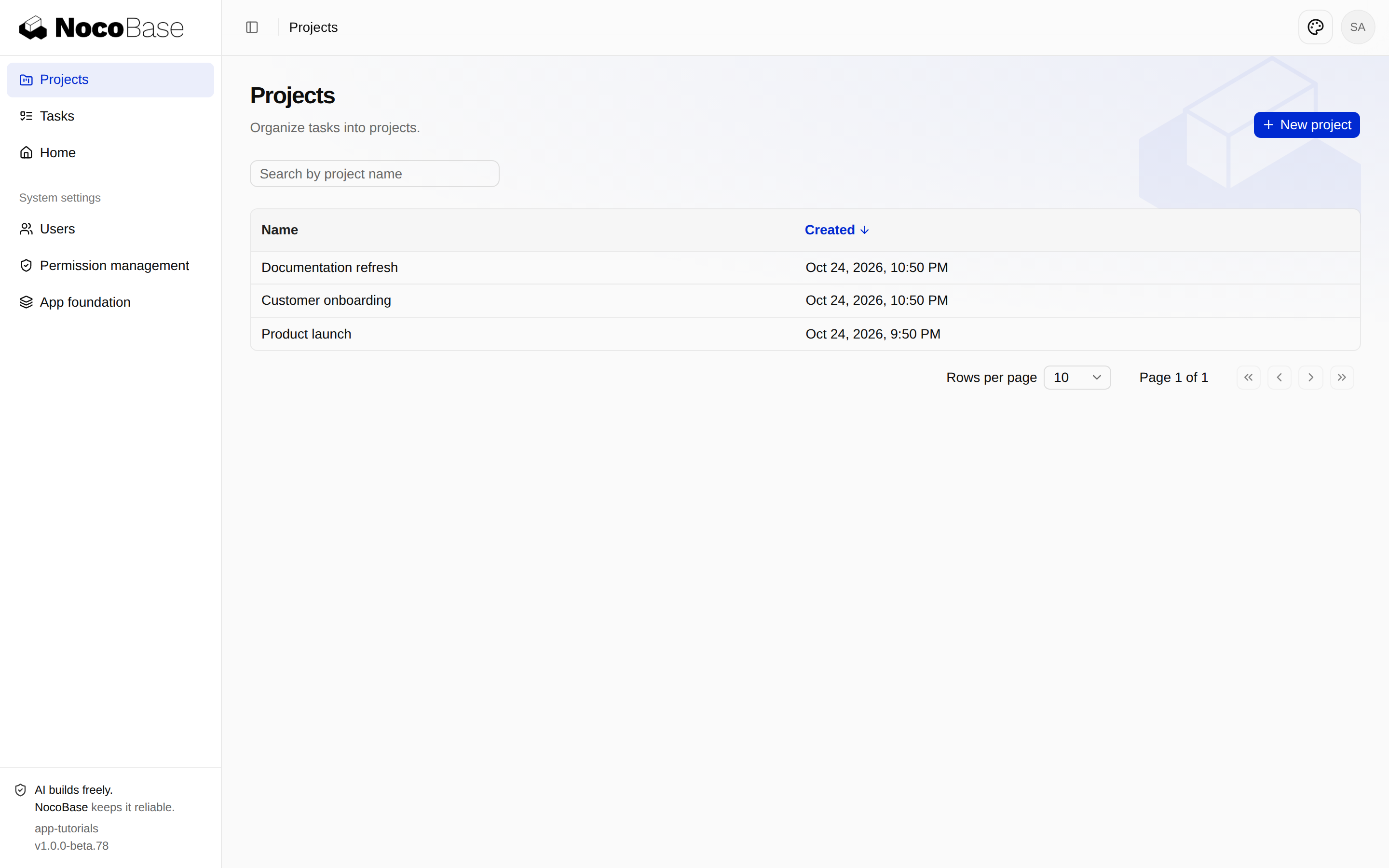
This chapter adds no project detail, deletion or approval flow. The Tasks table keeps its existing columns. Its row action opens Change project, where the current association is displayed.
Before you start
Running this example requires the examples in Data models and migrations and Business services and HTTP APIs, retaining their migrations, services, routes and permissions. The example uses @nocobase/app-template-default@1.0.0-beta.78 and needs no new plugin.
This incremental package targets the historical project example above, not the current getting-started application with its tasks table and three-stage progress.
Several frontend files work together here. Download the incremental source package for the added and modified files, a patch and instructions. It starts from the state after those two examples and contains no configuration, accounts, database or dependencies.
Repository chapter tags remain the reference for published examples. This chapter's source is supplied with the documentation without depending on an unpublished tag. If your application already has custom changes, inspect and merge the patch instead of overwriting business code.
With an agent
Give the agent this chapter as context from the application directory, then describe the request below. Field, API and component details are in the manual steps; the agent should follow them alongside the project's guidance.
Please make the existing project features usable through pages, following the application's visual style with English and Chinese text.

I need a Projects page with name search, creation-time sorting and pagination, plus a New project dialog.
Add Change project to task row actions. The dialog should show the current assignment, let me select an eligible project, or clear it.
Load current information when opening it, and retain my selection when paging through available projects.
Only offer projects allowed for this assignment operation; viewing permission alone must not grant assignment access.

Show progress while loading and explain empty data or searches with no matches.
Place validation messages beside their fields. Keep input and allow retry if saving fails.
Prevent duplicate submissions, update the list and confirm success after saving, and preserve filters and page position when closing dialogs.
Request sign-in when the session expires, explain insufficient permissions, and stop editing if the task no longer exists.

Follow the project's guidance and retain existing permissions without automatically assigning roles.
Verify creation, assignment, clearing and denied actions, as well as keyboard use, Chinese input and narrow screens.
Do not add project details, deletion or workflows yet. Report changes and verification results.
Without an agent
Map pages to APIs
Page paths are relative to the application entry. API paths are relative to its API root. Do not hard-code /main or a server address in the components.
| Page route | Presentation | API |
|---|---|---|
/projects |
Project list | GET /tutorialProjects |
/projects/create |
Create dialog | POST /tutorialProjects |
/tasks/:taskId/project |
Assignment dialog | GET and PATCH /tutorialTasks/:id/project |
Extend the previous list endpoint with q and order: a name contains search and ascending or descending creation-time sorting, newest first by default. Break timestamp ties with id. Apply the same filter and authorization policy to the rows and total.
The assignment dialog also needs a read endpoint. Read the task through the assignTask task policy, then load options and the current project name through that action's project policy:
{
  data: {
    task: { id, title, projectId, projectName },
    options: [{ id, name, createdAt }],
  },
  meta: { page, pageSize, total },
}
projectName can be null when the existing project is now outside the allowed scope. Display Project unavailable without exposing its name or treating it as an unset association. Saving still checks the task and target project again; an earlier editor response is not lasting authorization.
The complete changes are in the package's server/providers/tutorial-project-service.ts, tutorial-projects.ts and server/routes/tutorial-projects.ts. The new GET endpoint declares describeRoute() and validates inputs with apiValidator(). No new migration is needed.
Declare pages, navigation and dialogs in routes
Add Projects to defineAppRoutes() in client/routes.ts, preserving the existing Tasks, authentication and settings routes:
{
  name: 'projects',
  path: '/projects',
  auth: 'required',
  authz: {
    resource: { type: 'page', id: 'projects' },
    action: 'access',
  },
  navigation: { title: 'projects.title', icon: FolderKanban },
  breadcrumb: { title: 'projects.title' },
  componentLoader: () => import('./pages/projects/index.js'),
  children: [
    {
      name: 'projectCreate',
      path: 'create',
      authz: {
        resource: { type: 'composite', id: 'tutorial.projects' },
        action: 'create',
      },
      breadcrumb: { title: 'projects.new' },
      componentLoader: () => import('./pages/projects/create.js'),
    },
  ],
}
Import FolderKanban from lucide-react. The navigation declaration supplies the sidebar entry. Each page module default-exports a React component, and the parent renders <Outlet /> for child routes.
Add :taskId/project to the existing tasks.children, guarded by tutorial.projects/assignTask.
Preserve the list query when opening a dialog:
<Button
  nativeButton={false}
  render={<Link to={{ pathname: 'create', search: location.search }} />}
>
  {t('projects.new')}
</Button>
This makes copied links, refreshes and closing predictable. For example, /projects/create?q=launch&page=2 opens over the corresponding project list and returns to the same query when closed.
Keep list state in the URL
client/pages/projects/index.tsx uses PageContainer, PageHeader and DataTable. useUrlSearch() manages the search input and IME composition, while useTableUrlState() manages page number, page size and sorting.
Load data through useApiClient():
api.request({
  path: 'tutorialProjects',
  query: { q: search, order, page: pageIndex + 1, pageSize },
  signal: controller.signal,
});
Abort in the effect cleanup and check cancellation before updating state. An older search response must not overwrite newer results. Only a successful count for the current query should normalize an out-of-range page.
Enable manualPagination and manualSorting, supplying the server's rows and total. The default header indicator must also show Created descending; a server default alone is insufficient.
| State | Presentation |
|---|---|
| Initial load | Skeletons; creation is not shown yet |
| Refresh | Keep existing rows with a loading indicator |
| No projects | Empty state with the sole create action when allowed |
| No search matches | No-results message, header create action and Clear filters |
| Search has matches | Keep Clear filters available too |
| Request failed | Explain the failure; allow retry for network/server errors |
| Session expired or permission denied | Hide stale data and offer sign-in or administrator guidance |
Build the create form
client/pages/projects/create.tsx uses RouteDialog with sm:max-w-md for its single field. react-hook-form manages the form, and zodResolver requires a trimmed name of 1–120 characters.
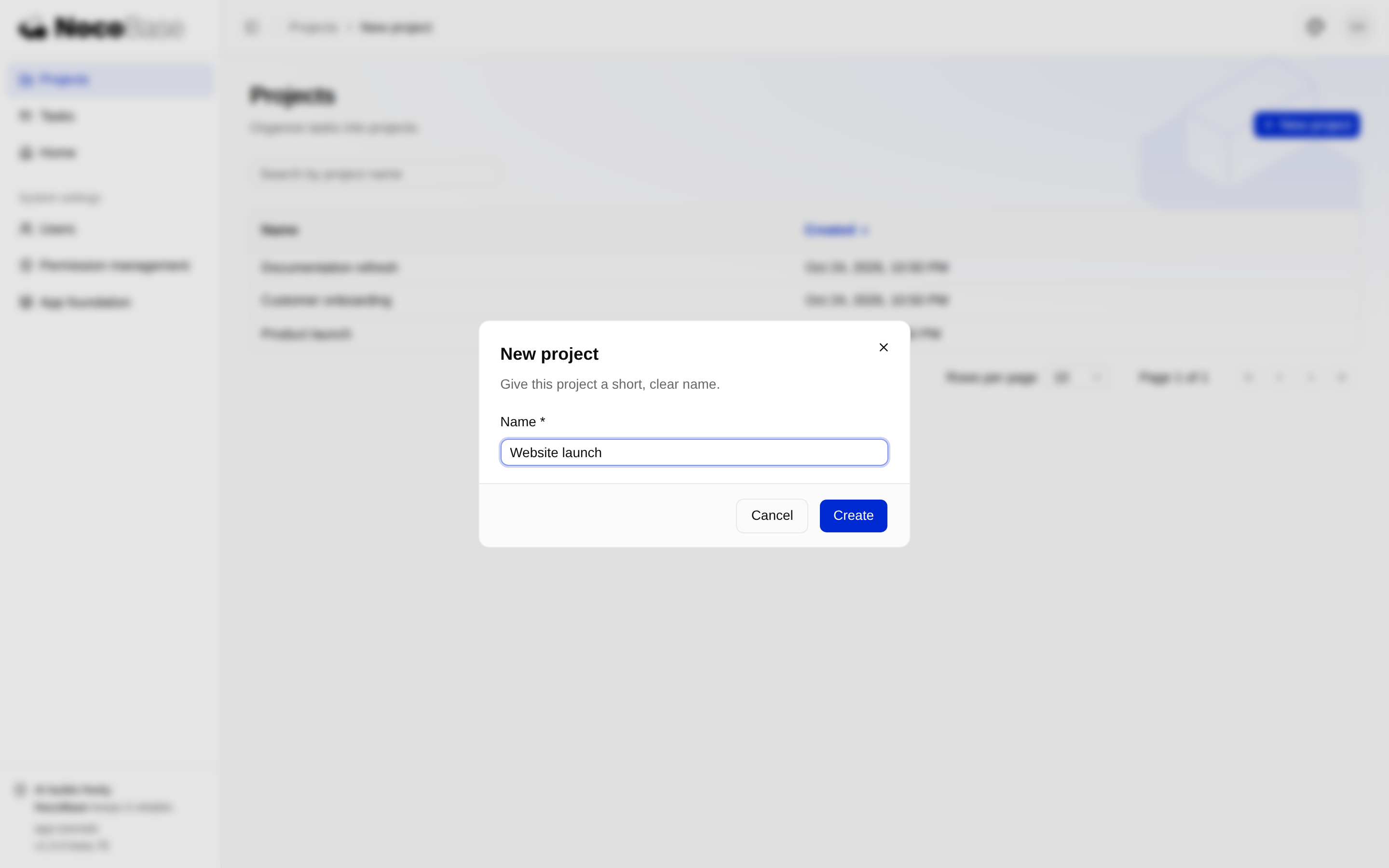
Handle the submission lifecycle explicitly:
- Validate on submit. Associate the name error with
aria-invalidandaria-describedby. - Disable Submit and Cancel while pending, make the input read-only, and use a ref to prevent duplicate requests and close races.
- Map server name violations back to the field, preserve its value and focus it. Show other failures in a form alert.
- Update the list using the returned project, show a named success message and close.
Guard the dialog's close button, Cancel and Escape with the template's beforeClose:
<RouteDialog
  title={t('projects.new')}
  className="sm:max-w-md"
  beforeClose={() => !pendingRef.current}
  footer={<Footer pending={pending} />}
>
  <ProjectForm />
</RouteDialog>
Pending saves must also block browser Back and in-app navigation. The source package’s usePendingNavigation calls useNavigationGuard from @nocobase/app-client, checking the same pending ref. It registers beforeunload only during a save to request the browser’s warning on reload or tab close. beforeClose alone does not cover these navigation paths.
This illustrates component relationships. In the full source, the form synchronizes pending state with the parent, and the footer's form attribute connects its submit button to the form. Keep those connections when using the source package.
A newly created row may belong outside the visible page: an oldest-first list, a later page or a nonmatching search are examples. Insert immediately only on a matching first page sorted descending. Otherwise preserve context, confirm the saved project by name and offer Show latest projects.
Open the assignment dialog from a task
When completion/reopening and project assignment are both available, put them in one row menu. When only one action is available, show a single button. Each action uses its own useCan() result.
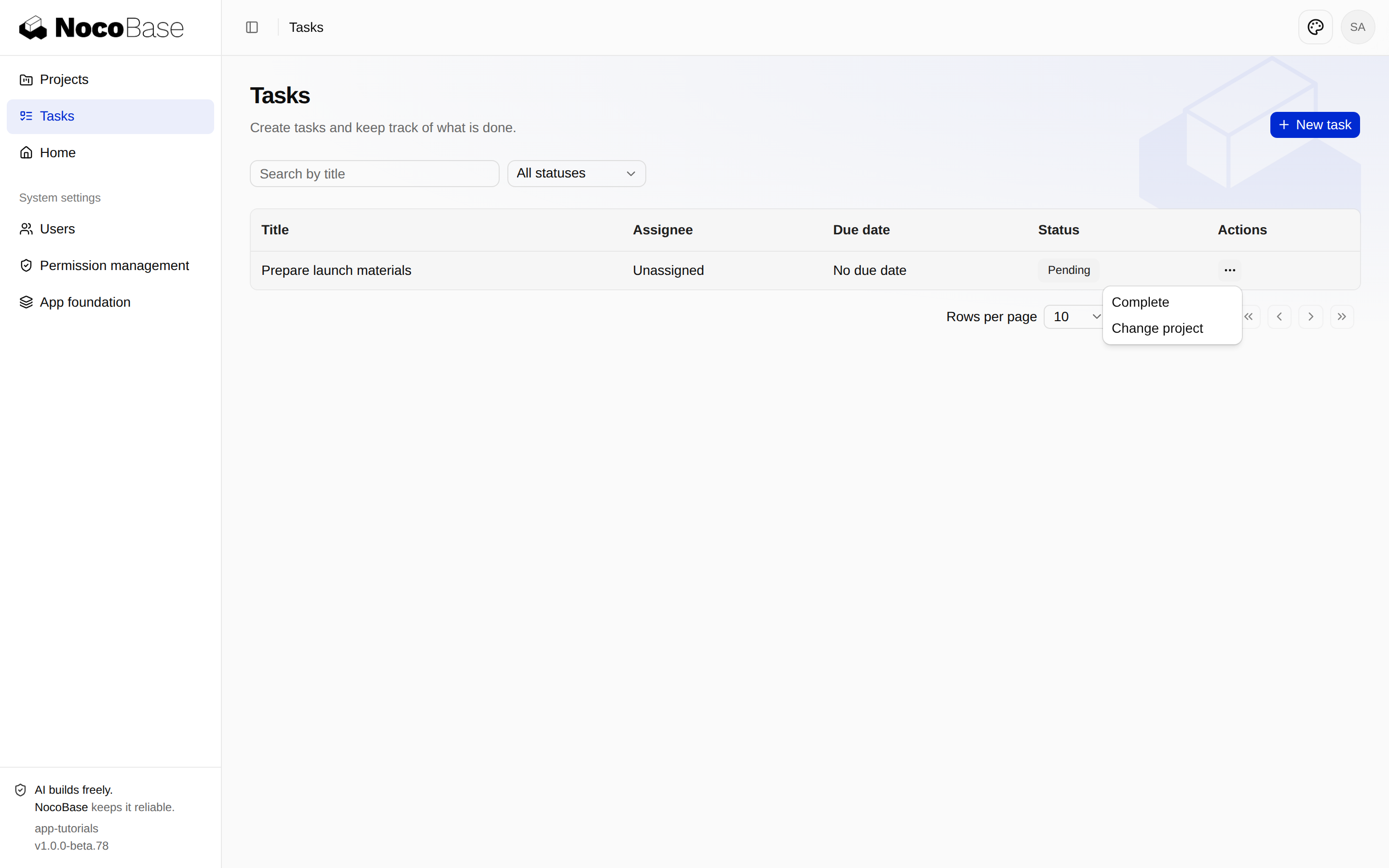
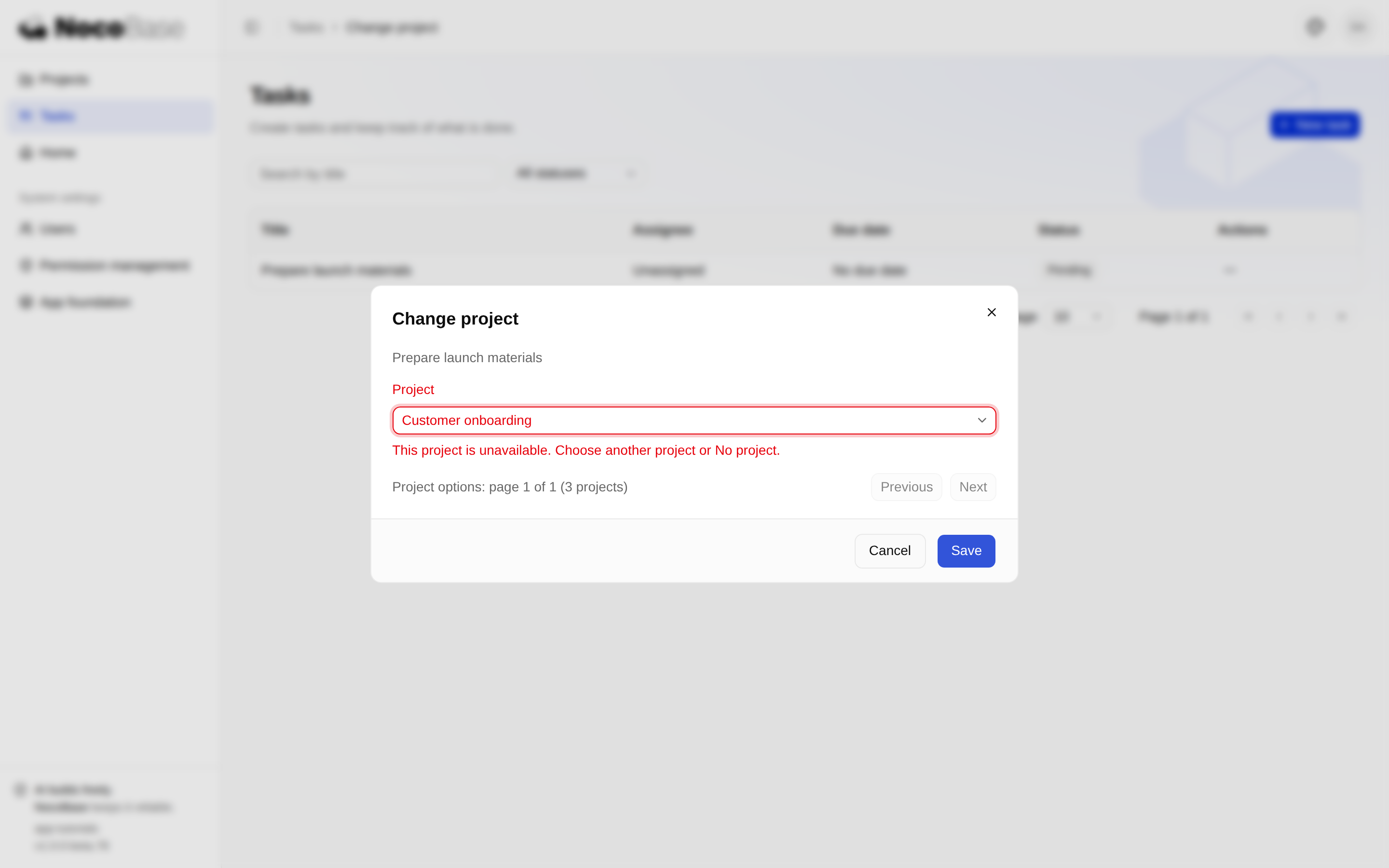
client/pages/tasks/[taskId]/project.tsx loads the latest task and allowed projects when opened. Options are paged in groups of 20 with Previous and Next; the first page is not presented as the complete list.
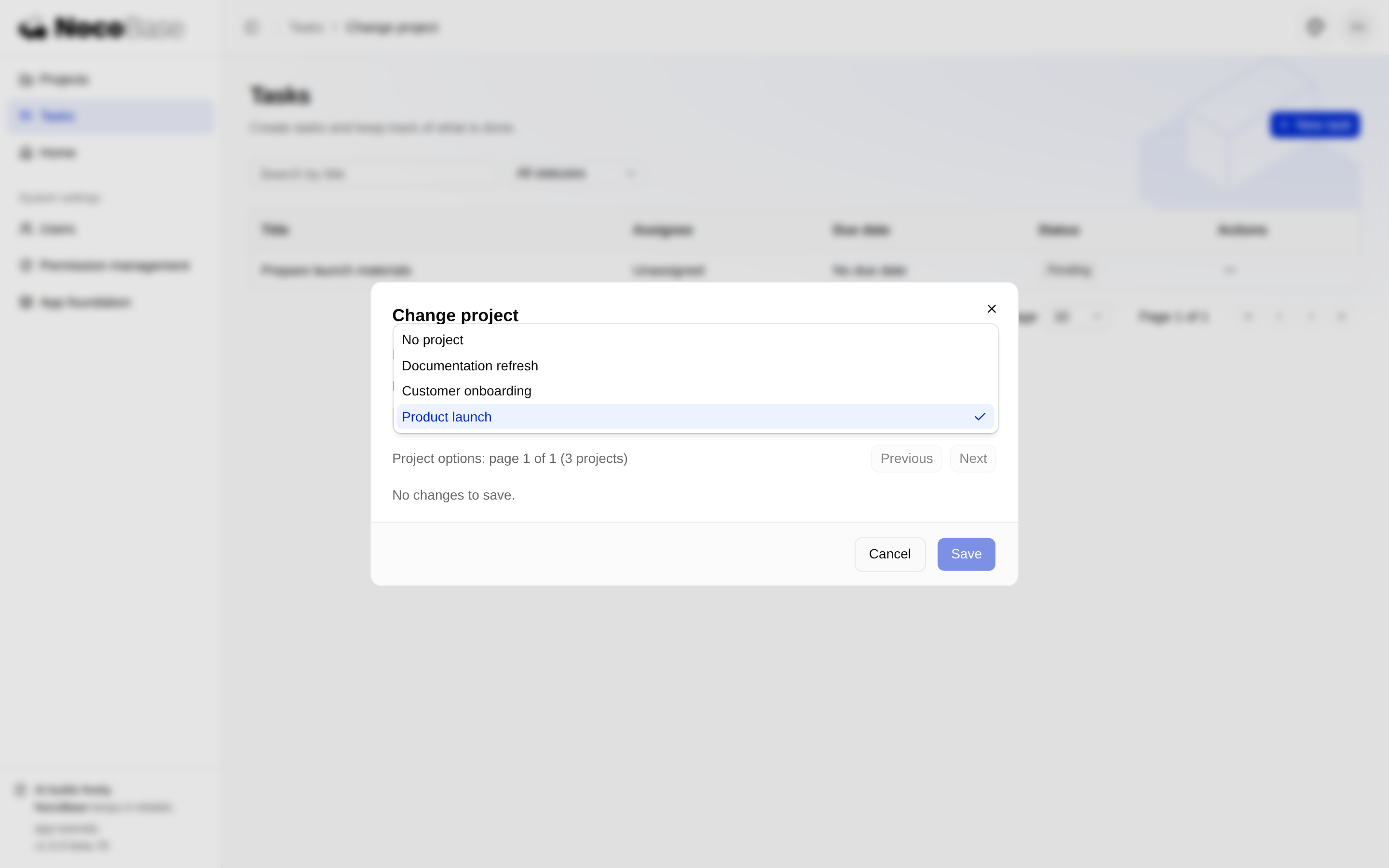
Options pagination and the form draft are separate state. Initialize the selection from the first response only. Later option pages must preserve the draft and its label, even when the selected project is on another page. Retrying a failed load must not reset input.
Save the selected ID, or null for No project:
const { data } = await api.request({
  path: `tutorialTasks/${encodeURIComponent(taskId)}/project`,
  method: 'PATCH',
  json: { projectId },
});
The response contains only id, projectId and updatedAt. Merge those fields into the existing task, then refresh the list. Do not overwrite its title, assignee or completion status using an older editor object. Reopening reads the association from the server again.
Give failures a useful next step
| Situation | Behavior |
|---|---|
| Unchanged form | Disable Save and explain that there are no changes |
| Unavailable target project | Associate the error with Project, focus the trigger and retain the draft |
| Missing or out-of-scope task | End editing and return to the refreshed list |
| Expired session | Offer sign-in |
| Revoked action permission | Explain the denial without an ineffective Retry button |
| Network or server failure | Keep input and allow retry |
Keyboard behavior matters too: confirming an IME candidate must not submit; pending saves must not submit twice; closing returns focus to the trigger, or to the parent heading when the trigger disappeared or the dialog opened from a direct link.
Configure permissions and verify
Use System settings → Permission management to configure explicit roles:
- Projects page access and the required view/create actions.
- Tasks page access and Change task project.
- Separate task and project scopes for assignment.
Assign the role to specific people through user management. Page access does not grant data access or creation. Viewing a project does not necessarily allow assigning a task to it. Hidden buttons are feedback; the server independently checks every request.
The package includes real API tests, component tests and a browser test:
pnpm exec vitest run --config vitest.tutorial.config.ts tests/server/tutorial-tasks-project-api.test.ts
pnpm exec vitest run tests/components/tutorial-projects.test.tsx
pnpm exec vitest run tests/logic/client-routes.test.ts tests/logic/page-permission-titles.test.ts tests/logic/app-locale-coverage.test.ts tests/logic/authorization-assignment-safety.test.ts
pnpm typecheck
Run browser tests against a separate local test application: they create projects and tasks. Set APP_URL to the complete application entry printed by pnpm dev, and use a local test account:
APP_URL=http://127.0.0.1:13321/main/ pnpm exec playwright test tests/playwright/tutorial-projects.test.tsSet TUTORIAL_USERNAME and TUTORIAL_PASSWORD as needed; keep production credentials out of scripts. Creation, assignment, clearing and scopes use a real database. Component tests substitute only necessary session, transport and jsdom browser-capability boundaries.
Reuse in other pages
The model, business APIs and page interactions now work together. For another business page, follow the same sequence: establish data and permissions, declare routes and components, then complete loading, failure, save feedback and verification.
The example still uses last-successful-write-wins behavior, without a concurrency version check. Search matches names by containment; sorting is by creation time, with no claim of Chinese pinyin ordering.