

#AI 従業員で JS ブロックのカスタムフォームを入力する
NocoBase の AI 従業員は「フォーム入力」ツールを使い、メール、会話、文書から情報を抽出してフォームへ入力できます。
NocoBase 標準フォームブロックではそのまま利用できますが、JS ブロック内で作成したフォームは標準フォームブロックではないため、初期状態では AI 従業員が認識できません。
本ガイドでは Event Planning Request を例に、グループ化、条件分岐、自動サマリーを含む Ant Design Form を JS ブロックで作成し、AI 従業員から入力できるようにします。
#利用方法
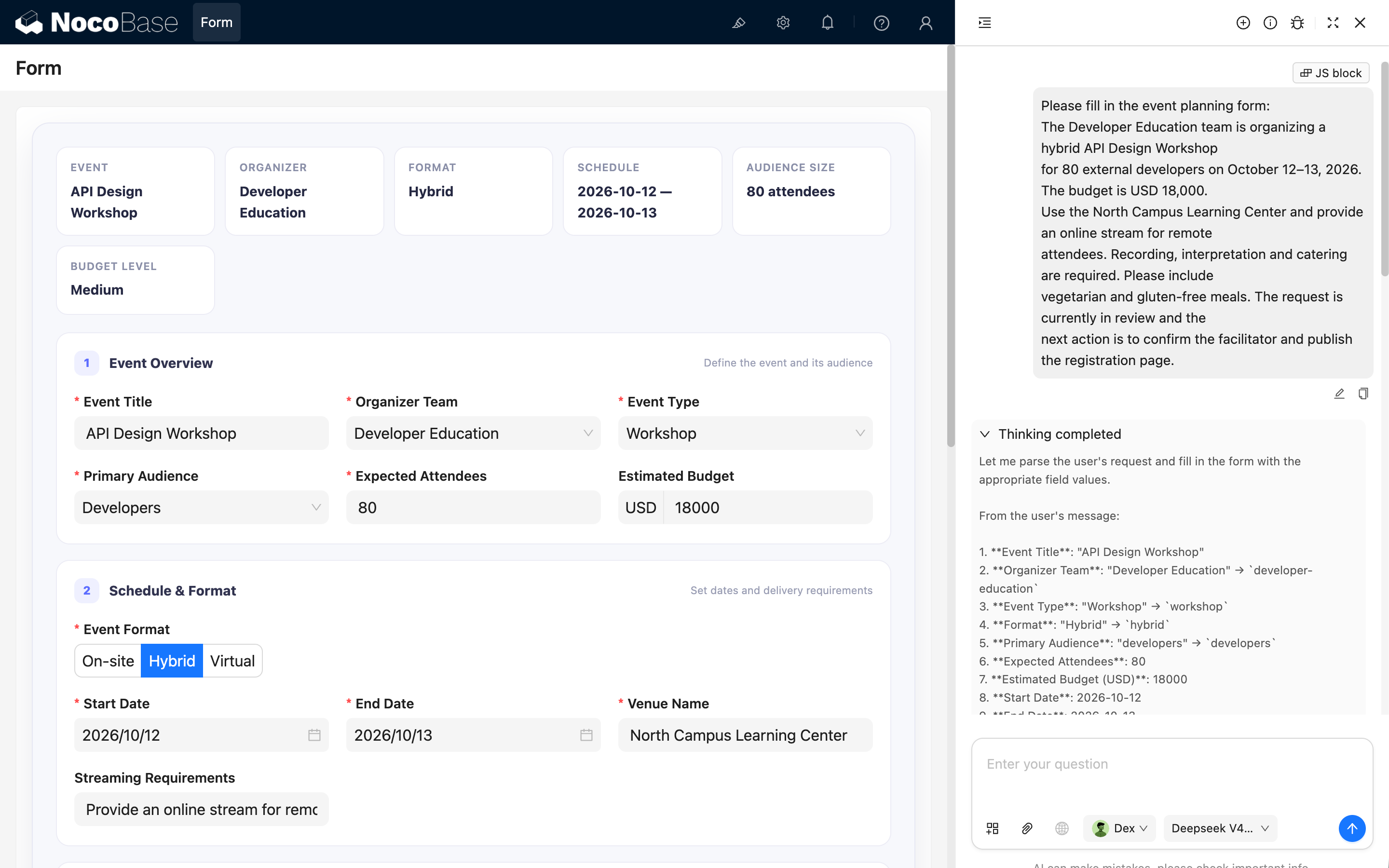
- 組み込みの Dex:データ整理スペシャリスト などの AI 従業員を開きます。
- 「コンテキストを追加」から「ブロックを選択」を選びます。
- ページ上の Event Planning Request ブロックを選択します。
- イベント要件を説明する文章を送信します。
- AI 従業員が情報を抽出し、対応するフィールドへ入力します。
送信例:
Please fill in the event planning form:
The Developer Education team is organizing a hybrid API Design Workshop
for 80 external developers on October 12–13, 2026. The budget is USD 18,000.
Use the North Campus Learning Center and provide an online stream for remote
attendees. Recording, interpretation and catering are required. Please include
vegetarian and gluten-free meals. The request is currently in review and the
next action is to confirm the facilitator and publish the registration page.#実装の仕組み
実装は二つの部分で構成されます。まず、現在のブロックモデルから Ant Design Form インスタンスを公開します。
ctx.model.form = form;次に、フィールド名、型、列挙値、日付形式、対象ブロック UID を AI に伝えるフィールドメタデータを設定します。
- Field names and data types;
- Enum values for Select, Radio, and multi-select fields;
- Date value formats;
- The UID of the target block.
メタデータとフォームを同じ JS ブロックで管理すると、変更内容を同期しやすくなります。
#JS ブロックを追加する
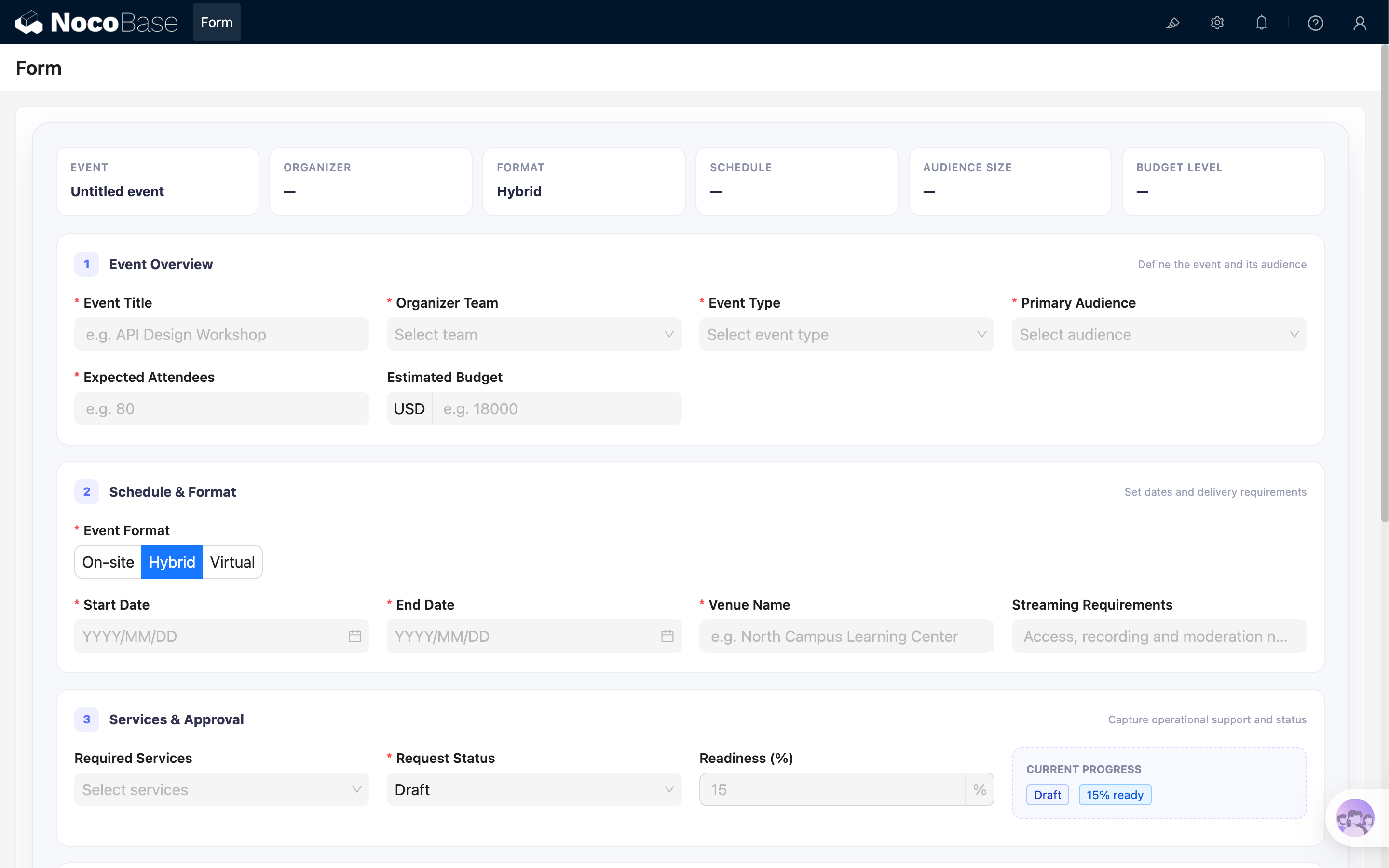
JS ブロックを追加し、JavaScript エディターに以下の完全なコードを貼り付けます。
#完全なサンプルコード
クリックして展開し、コピー
const React = ctx.libs.React;
const { useEffect, useMemo } = React;
const {
Form,
Input,
InputNumber,
Select,
Button,
Radio,
Space,
Tag,
DatePicker,
} = ctx.libs.antd;
const dayjs = ctx.libs.dayjs;
const BRAND = '#5B6CFF';
const TEAM_OPTIONS = [
{ value: 'product-design', label: 'Product Design' },
{ value: 'developer-education', label: 'Developer Education' },
{ value: 'customer-learning', label: 'Customer Learning' },
{ value: 'operations', label: 'Operations' },
];
const EVENT_TYPE_OPTIONS = [
{ value: 'workshop', label: 'Workshop' },
{ value: 'conference', label: 'Conference' },
{ value: 'webinar', label: 'Webinar' },
{ value: 'community-meetup', label: 'Community Meetup' },
{ value: 'team-offsite', label: 'Team Offsite' },
];
const FORMAT_OPTIONS = [
{ value: 'onsite', label: 'On-site' },
{ value: 'hybrid', label: 'Hybrid' },
{ value: 'virtual', label: 'Virtual' },
];
const AUDIENCE_OPTIONS = [
{ value: 'employees', label: 'Employees' },
{ value: 'customers', label: 'Customers' },
{ value: 'partners', label: 'Partners' },
{ value: 'developers', label: 'Developers' },
{ value: 'public', label: 'General Public' },
];
const STATUS_OPTIONS = [
{ value: 'draft', label: 'Draft', readiness: 15 },
{ value: 'in-review', label: 'In Review', readiness: 45 },
{ value: 'approved', label: 'Approved', readiness: 80 },
{ value: 'scheduled', label: 'Scheduled', readiness: 100 },
{ value: 'cancelled', label: 'Cancelled', readiness: 0 },
];
const SERVICE_OPTIONS = [
{ value: 'catering', label: 'Catering' },
{ value: 'recording', label: 'Recording' },
{ value: 'interpretation', label: 'Interpretation' },
{ value: 'photography', label: 'Photography' },
{ value: 'printed-materials', label: 'Printed Materials' },
{ value: 'accessibility-support', label: 'Accessibility Support' },
];
const CANCELLATION_REASON_OPTIONS = [
{ value: 'schedule-conflict', label: 'Schedule conflict' },
{ value: 'budget-unavailable', label: 'Budget unavailable' },
{ value: 'low-registration', label: 'Low registration' },
{ value: 'venue-unavailable', label: 'Venue unavailable' },
{ value: 'scope-changed', label: 'Scope changed' },
{ value: 'other', label: 'Other' },
];
const FORM_FIELDS = [
{
name: 'eventTitle',
title: 'Event Title',
type: 'string',
required: true,
},
{
name: 'organizerTeam',
title: 'Organizer Team',
type: 'string',
required: true,
enum: TEAM_OPTIONS,
},
{
name: 'eventType',
title: 'Event Type',
type: 'string',
required: true,
enum: EVENT_TYPE_OPTIONS,
},
{
name: 'format',
title: 'Event Format',
type: 'string',
required: true,
enum: FORMAT_OPTIONS,
},
{
name: 'audience',
title: 'Primary Audience',
type: 'string',
required: true,
enum: AUDIENCE_OPTIONS,
},
{
name: 'attendeeCount',
title: 'Expected Attendees',
type: 'number',
required: true,
},
{
name: 'budgetUsd',
title: 'Estimated Budget (USD)',
type: 'number',
},
{
name: 'startDate',
title: 'Start Date',
type: 'string',
required: true,
prompt: 'Use YYYY-MM-DD format.',
},
{
name: 'endDate',
title: 'End Date',
type: 'string',
required: true,
prompt: 'Use YYYY-MM-DD format.',
},
{
name: 'venueName',
title: 'Venue Name',
type: 'string',
prompt: 'Fill this field only for On-site or Hybrid events.',
},
{
name: 'streamingNotes',
title: 'Streaming Requirements',
type: 'string',
prompt: 'Fill this field only for Hybrid or Virtual events.',
},
{
name: 'services',
title: 'Required Services',
type: 'array',
enum: SERVICE_OPTIONS,
prompt: 'Use an array containing service option values.',
},
{
name: 'dietaryNotes',
title: 'Dietary Requirements',
type: 'string',
prompt: 'Fill this field when Required Services includes Catering.',
},
{
name: 'status',
title: 'Request Status',
type: 'string',
required: true,
enum: STATUS_OPTIONS.map(({ value, label }) => ({ value, label })),
},
{
name: 'readiness',
title: 'Readiness (%)',
type: 'number',
},
{
name: 'cancellationReason',
title: 'Cancellation Reason',
type: 'string',
enum: CANCELLATION_REASON_OPTIONS,
prompt: 'Fill this field only when Request Status is Cancelled.',
},
{
name: 'objectives',
title: 'Event Objectives',
type: 'string',
},
{
name: 'agendaNotes',
title: 'Agenda Notes',
type: 'string',
},
{
name: 'risks',
title: 'Risks and Constraints',
type: 'string',
},
{
name: 'nextAction',
title: 'Next Action',
type: 'string',
},
];
ctx.model.setTitle('Event Planning Request');
ctx.model.setProps({
aiForm: {
prompt: `This is a fillable Event Planning Request form. Use the Fill form tool when the user asks to populate it. Use the current block UID as the form target: ${ctx.model.uid}. Always use enum values instead of labels, use YYYY-MM-DD for date fields, and use an array for services.`,
fields: FORM_FIELDS,
},
});
const styles = {
shell: {
overflow: 'hidden',
border: '1px solid #E7E8F3',
borderRadius: 18,
background: '#F7F8FC',
boxShadow: '0 16px 42px rgba(31, 35, 76, 0.10)',
},
body: {
padding: 24,
},
summary: {
display: 'grid',
gridTemplateColumns: 'repeat(auto-fit, minmax(150px, 1fr))',
gap: 10,
marginBottom: 18,
},
summaryItem: {
minHeight: 72,
padding: '12px 14px',
border: '1px solid #ECECF5',
borderRadius: 12,
background: '#FFFFFF',
},
summaryLabel: {
marginBottom: 5,
color: '#8A8FA8',
fontSize: 11,
fontWeight: 600,
textTransform: 'uppercase',
letterSpacing: 0.5,
},
summaryValue: {
color: '#252842',
fontSize: 14,
fontWeight: 700,
},
section: {
marginBottom: 16,
padding: '18px 18px 4px',
border: '1px solid #ECECF5',
borderRadius: 14,
background: '#FFFFFF',
},
sectionHeader: {
display: 'flex',
alignItems: 'center',
gap: 10,
marginBottom: 16,
},
sectionNumber: {
display: 'inline-flex',
width: 26,
height: 26,
alignItems: 'center',
justifyContent: 'center',
borderRadius: 8,
color: BRAND,
background: '#EEF0FF',
fontSize: 12,
fontWeight: 800,
},
sectionTitle: {
color: '#30334F',
fontSize: 14,
fontWeight: 750,
},
sectionHint: {
marginLeft: 'auto',
color: '#9A9EB4',
fontSize: 11,
},
grid: {
display: 'grid',
gridTemplateColumns: 'repeat(auto-fit, minmax(260px, 1fr))',
columnGap: 18,
},
infoPanel: {
marginBottom: 24,
padding: '13px 14px',
border: '1px dashed #D9DDFC',
borderRadius: 10,
background: '#F8F9FF',
},
actionBar: {
position: 'sticky',
bottom: 0,
zIndex: 2,
display: 'flex',
alignItems: 'center',
gap: 10,
margin: '18px -24px -24px',
padding: '13px 24px',
borderTop: '1px solid #E8E9F2',
background: 'rgba(255,255,255,0.94)',
backdropFilter: 'blur(10px)',
},
};
function Section({ number, title, hint, children }) {
return (
<section style={styles.section}>
<div style={styles.sectionHeader}>
<span style={styles.sectionNumber}>{number}</span>
<span style={styles.sectionTitle}>{title}</span>
{hint ? <span style={styles.sectionHint}>{hint}</span> : null}
</div>
{children}
</section>
);
}
function SummaryItem({ label, value }) {
return (
<div style={styles.summaryItem}>
<div style={styles.summaryLabel}>{label}</div>
<div style={styles.summaryValue}>{value || '—'}</div>
</div>
);
}
function DateField({ name, label, required = false }) {
return (
<Form.Item
name={name}
label={label}
rules={
required ? [{ required: true, message: `Please select ${label}` }] : []
}
getValueProps={(value) => ({
value: value ? dayjs(String(value).slice(0, 10)) : null,
})}
getValueFromEvent={(value) => (value ? value.format('YYYY-MM-DD') : null)}
>
<DatePicker
format="YYYY/MM/DD"
placeholder="YYYY/MM/DD"
style={{ width: '100%' }}
/>
</Form.Item>
);
}
function EventPlanningForm() {
const [form] = Form.useForm();
const watchedValues =
Form.useWatch([], {
form,
preserve: true,
}) || {};
const values = {
format: 'hybrid',
status: 'draft',
readiness: 15,
services: [],
...watchedValues,
};
const teamLabel = TEAM_OPTIONS.find(
(item) => item.value === values.organizerTeam,
)?.label;
const formatLabel = FORMAT_OPTIONS.find(
(item) => item.value === values.format,
)?.label;
const status = STATUS_OPTIONS.find((item) => item.value === values.status);
const hasPhysicalVenue =
values.format === 'onsite' || values.format === 'hybrid';
const needsStreaming =
values.format === 'virtual' || values.format === 'hybrid';
const needsCatering = values.services?.includes('catering');
const isCancelled = values.status === 'cancelled';
const dateRange = [values.startDate, values.endDate]
.filter(Boolean)
.join(' — ');
const budgetLevel = useMemo(() => {
const budget = Number(values.budgetUsd || 0);
if (budget >= 50000) {
return 'Large';
}
if (budget >= 10000) {
return 'Medium';
}
return budget > 0 ? 'Small' : '';
}, [values.budgetUsd]);
useEffect(() => {
const previousForm = ctx.model.form;
// Allow the Fill form tool to write values into this form.
ctx.model.form = form;
return () => {
if (ctx.model.form === form) {
ctx.model.form = previousForm;
}
};
}, [form]);
useEffect(() => {
if (!status) {
return;
}
const currentReadiness = form.getFieldValue('readiness');
if (currentReadiness !== status.readiness) {
form.setFieldsValue({ readiness: status.readiness });
}
}, [form, status]);
const handleFinish = (formValues) => {
console.log('Event planning form values:', formValues);
ctx.message.success('The form is complete and ready for submission.');
};
return (
<div style={styles.shell}>
<div style={styles.body}>
<div style={styles.summary}>
<SummaryItem
label="Event"
value={values.eventTitle || 'Untitled event'}
/>
<SummaryItem label="Organizer" value={teamLabel} />
<SummaryItem label="Format" value={formatLabel} />
<SummaryItem label="Schedule" value={dateRange} />
<SummaryItem
label="Audience Size"
value={
values.attendeeCount
? `${values.attendeeCount} attendees`
: undefined
}
/>
<SummaryItem label="Budget Level" value={budgetLevel} />
</div>
<Form
form={form}
layout="vertical"
size="large"
variant="filled"
initialValues={{
format: 'hybrid',
status: 'draft',
readiness: 15,
services: [],
}}
onFinish={handleFinish}
>
<Section
number="1"
title="Event Overview"
hint="Define the event and its audience"
>
<div style={styles.grid}>
<Form.Item
name="eventTitle"
label="Event Title"
rules={[
{
required: true,
message: 'Please enter the event title',
},
]}
>
<Input placeholder="e.g. API Design Workshop" />
</Form.Item>
<Form.Item
name="organizerTeam"
label="Organizer Team"
rules={[
{
required: true,
message: 'Please select the organizer team',
},
]}
>
<Select options={TEAM_OPTIONS} placeholder="Select team" />
</Form.Item>
<Form.Item
name="eventType"
label="Event Type"
rules={[
{
required: true,
message: 'Please select the event type',
},
]}
>
<Select
options={EVENT_TYPE_OPTIONS}
placeholder="Select event type"
/>
</Form.Item>
<Form.Item
name="audience"
label="Primary Audience"
rules={[
{
required: true,
message: 'Please select the primary audience',
},
]}
>
<Select
options={AUDIENCE_OPTIONS}
placeholder="Select audience"
/>
</Form.Item>
<Form.Item
name="attendeeCount"
label="Expected Attendees"
rules={[
{
required: true,
message: 'Please enter the expected attendee count',
},
]}
>
<InputNumber
min={1}
precision={0}
style={{ width: '100%' }}
placeholder="e.g. 80"
/>
</Form.Item>
<Form.Item name="budgetUsd" label="Estimated Budget">
<InputNumber
min={0}
precision={0}
addonBefore="USD"
style={{ width: '100%' }}
placeholder="e.g. 18000"
/>
</Form.Item>
</div>
</Section>
<Section
number="2"
title="Schedule & Format"
hint="Set dates and delivery requirements"
>
<Form.Item
name="format"
label="Event Format"
rules={[
{
required: true,
message: 'Please select the event format',
},
]}
>
<Radio.Group
optionType="button"
buttonStyle="solid"
options={FORMAT_OPTIONS}
/>
</Form.Item>
<div style={styles.grid}>
<DateField name="startDate" label="Start Date" required />
<DateField name="endDate" label="End Date" required />
{hasPhysicalVenue ? (
<Form.Item
name="venueName"
label="Venue Name"
rules={[
{
required: true,
message: 'Please enter the venue name',
},
]}
>
<Input placeholder="e.g. North Campus Learning Center" />
</Form.Item>
) : null}
{needsStreaming ? (
<Form.Item name="streamingNotes" label="Streaming Requirements">
<Input placeholder="Access, recording and moderation needs" />
</Form.Item>
) : null}
</div>
</Section>
<Section
number="3"
title="Services & Approval"
hint="Capture operational support and status"
>
<div style={styles.grid}>
<Form.Item name="services" label="Required Services">
<Select
mode="multiple"
showSearch
optionFilterProp="label"
options={SERVICE_OPTIONS}
placeholder="Select services"
/>
</Form.Item>
{needsCatering ? (
<Form.Item name="dietaryNotes" label="Dietary Requirements">
<Input placeholder="Meal preferences and allergies" />
</Form.Item>
) : null}
<Form.Item
name="status"
label="Request Status"
rules={[
{
required: true,
message: 'Please select the request status',
},
]}
>
<Select
options={STATUS_OPTIONS.map(({ value, label }) => ({
value,
label,
}))}
placeholder="Select status"
/>
</Form.Item>
<Form.Item name="readiness" label="Readiness (%)">
<InputNumber
min={0}
max={100}
precision={0}
addonAfter="%"
style={{ width: '100%' }}
disabled
/>
</Form.Item>
{isCancelled ? (
<Form.Item
name="cancellationReason"
label="Cancellation Reason"
rules={[
{
required: true,
message: 'Please select the cancellation reason',
},
]}
>
<Select
options={CANCELLATION_REASON_OPTIONS}
placeholder="Select reason"
/>
</Form.Item>
) : (
<div style={styles.infoPanel}>
<div
style={{
marginBottom: 6,
color: '#8589A1',
fontSize: 11,
fontWeight: 700,
textTransform: 'uppercase',
}}
>
Current Progress
</div>
<Space size={6} wrap>
<Tag color="geekblue">{status?.label || 'Draft'}</Tag>
<Tag color="blue">{values.readiness || 0}% ready</Tag>
</Space>
</div>
)}
</div>
</Section>
<Section
number="4"
title="Planning Notes"
hint="Keep the delivery handoff clear"
>
<Form.Item name="objectives" label="Event Objectives">
<Input.TextArea
rows={3}
placeholder="Describe the intended outcomes"
/>
</Form.Item>
<Form.Item name="agendaNotes" label="Agenda Notes">
<Input.TextArea
rows={3}
placeholder="Outline the sessions and timing"
/>
</Form.Item>
<Form.Item name="risks" label="Risks and Constraints">
<Input.TextArea
rows={3}
placeholder="Record dependencies, limits and open questions"
/>
</Form.Item>
<Form.Item name="nextAction" label="Next Action">
<Input.TextArea
rows={3}
placeholder="Describe the next action, owner and due date"
/>
</Form.Item>
</Section>
<div style={styles.actionBar}>
<span
style={{
marginRight: 'auto',
color: '#8C90A7',
fontSize: 12,
}}
>
Review AI-filled values before submission.
</span>
<Button onClick={() => form.resetFields()}>Reset</Button>
<Button
type="primary"
htmlType="submit"
style={{
minWidth: 150,
background: BRAND,
borderColor: BRAND,
}}
>
Validate Form
</Button>
</div>
</Form>
</div>
</div>
);
}
ctx.render(<EventPlanningForm />);コードを実行すると、ページに Event Planning Request フォームが表示されます。
#主要な実装ポイント
#Ant Design Form を AI 従業員に公開する
ctx.model.form にフォームインスタンスを設定すると、「フォーム入力」ツールが値を書き込めます。クリーンアップ処理はコンポーネントのアンマウント時に以前の値を復元します。
useEffect(() => {
  const previousForm = ctx.model.form;
  ctx.model.form = form;

  return () => {
    if (ctx.model.form === form) {
      ctx.model.form = previousForm;
    }
  };
}, [form]);#「ブロックを選択」に表示する名前を設定する
JS ブロックは「ブロックを選択」で既定では JS block と表示されます。ctx.model.setTitle() を使うと、識別しやすい名前を設定できます。
ctx.model.setTitle('Event Planning Request');設定後は、コンテキストを選択するときに Event Planning Request と表示され、同じページに複数のブロックがある場合でも対象フォームを見つけやすくなります。
JS ブロックごとに短く明確な名前を付け、この行を完全なサンプルコードに残してください。
#「フォーム入力」ツールにフォーム情報を提供する
ctx.model.form はフィールド値を受け取る Form インスタンスを提供します。さらに、フォームに含まれるフィールドと入力時のルールをツールへ伝える必要があります。
ctx.model.setProps() を使って、現在の JS ブロックにこの情報を設定します。
ctx.model.setProps({
  aiForm: {
    prompt: `This is a fillable Event Planning Request form. Use the Fill form tool when the user asks to populate it. Use the current block UID as the form target: ${ctx.model.uid}. Always use enum values instead of labels, use YYYY-MM-DD for date fields, and use an array for services.`,
    fields: FORM_FIELDS,
  },
});
aiForm には次の二つを設定します。
prompt:フォームの用途、対象ブロック UID、列挙値、日付、複数選択の入力ルールを説明します。fields:FORM_FIELDSを通じてフィールド名、型、必須状態、選択肢を提供します。
ユーザーがこの JS ブロックを AI 従業員のコンテキストへ追加すると、「フォーム入力」ツールはこれらの情報を読み取り、対象ブロックのどのフィールドへ入力するかを判断します。
二つの接続コードが必要です。
// ツールにフォームの構造を伝える
ctx.model.setProps({
  aiForm: {
    prompt: '...',
    fields: FORM_FIELDS,
  },
});

// 値を受け取る Ant Design Form インスタンスを提供する
ctx.model.form = form;
選択肢を API から取得する場合は、リクエストと options の変換を完了してから FORM_FIELDS を定義し、ctx.model.setProps() を呼び出します。これにより、ツールが参照する enum と画面の選択肢を一致させられます。
#複雑なフォームフィールドを記述する
FORM_FIELDS は AI 向けのフォーム定義です。各 name は対応する Form.Item と完全に一致させます。Select と Radio には enum を指定し、AI はラベルではなく値を入力します。複数選択は配列を使用します。
{
  name: 'eventTitle',
  title: 'Event Title',
  type: 'string',
  required: true,
}<Form.Item name="eventTitle" label="Event Title">
<Input />
</Form.Item>{
"status": "in-review",
"services": ["recording", "interpretation", "catering"]
}#日付値を変換する
DatePicker は dayjs オブジェクトを必要としますが、AI には YYYY-MM-DD 文字列が適しています。getValueProps と getValueFromEvent で相互変換します。
<Form.Item
  name="startDate"
  getValueProps={(value) => ({
    value: value ? dayjs(String(value).slice(0, 10)) : null,
  })}
  getValueFromEvent={(value) =>
    value ? value.format('YYYY-MM-DD') : null
  }
>
  <DatePicker format="YYYY/MM/DD" />
</Form.Item>#AI 入力でもフィールド連動を動作させる
setFieldsValue() は onValuesChange を発火しません。連動には Form.useWatch() を使います。この例では Request Status に応じて Readiness が自動更新されます。
const status = STATUS_OPTIONS.find(
  (item) => item.value === values.status,
);

useEffect(() => {
  if (status) {
    form.setFieldsValue({ readiness: status.readiness });
  }
}, [form, status]);#条件付きフィールドを表示する
Form.useWatch() の値で JSX を制御できます。オンサイトまたはハイブリッドでは Venue Name、Catering 選択時は Dietary Requirements、Cancelled では Cancellation Reason を表示します。
{values.services?.includes('catering') ? (
  <Form.Item name="dietaryNotes" label="Dietary Requirements">
    <Input />
  </Form.Item>
) : null}#AI 従業員でフォームを入力する
#1. フォーム入力ツールを有効にする
組み込みの Dex を使用するか、別の AI 従業員で「フォーム入力」ツールを有効にします。
#2. JS ブロックをコンテキストに追加する
AI 従業員ダイアログで「コンテキストを追加 → ブロックを選択」を選び、Event Planning Request を指定します。コンテキストを追加 - ブロックを選択も参照してください。
#3. 元資料を送信する
自然言語を入力するか、メール、議事録、イベント要件を貼り付けます。異なる言語の内容でも英語のフィールド値へ対応付けできます。
#4. 送信前に確認する
選択肢、数値と単位、日付、複数選択、条件付きフィールド、必須項目を確認してください。「フォーム入力」は値を書き込むだけで、Validate Form のクリックやデータ送信は行いません。
#独自フォームへ適用する
#静的な選択肢
少数の固定選択肢は JS ブロックで定義し、FORM_FIELDS と Select で同じ配列を再利用します。
const TEAM_OPTIONS = [
  { value: 'team-a', label: 'Team A' },
  { value: 'team-b', label: 'Team B' },
];#API から選択肢を読み込む
NocoBase API や他の API から選択肢を取得できます。FORM_FIELDS の定義と描画より前にリクエストを完了し、レコードを { value, label } に変換します。
const { data } = await ctx.request({
  url: 'eventCategories:list',
  method: 'get',
  params: {
    fields: ['id', 'name'],
    sort: ['name'],
    pageSize: 100,
  },
});

const categoryRecords = Array.isArray(data?.data) ? data.data : [];
const CATEGORY_OPTIONS = categoryRecords.map((record) => ({
  value: record.id,
  label: record.name,
}));

const FORM_FIELDS = [
  {
    name: 'categoryId',
    title: 'Event Category',
    type: 'number',
    enum: CATEGORY_OPTIONS,
  },
];

ctx.model.setProps({
  aiForm: {
    fields: FORM_FIELDS,
  },
});<Form.Item name="categoryId" label="Event Category">
<Select options={CATEGORY_OPTIONS} />
</Form.Item>リクエストと変換の後で ctx.model.setProps() を呼び、AI の enum と画面の選択肢を一致させます。値の型もフィールド型と一致させてください。
リクエストには現在のユーザー権限が適用されます。外部 API では CORS と認証も確認してください。詳細は ctx.request を参照してください。
#フィールドメタデータ
対象フォームに合わせて名前、タイトル、型、列挙値、必須条件、プロンプトを変更します。
const FORM_FIELDS = [
  {
    name: 'yourFieldName',
    title: 'Your Field Title',
    type: 'string',
  },
];#フォームフィールドとレイアウト
対応する Form.Item とレイアウトを変更します。Section、SummaryItem、styles.grid は再利用できます。
<Form.Item name="yourFieldName" label="Your Field Title">
  <Input />
</Form.Item>#適用範囲と注意事項
#一つの JS ブロックに一つの主要フォーム
AI が対象を明確に判断できるよう、一つの JS ブロックには一つの主要フォームを配置します。独立したフォームは別ブロックに分けます。
#大量の選択肢をコンテキストへ入れない
静的選択肢と API 選択肢のどちらも利用できます。数百件ある場合は、クエリを絞る、先に関連レコードを選択する、または専用の照合フローを使用してください。
#まとめ
JS ブロックのフォームを AI から入力可能にするには、Ant Design Form で値を管理し、フォームインスタンスをブロックモデルへ公開し、正確なフィールドメタデータを提供します。この例では JSX、レスポンシブグリッド、カード、サマリー、連動、条件表示も扱います。