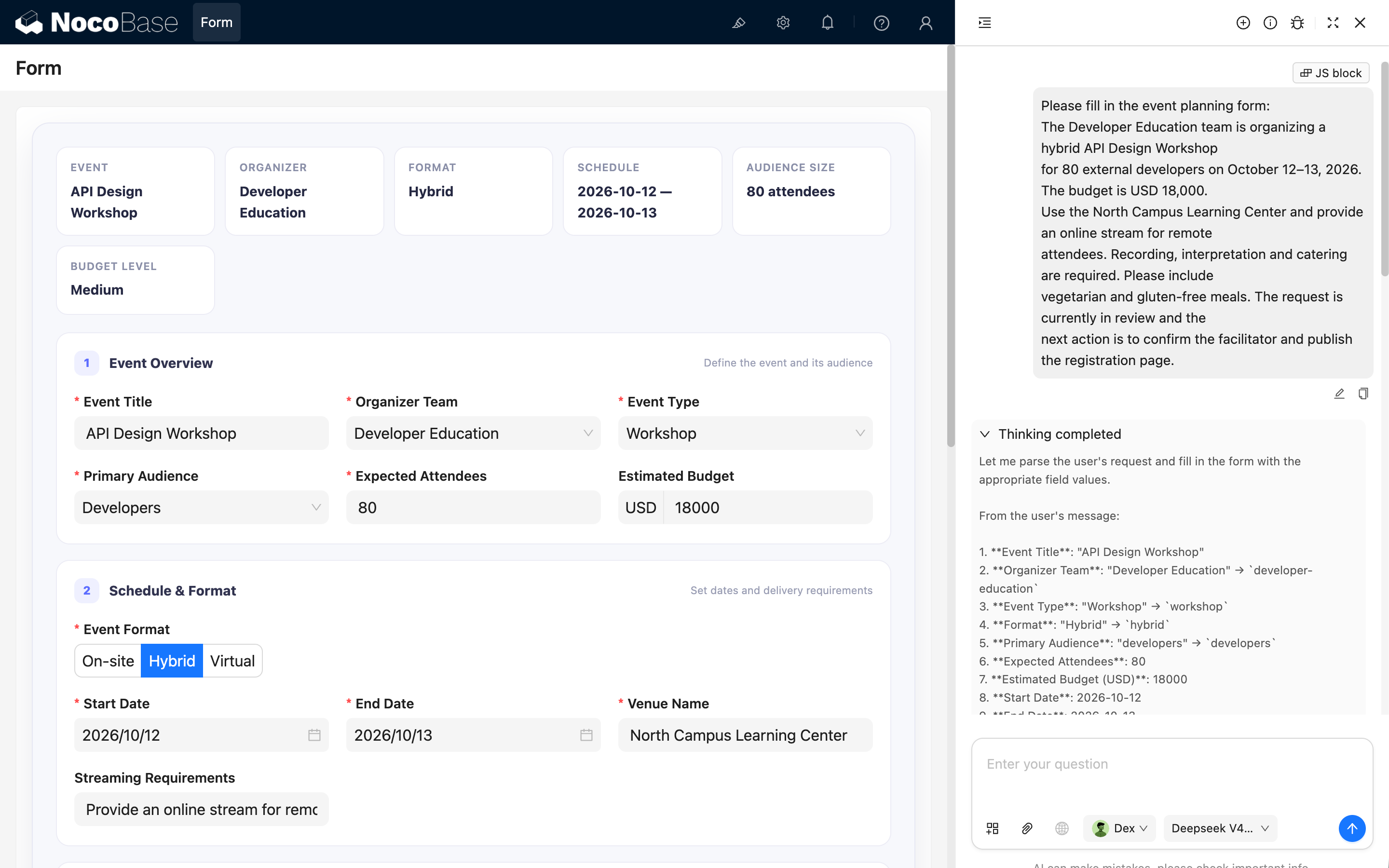
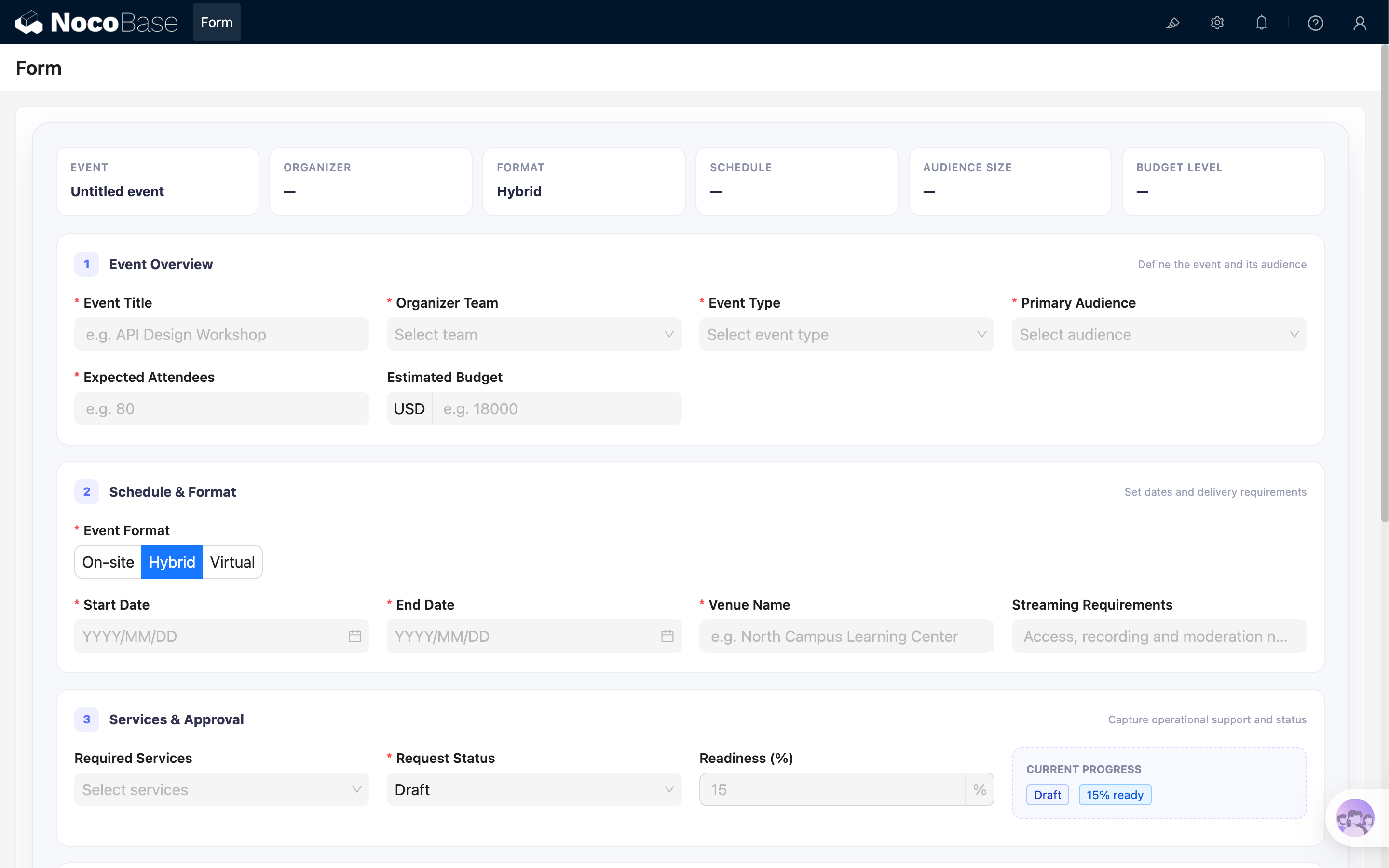
const React = ctx.libs.React;
const { useEffect, useMemo } = React;
const {
Form,
Input,
InputNumber,
Select,
Button,
Radio,
Space,
Tag,
DatePicker,
} = ctx.libs.antd;
const dayjs = ctx.libs.dayjs;
const BRAND = '#5B6CFF';
const TEAM_OPTIONS = [
{ value: 'product-design', label: 'Product Design' },
{ value: 'developer-education', label: 'Developer Education' },
{ value: 'customer-learning', label: 'Customer Learning' },
{ value: 'operations', label: 'Operations' },
];
const EVENT_TYPE_OPTIONS = [
{ value: 'workshop', label: 'Workshop' },
{ value: 'conference', label: 'Conference' },
{ value: 'webinar', label: 'Webinar' },
{ value: 'community-meetup', label: 'Community Meetup' },
{ value: 'team-offsite', label: 'Team Offsite' },
];
const FORMAT_OPTIONS = [
{ value: 'onsite', label: 'On-site' },
{ value: 'hybrid', label: 'Hybrid' },
{ value: 'virtual', label: 'Virtual' },
];
const AUDIENCE_OPTIONS = [
{ value: 'employees', label: 'Employees' },
{ value: 'customers', label: 'Customers' },
{ value: 'partners', label: 'Partners' },
{ value: 'developers', label: 'Developers' },
{ value: 'public', label: 'General Public' },
];
const STATUS_OPTIONS = [
{ value: 'draft', label: 'Draft', readiness: 15 },
{ value: 'in-review', label: 'In Review', readiness: 45 },
{ value: 'approved', label: 'Approved', readiness: 80 },
{ value: 'scheduled', label: 'Scheduled', readiness: 100 },
{ value: 'cancelled', label: 'Cancelled', readiness: 0 },
];
const SERVICE_OPTIONS = [
{ value: 'catering', label: 'Catering' },
{ value: 'recording', label: 'Recording' },
{ value: 'interpretation', label: 'Interpretation' },
{ value: 'photography', label: 'Photography' },
{ value: 'printed-materials', label: 'Printed Materials' },
{ value: 'accessibility-support', label: 'Accessibility Support' },
];
const CANCELLATION_REASON_OPTIONS = [
{ value: 'schedule-conflict', label: 'Schedule conflict' },
{ value: 'budget-unavailable', label: 'Budget unavailable' },
{ value: 'low-registration', label: 'Low registration' },
{ value: 'venue-unavailable', label: 'Venue unavailable' },
{ value: 'scope-changed', label: 'Scope changed' },
{ value: 'other', label: 'Other' },
];
const FORM_FIELDS = [
{
name: 'eventTitle',
title: 'Event Title',
type: 'string',
required: true,
},
{
name: 'organizerTeam',
title: 'Organizer Team',
type: 'string',
required: true,
enum: TEAM_OPTIONS,
},
{
name: 'eventType',
title: 'Event Type',
type: 'string',
required: true,
enum: EVENT_TYPE_OPTIONS,
},
{
name: 'format',
title: 'Event Format',
type: 'string',
required: true,
enum: FORMAT_OPTIONS,
},
{
name: 'audience',
title: 'Primary Audience',
type: 'string',
required: true,
enum: AUDIENCE_OPTIONS,
},
{
name: 'attendeeCount',
title: 'Expected Attendees',
type: 'number',
required: true,
},
{
name: 'budgetUsd',
title: 'Estimated Budget (USD)',
type: 'number',
},
{
name: 'startDate',
title: 'Start Date',
type: 'string',
required: true,
prompt: 'Use YYYY-MM-DD format.',
},
{
name: 'endDate',
title: 'End Date',
type: 'string',
required: true,
prompt: 'Use YYYY-MM-DD format.',
},
{
name: 'venueName',
title: 'Venue Name',
type: 'string',
prompt: 'Fill this field only for On-site or Hybrid events.',
},
{
name: 'streamingNotes',
title: 'Streaming Requirements',
type: 'string',
prompt: 'Fill this field only for Hybrid or Virtual events.',
},
{
name: 'services',
title: 'Required Services',
type: 'array',
enum: SERVICE_OPTIONS,
prompt: 'Use an array containing service option values.',
},
{
name: 'dietaryNotes',
title: 'Dietary Requirements',
type: 'string',
prompt: 'Fill this field when Required Services includes Catering.',
},
{
name: 'status',
title: 'Request Status',
type: 'string',
required: true,
enum: STATUS_OPTIONS.map(({ value, label }) => ({ value, label })),
},
{
name: 'readiness',
title: 'Readiness (%)',
type: 'number',
},
{
name: 'cancellationReason',
title: 'Cancellation Reason',
type: 'string',
enum: CANCELLATION_REASON_OPTIONS,
prompt: 'Fill this field only when Request Status is Cancelled.',
},
{
name: 'objectives',
title: 'Event Objectives',
type: 'string',
},
{
name: 'agendaNotes',
title: 'Agenda Notes',
type: 'string',
},
{
name: 'risks',
title: 'Risks and Constraints',
type: 'string',
},
{
name: 'nextAction',
title: 'Next Action',
type: 'string',
},
];
ctx.model.setTitle('Event Planning Request');
ctx.model.setProps({
aiForm: {
prompt: `This is a fillable Event Planning Request form. Use the Fill form tool when the user asks to populate it. Use the current block UID as the form target: ${ctx.model.uid}. Always use enum values instead of labels, use YYYY-MM-DD for date fields, and use an array for services.`,
fields: FORM_FIELDS,
},
});
const styles = {
shell: {
overflow: 'hidden',
border: '1px solid #E7E8F3',
borderRadius: 18,
background: '#F7F8FC',
boxShadow: '0 16px 42px rgba(31, 35, 76, 0.10)',
},
body: {
padding: 24,
},
summary: {
display: 'grid',
gridTemplateColumns: 'repeat(auto-fit, minmax(150px, 1fr))',
gap: 10,
marginBottom: 18,
},
summaryItem: {
minHeight: 72,
padding: '12px 14px',
border: '1px solid #ECECF5',
borderRadius: 12,
background: '#FFFFFF',
},
summaryLabel: {
marginBottom: 5,
color: '#8A8FA8',
fontSize: 11,
fontWeight: 600,
textTransform: 'uppercase',
letterSpacing: 0.5,
},
summaryValue: {
color: '#252842',
fontSize: 14,
fontWeight: 700,
},
section: {
marginBottom: 16,
padding: '18px 18px 4px',
border: '1px solid #ECECF5',
borderRadius: 14,
background: '#FFFFFF',
},
sectionHeader: {
display: 'flex',
alignItems: 'center',
gap: 10,
marginBottom: 16,
},
sectionNumber: {
display: 'inline-flex',
width: 26,
height: 26,
alignItems: 'center',
justifyContent: 'center',
borderRadius: 8,
color: BRAND,
background: '#EEF0FF',
fontSize: 12,
fontWeight: 800,
},
sectionTitle: {
color: '#30334F',
fontSize: 14,
fontWeight: 750,
},
sectionHint: {
marginLeft: 'auto',
color: '#9A9EB4',
fontSize: 11,
},
grid: {
display: 'grid',
gridTemplateColumns: 'repeat(auto-fit, minmax(260px, 1fr))',
columnGap: 18,
},
infoPanel: {
marginBottom: 24,
padding: '13px 14px',
border: '1px dashed #D9DDFC',
borderRadius: 10,
background: '#F8F9FF',
},
actionBar: {
position: 'sticky',
bottom: 0,
zIndex: 2,
display: 'flex',
alignItems: 'center',
gap: 10,
margin: '18px -24px -24px',
padding: '13px 24px',
borderTop: '1px solid #E8E9F2',
background: 'rgba(255,255,255,0.94)',
backdropFilter: 'blur(10px)',
},
};
function Section({ number, title, hint, children }) {
return (
<section style={styles.section}>
<div style={styles.sectionHeader}>
<span style={styles.sectionNumber}>{number}</span>
<span style={styles.sectionTitle}>{title}</span>
{hint ? <span style={styles.sectionHint}>{hint}</span> : null}
</div>
{children}
</section>
);
}
function SummaryItem({ label, value }) {
return (
<div style={styles.summaryItem}>
<div style={styles.summaryLabel}>{label}</div>
<div style={styles.summaryValue}>{value || '—'}</div>
</div>
);
}
function DateField({ name, label, required = false }) {
return (
<Form.Item
name={name}
label={label}
rules={
required ? [{ required: true, message: `Please select ${label}` }] : []
}
getValueProps={(value) => ({
value: value ? dayjs(String(value).slice(0, 10)) : null,
})}
getValueFromEvent={(value) => (value ? value.format('YYYY-MM-DD') : null)}
>
<DatePicker
format="YYYY/MM/DD"
placeholder="YYYY/MM/DD"
style={{ width: '100%' }}
/>
</Form.Item>
);
}
function EventPlanningForm() {
const [form] = Form.useForm();
const watchedValues =
Form.useWatch([], {
form,
preserve: true,
}) || {};
const values = {
format: 'hybrid',
status: 'draft',
readiness: 15,
services: [],
...watchedValues,
};
const teamLabel = TEAM_OPTIONS.find(
(item) => item.value === values.organizerTeam,
)?.label;
const formatLabel = FORMAT_OPTIONS.find(
(item) => item.value === values.format,
)?.label;
const status = STATUS_OPTIONS.find((item) => item.value === values.status);
const hasPhysicalVenue =
values.format === 'onsite' || values.format === 'hybrid';
const needsStreaming =
values.format === 'virtual' || values.format === 'hybrid';
const needsCatering = values.services?.includes('catering');
const isCancelled = values.status === 'cancelled';
const dateRange = [values.startDate, values.endDate]
.filter(Boolean)
.join(' — ');
const budgetLevel = useMemo(() => {
const budget = Number(values.budgetUsd || 0);
if (budget >= 50000) {
return 'Large';
}
if (budget >= 10000) {
return 'Medium';
}
return budget > 0 ? 'Small' : '';
}, [values.budgetUsd]);
useEffect(() => {
const previousForm = ctx.model.form;
// Allow the Fill form tool to write values into this form.
ctx.model.form = form;
return () => {
if (ctx.model.form === form) {
ctx.model.form = previousForm;
}
};
}, [form]);
useEffect(() => {
if (!status) {
return;
}
const currentReadiness = form.getFieldValue('readiness');
if (currentReadiness !== status.readiness) {
form.setFieldsValue({ readiness: status.readiness });
}
}, [form, status]);
const handleFinish = (formValues) => {
console.log('Event planning form values:', formValues);
ctx.message.success('The form is complete and ready for submission.');
};
return (
<div style={styles.shell}>
<div style={styles.body}>
<div style={styles.summary}>
<SummaryItem
label="Event"
value={values.eventTitle || 'Untitled event'}
/>
<SummaryItem label="Organizer" value={teamLabel} />
<SummaryItem label="Format" value={formatLabel} />
<SummaryItem label="Schedule" value={dateRange} />
<SummaryItem
label="Audience Size"
value={
values.attendeeCount
? `${values.attendeeCount} attendees`
: undefined
}
/>
<SummaryItem label="Budget Level" value={budgetLevel} />
</div>
<Form
form={form}
layout="vertical"
size="large"
variant="filled"
initialValues={{
format: 'hybrid',
status: 'draft',
readiness: 15,
services: [],
}}
onFinish={handleFinish}
>
<Section
number="1"
title="Event Overview"
hint="Define the event and its audience"
>
<div style={styles.grid}>
<Form.Item
name="eventTitle"
label="Event Title"
rules={[
{
required: true,
message: 'Please enter the event title',
},
]}
>
<Input placeholder="e.g. API Design Workshop" />
</Form.Item>
<Form.Item
name="organizerTeam"
label="Organizer Team"
rules={[
{
required: true,
message: 'Please select the organizer team',
},
]}
>
<Select options={TEAM_OPTIONS} placeholder="Select team" />
</Form.Item>
<Form.Item
name="eventType"
label="Event Type"
rules={[
{
required: true,
message: 'Please select the event type',
},
]}
>
<Select
options={EVENT_TYPE_OPTIONS}
placeholder="Select event type"
/>
</Form.Item>
<Form.Item
name="audience"
label="Primary Audience"
rules={[
{
required: true,
message: 'Please select the primary audience',
},
]}
>
<Select
options={AUDIENCE_OPTIONS}
placeholder="Select audience"
/>
</Form.Item>
<Form.Item
name="attendeeCount"
label="Expected Attendees"
rules={[
{
required: true,
message: 'Please enter the expected attendee count',
},
]}
>
<InputNumber
min={1}
precision={0}
style={{ width: '100%' }}
placeholder="e.g. 80"
/>
</Form.Item>
<Form.Item name="budgetUsd" label="Estimated Budget">
<InputNumber
min={0}
precision={0}
addonBefore="USD"
style={{ width: '100%' }}
placeholder="e.g. 18000"
/>
</Form.Item>
</div>
</Section>
<Section
number="2"
title="Schedule & Format"
hint="Set dates and delivery requirements"
>
<Form.Item
name="format"
label="Event Format"
rules={[
{
required: true,
message: 'Please select the event format',
},
]}
>
<Radio.Group
optionType="button"
buttonStyle="solid"
options={FORMAT_OPTIONS}
/>
</Form.Item>
<div style={styles.grid}>
<DateField name="startDate" label="Start Date" required />
<DateField name="endDate" label="End Date" required />
{hasPhysicalVenue ? (
<Form.Item
name="venueName"
label="Venue Name"
rules={[
{
required: true,
message: 'Please enter the venue name',
},
]}
>
<Input placeholder="e.g. North Campus Learning Center" />
</Form.Item>
) : null}
{needsStreaming ? (
<Form.Item name="streamingNotes" label="Streaming Requirements">
<Input placeholder="Access, recording and moderation needs" />
</Form.Item>
) : null}
</div>
</Section>
<Section
number="3"
title="Services & Approval"
hint="Capture operational support and status"
>
<div style={styles.grid}>
<Form.Item name="services" label="Required Services">
<Select
mode="multiple"
showSearch
optionFilterProp="label"
options={SERVICE_OPTIONS}
placeholder="Select services"
/>
</Form.Item>
{needsCatering ? (
<Form.Item name="dietaryNotes" label="Dietary Requirements">
<Input placeholder="Meal preferences and allergies" />
</Form.Item>
) : null}
<Form.Item
name="status"
label="Request Status"
rules={[
{
required: true,
message: 'Please select the request status',
},
]}
>
<Select
options={STATUS_OPTIONS.map(({ value, label }) => ({
value,
label,
}))}
placeholder="Select status"
/>
</Form.Item>
<Form.Item name="readiness" label="Readiness (%)">
<InputNumber
min={0}
max={100}
precision={0}
addonAfter="%"
style={{ width: '100%' }}
disabled
/>
</Form.Item>
{isCancelled ? (
<Form.Item
name="cancellationReason"
label="Cancellation Reason"
rules={[
{
required: true,
message: 'Please select the cancellation reason',
},
]}
>
<Select
options={CANCELLATION_REASON_OPTIONS}
placeholder="Select reason"
/>
</Form.Item>
) : (
<div style={styles.infoPanel}>
<div
style={{
marginBottom: 6,
color: '#8589A1',
fontSize: 11,
fontWeight: 700,
textTransform: 'uppercase',
}}
>
Current Progress
</div>
<Space size={6} wrap>
<Tag color="geekblue">{status?.label || 'Draft'}</Tag>
<Tag color="blue">{values.readiness || 0}% ready</Tag>
</Space>
</div>
)}
</div>
</Section>
<Section
number="4"
title="Planning Notes"
hint="Keep the delivery handoff clear"
>
<Form.Item name="objectives" label="Event Objectives">
<Input.TextArea
rows={3}
placeholder="Describe the intended outcomes"
/>
</Form.Item>
<Form.Item name="agendaNotes" label="Agenda Notes">
<Input.TextArea
rows={3}
placeholder="Outline the sessions and timing"
/>
</Form.Item>
<Form.Item name="risks" label="Risks and Constraints">
<Input.TextArea
rows={3}
placeholder="Record dependencies, limits and open questions"
/>
</Form.Item>
<Form.Item name="nextAction" label="Next Action">
<Input.TextArea
rows={3}
placeholder="Describe the next action, owner and due date"
/>
</Form.Item>
</Section>
<div style={styles.actionBar}>
<span
style={{
marginRight: 'auto',
color: '#8C90A7',
fontSize: 12,
}}
>
Review AI-filled values before submission.
</span>
<Button onClick={() => form.resetFields()}>Reset</Button>
<Button
type="primary"
htmlType="submit"
style={{
minWidth: 150,
background: BRAND,
borderColor: BRAND,
}}
>
Validate Form
</Button>
</div>
</Form>
</div>
</div>
);
}
ctx.render(<EventPlanningForm />);