

Overview
Introduction
Storage engines are used to save files to specific services, including local storage (saved to the server's hard drive), cloud storage, etc.
Before uploading any files, you need to configure a storage engine. The system automatically adds a local storage engine during installation, which can be used directly. You can also add new engines or edit the parameters of existing ones.
Storage Engine Types
Currently, NocoBase has built-in support for the following engine types:
The system automatically adds a local storage engine during installation, which can be used directly. You can also add new engines or edit the parameters of existing ones.
Common Parameters
In addition to the specific parameters for different engine types, the following are common parameters (using local storage as an example):
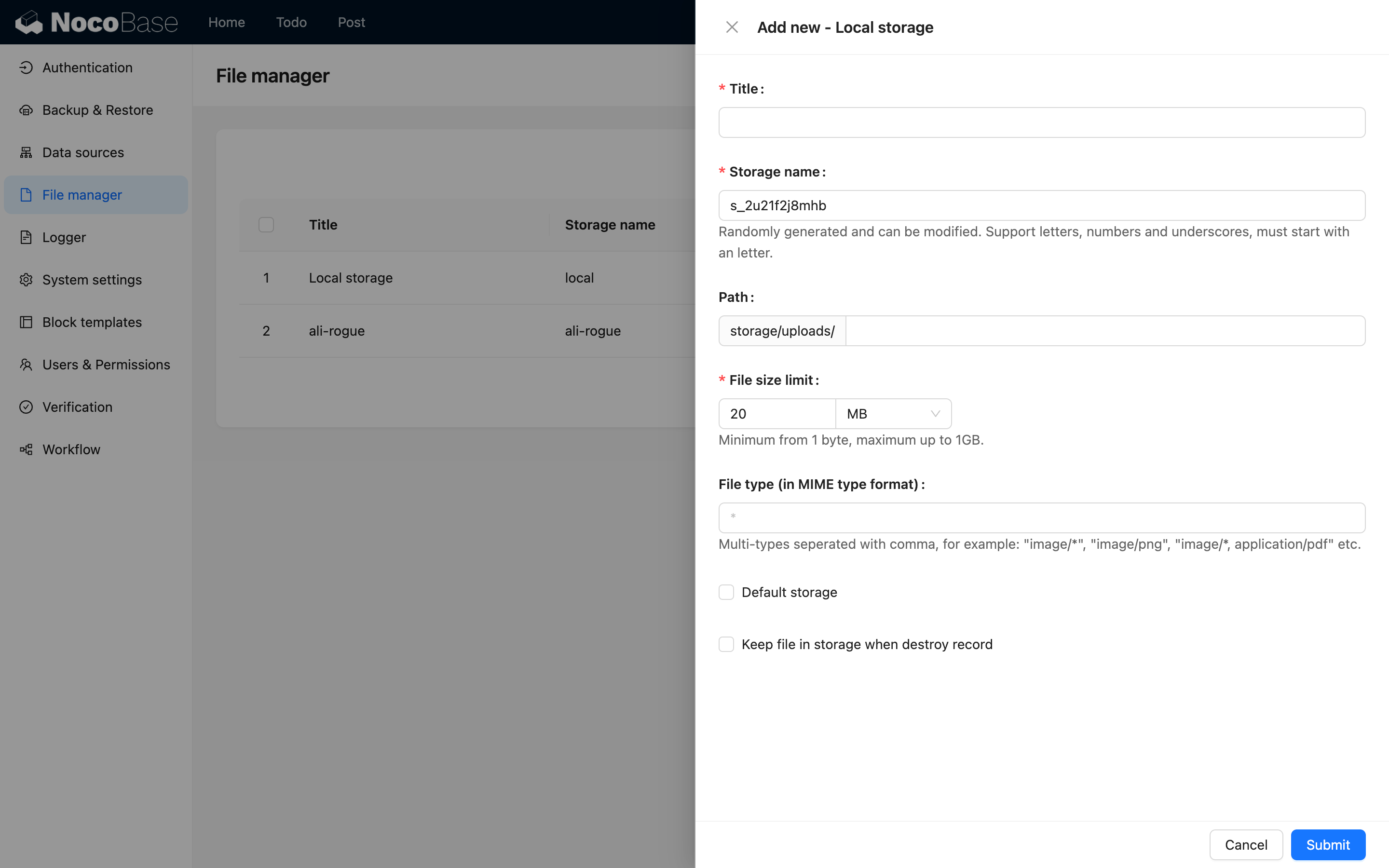
Title
The name of the storage engine, for human identification.
System Name
The system name of the storage engine, used for system identification. It must be unique within the system. If left blank, the system will automatically generate a random one.
Public URL prefix
The prefix part of the publicly accessible URL for the file. It can be the base URL of a CDN, such as: "https://cdn.nocobase.com/app" (no trailing "/").
Path
The relative path used when storing files. This part will also be automatically appended to the final URL during access. For example: "user/avatar" (no leading or trailing "/").
File size limit
The size limit for files uploaded to this storage engine. Files exceeding this size cannot be uploaded. The system default limit is 20MB, and it can be adjusted up to a maximum of 1GB.
File types
You can restrict the types of files that can be uploaded, using the MIME syntax. For example: image/* represents image files. Multiple types can be separated by commas, such as: image/*, application/pdf which allows image and PDF files.
Default storage engine
When checked, this is set as the system's default storage engine. When an attachment field or file collection does not specify a storage engine, uploaded files will be saved to the default storage engine. The default storage engine cannot be deleted.
Keep file when record is deleted
When checked, the uploaded file in the storage engine will be kept even when the data record in the attachment or file collection is deleted. By default, this is not checked, meaning the file in the storage engine will be deleted along with the record.
When Original URL is selected, the final storage address is constructed from several parts:
For example: https://cdn.nocobase.com/app/user/avatar/20240529115151.png.
When NocoBase URL is selected, the file record returns a NocoBase path in the /files/... format. The configuration above is still used when accessing the storage service.
File URLs and access control
A storage engine can return either a NocoBase URL or the storage service's original URL. NocoBase URL is the default. Select Original URL only when an external service must use the storage address directly.
This configuration applies per storage engine. After it is saved, both existing files and newly uploaded files under that engine return URLs in the selected form. Files are not moved or uploaded again.
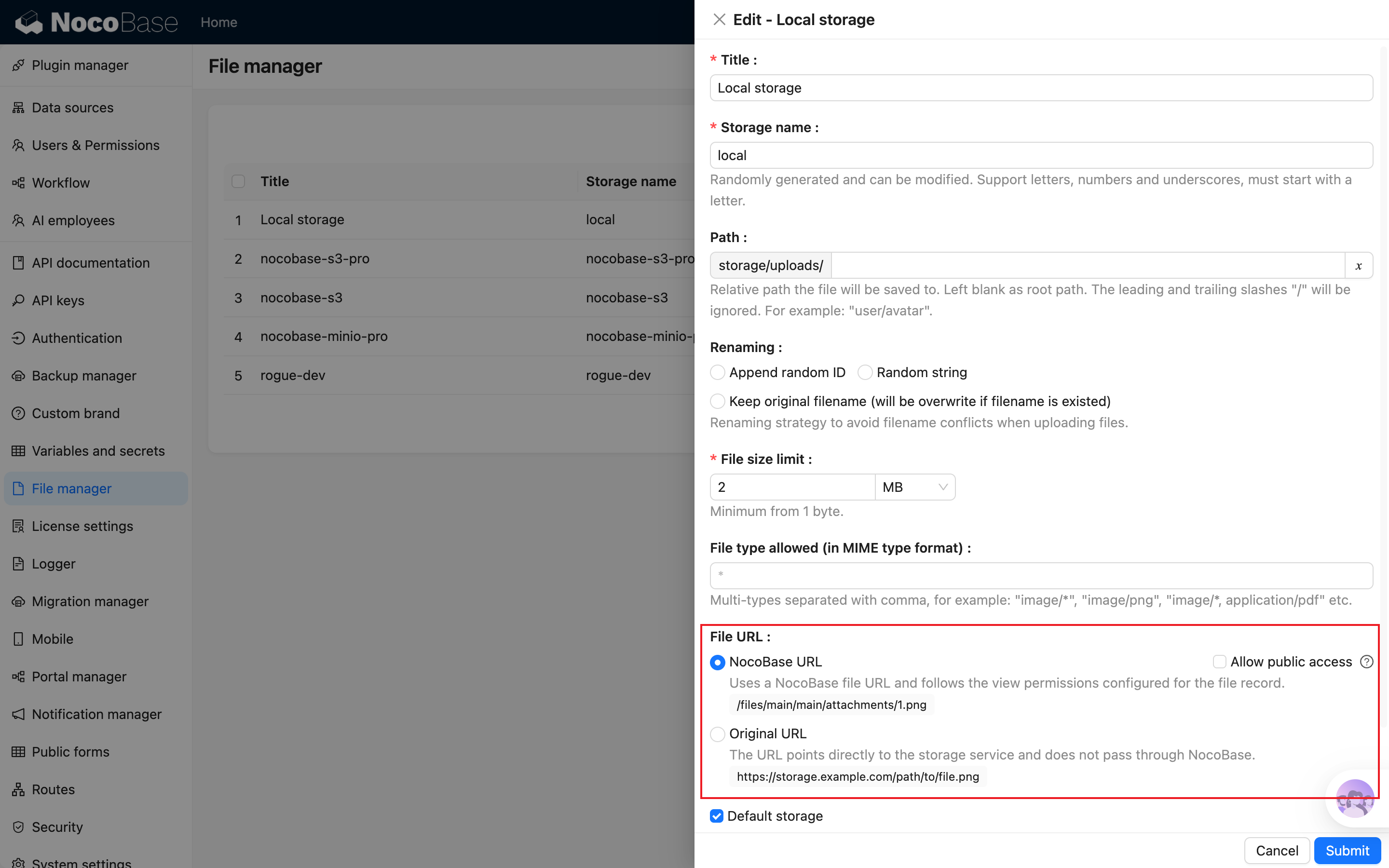
NocoBase URL
The file record returns an access path provided by NocoBase, for example:
Requests to this URL first pass through NocoBase and follow the view permissions configured for the corresponding file record. NocoBase reads the file or redirects to the address generated by the storage service only after the permission check succeeds.
This is the recommended default. The file record returns a NocoBase path, so callers do not need to know whether local or cloud storage is being used.
Original URL
The file record directly returns the address generated by the storage service, for example:
This URL does not check the file record's view permissions. For local storage, it is usually a legacy /storage/uploads/ URL, which requires sign-in by default but does not check the individual file record again. For cloud storage, it is usually an object storage or CDN address whose access policy is controlled by that storage service.
Select Original URL only when the caller cannot use a NocoBase URL—for example, when it cannot follow 302 redirects or explicitly requires an object storage or CDN address.
After Original URL is selected, anyone with a valid URL can bypass NocoBase file-record permissions. For local storage, the legacy URL is still subject to the /storage/uploads/ login check; exposing the upload directory directly through custom Nginx may bypass that check. For cloud storage, if the URL has no signature or expiration, make sure the bucket and file allow public read access.
Allow public access
Allow public access only takes effect when NocoBase URL is selected. When checked, the storage engine still returns a NocoBase URL, but NocoBase no longer checks the file record's permissions when the URL is accessed. Anyone with the URL can access the file.
This option does not change the storage service's own public-read configuration. It only controls whether NocoBase checks file record permissions.
Markdown, external pages, and third-party services can also use a public NocoBase URL. For external use, convert the path returned by the API into an absolute URL that includes the NocoBase domain, and make sure the caller can follow 302 redirects.
A local-storage NocoBase URL eventually redirects to /storage/uploads/. Selecting Allow public access skips file-record permissions at the /files/ stage, but the legacy URL still requires sign-in by default. To make local files anonymously readable, also set LEGACY_LOCAL_STORAGE_PUBLIC_ACCESS=true and restart the application. This environment variable exposes the entire legacy /storage/uploads/ path, not only the storage where Allow public access was selected, so assess all existing files before enabling it.
When using custom Nginx, configure auth_request for /storage/uploads/ as well. See Nginx Reverse Proxy for the complete configuration.
How to choose
Local Storage, Amazon S3, Aliyun OSS, and Tencent COS do not generate temporary signed URLs. Even when NocoBase URL and file-record permissions are enabled, someone who has obtained the storage service's original address can bypass file-record permissions. Legacy local-storage URLs still require sign-in by default; access to an original cloud-storage URL depends on that service's public-read configuration.
For contracts, identity documents, internal materials, or other files that should not be public, use S3 Pro and refer to its dedicated access-control configuration.
If you are already using a public storage engine and want to migrate existing files to S3 Pro, see Migrate to S3 Pro.