
In the Customer Access example, sales representatives maintain their own customers and change the customer associated with their orders. Read-only sales users can only view records. The app uses real authentication, authorization and database storage, with the default template's shadcn components and user/role administration. See Example source and setup for the complete app.
Responsibilities of authentication, operation permissions and data scopes
Authentication identifies the caller. Operation permissions decide whether they may perform a business action. Data policies determine which records and fields that action can access.
| Check | Integration in this example | Denied result |
|---|---|---|
| Authentication | required() from authenticationToken | Unauthenticated requests receive 401 |
| Operation permission | authorize() on the request authorization context | Missing action permission returns 403 |
| Record and field access | Bind the decision's RepositoryPolicy to the Repository | Out-of-scope records are inaccessible; undeclared fields cannot be read or written |
Page permissions and button visibility help users find available features. Endpoints must independently enforce these checks; hiding a button does not prevent a direct request.
Authenticate endpoints
Require sign-in and read the current user
The default template already registers authentication. Resolve authenticationToken in an application route, mount auth.required() on its business paths, and read the verified session through c.get('auth'). When creating a customer, this example sets ownerId from the session instead of accepting an owner supplied by the client.
import { authenticationToken } from '@nocobase/app-plugin-authentication';

const auth = app.container.resolve(authenticationToken);
// Inside a request handler after required():
const ownerId = c.get('auth')!.user.id;
An anonymous GET /api/customers receives 401. A signed-in caller still needs permission to view customers. The example uses the standard login page and session rather than issuing its own tokens. Sign-in methods and session configuration belong in server/config/auth.ts, separate from business endpoints.
Source: Business routes, authentication configuration.
Mount authentication and authorization middleware
The route factory receives the application instance. After authentication, authz.middleware() creates an authorization context for this request. AuthEnv & AuthorizationEnv types Hono's context variables.
import { Hono } from 'hono';
import type { AuthEnv } from '@nocobase/app-plugin-authentication';
import {
  authorizationToken,
  type AuthorizationEnv,
} from '@nocobase/app-plugin-authorization/server';

const router = new Hono<AuthEnv & AuthorizationEnv>();
const authz = app.container.resolve(authorizationToken);
for (const path of ['/customers', '/customers/*', '/orders', '/orders/*']) {
  router.use(path, auth.required(), authz.middleware());
}
This excerpt shows authentication setup; the full routes also limit body size, validate input and declare API documentation. Middleware covers only this module's paths, leaving other endpoints such as sign-in unaffected. Create a context per request; do not retain a user or decision in module state. The security property in describeRoute() describes an endpoint but does not authenticate it.
Source: Routes and registration. See HTTP routes and APIs for route types and registration.
Declare business operations
Define database capabilities and field access
defineDatabasePermission() declares the database capabilities an action needs. defineCompositeResource() combines them into business operations that can be granted to users. Defining these objects neither registers them nor grants access.
import { defineDatabasePermission } from '@nocobase/app-plugin-authorization/server';
import { defineCompositeResource } from '@nocobase/authorization/core';

const customers = defineDatabasePermission((p) =>
  p.collection('accessCustomers')
    .read(['id', 'name', 'email', 'notes', 'ownerId']),
);

// Excerpt from accessResource, omitting titles and other actions.
const resource = defineCompositeResource('customerAccess', (r) =>
  r.action('editCustomer', (a) =>
    a.grant('customers', customers.update(['name', 'email', 'notes'])),
  ),
);
read() limits output fields; create() and update() limit input fields. The read declaration excludes internalNote, and the update declaration excludes ownerId. A sales user cannot read the internal note or change ownership by modifying a request.
Developers define field capabilities. Administrators select business operations and record scopes in the permission editor rather than editing arbitrary database fields. The app also declares viewCustomers, createCustomer, viewOrders and assignCustomer as independently assignable actions.
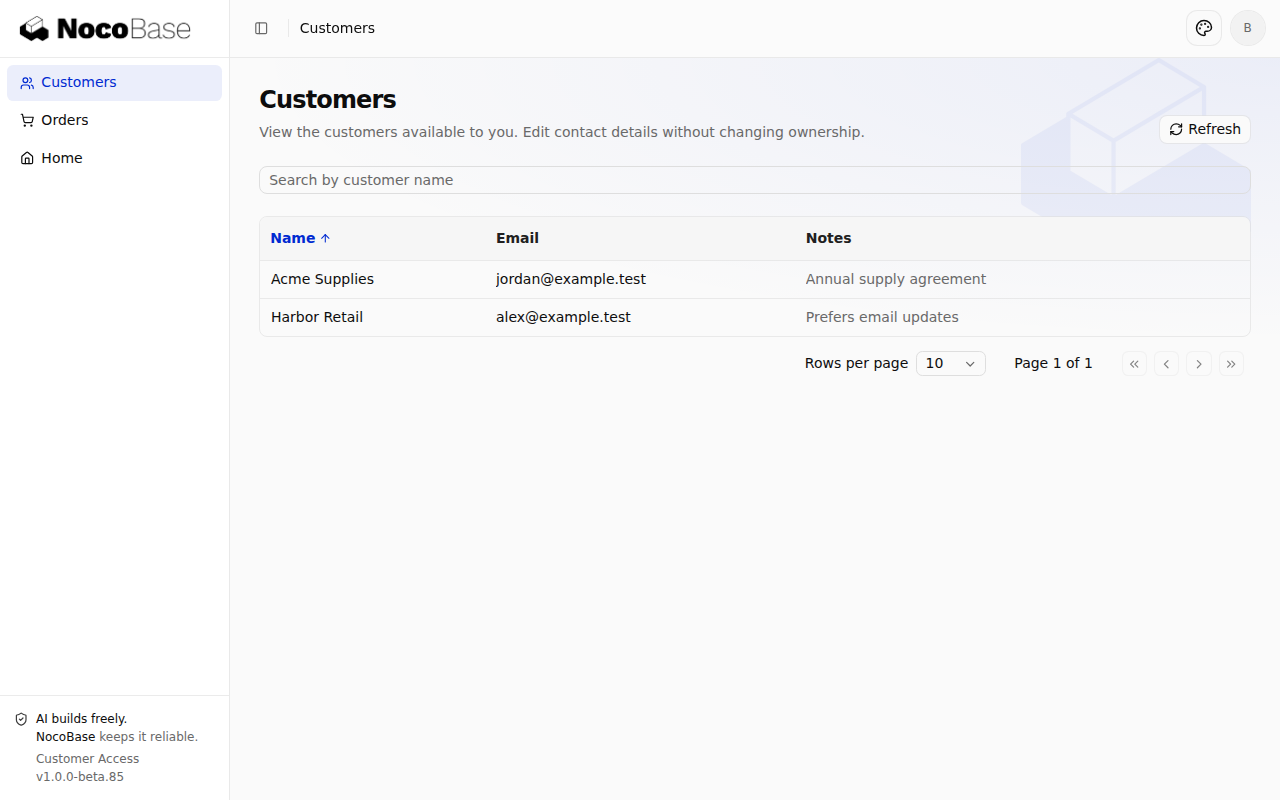
Source: Complete permission declarations. Sign in as a read-only sales user: Customers shows the list without create or edit controls.
Combine permissions across collections
Changing an order's customer requires access to both the editable order and the selectable customer. assignCustomer declares both capabilities in one operation:
const orders = defineDatabasePermission((p) =>
  p.collection('accessOrders').read(['id', 'number', 'customerId', 'ownerId']),
);

// Within the same customerAccess resource:
.action('assignCustomer', (a) =>
  a.grant('orders', orders.update(['customerId']))
    .grant('customers', customers),
)
orders and customers are the scope keys used in role configuration. The resulting conditions.database policies are keyed by collection name: accessOrders and accessCustomers. Do not confuse these names, or substitute a viewCustomers decision for the customer scope of assignCustomer.
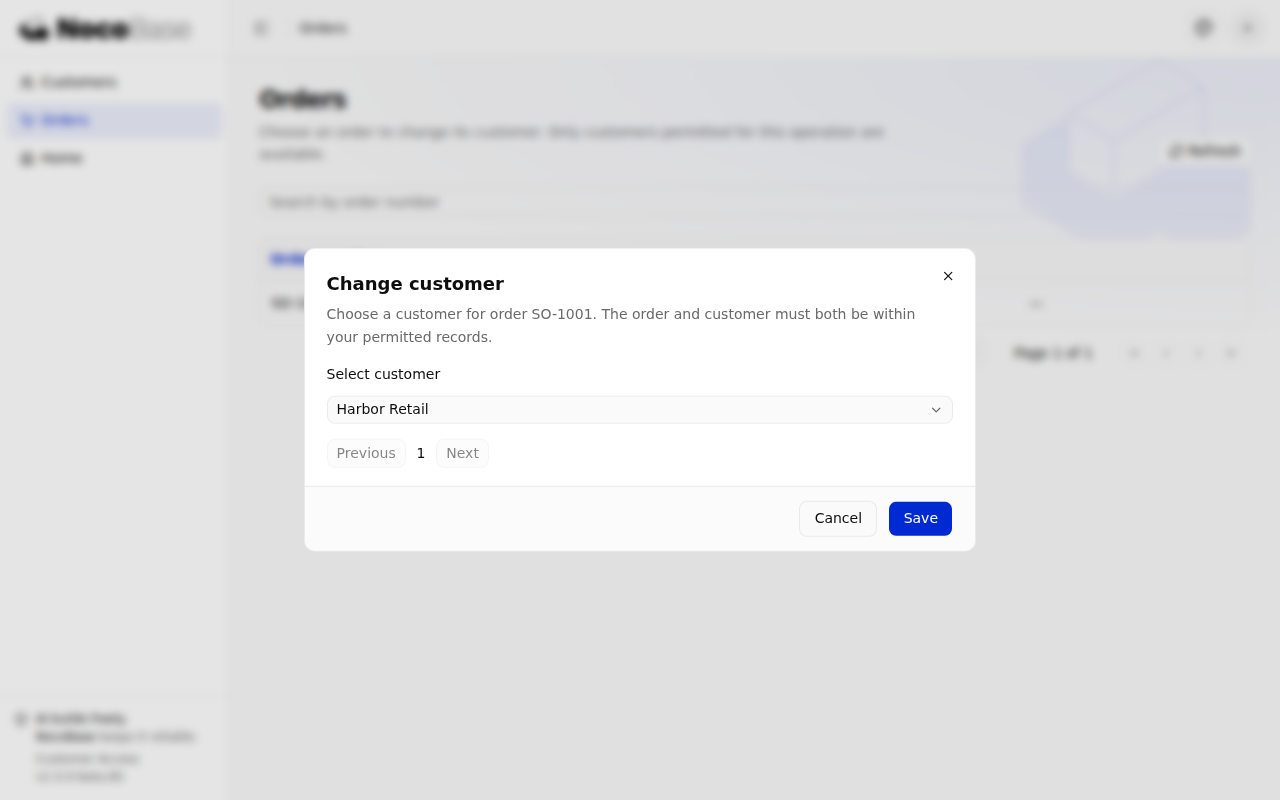
Choose Change customer from an order's row menu. Its paginated options come from /api/orders/customerOptions, protected by assignCustomer, rather than from the ordinary customer list.
Source: Permission declarations, customer selection page.
Register operations and the permission editor entry
Register collections, the resource and its workspace section in the provider's boot(), then add the provider to server/providers/index.ts. CustomerAccessProvider also registers the business service and the owned-records strategy.
const authz = this.app.container.resolve(authorizationToken);
authz.database.collections.add({ name: 'accessCustomers', title: title('customers') });
authz.database.collections.add({ name: 'accessOrders', title: title('orders') });
const resource = authz.compositeResources.define(accessResource);
authz.ui.sections.add({
  name: 'customer-access', title: title('title'), parent: 'business',
});
authz.ui.place(resource, { section: 'customer-access' });
title() is an application-owned translation helper. Collections must be registered explicitly: having a database table does not enroll it in authorization.
Select these operations in the business array of client/pages/settings/permission-workspace.ts:
{
  type: 'composite',
  id: 'customerAccess',
  actions: ['viewCustomers', 'createCustomer', 'editCustomer', 'viewOrders', 'assignCustomer'],
  scopeTitles: {
    accessCustomers: { key: 'access.customers' },
    accessOrders: { key: 'access.orders' },
  },
  hiddenActionScopes: { createCustomer: ['customers'] },
}
The endpoint controls creation fields and ownership, so the editor omits a meaningless range selector for new records. hiddenActionScopes changes presentation only, not stored grants. Register the template's prepared settingsRoutes in client/routes.ts to make user and role administration accessible.
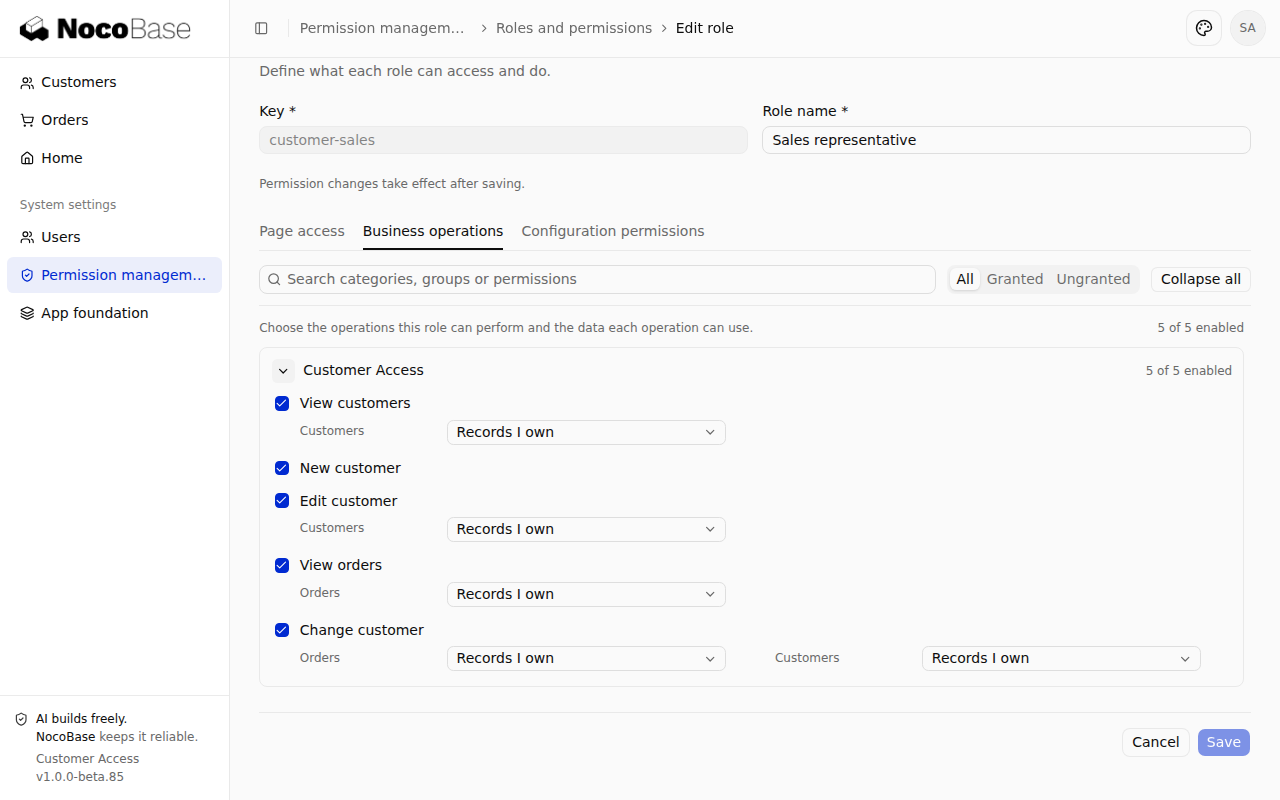
Source: Provider, permission editor configuration, page registration. The role editor should show five Customer Access actions, with separate order and customer scopes under Change customer.
Check operation permissions in endpoints
Obtain an authorization decision
Use the request's authz context to check the specific business operation:
const decision = await c.get('authz').authorize({
  resource: { type: 'composite', id: 'customerAccess' },
  action: 'assignCustomer',
});
const database = decision.conditions?.database;
authorize() returns a complete decision: permit, deny, or conditional with conditions. A conditional decision must be enforced through its database policies. Being signed in, or receiving a decision other than deny, is insufficient by itself. can() checks feature availability; it does not supply the policies needed for database access.
Source: authorizeAccess(). A user with only customer-view permission receives 403 when directly requesting an assignment change.
Reject denied decisions and missing policies
The example's authorizeAccess() checks the collections required by the action. For assignment, the check is equivalent to:
if (
  decision.effect === 'deny' ||
  !database?.accessOrders?.read ||
  !database?.accessCustomers?.read
) {
  throw new ApiError({
    status: 'PERMISSION_DENIED',
    reason: 'CUSTOMER_ACCESS_DENIED',
    domain: 'customer-access',
    message: 'This operation is not allowed.',
  });
}
Import ApiError from @nocobase/app-server/router. After this check, pass the order and customer policies separately to the service. Repository continues to enforce the actual read/write capabilities and scopes. Never fall back to an unscoped query or all records when a policy is missing.
These routes check operation permission before input validation. Writes also integrate the template's idempotent submission mechanism. Every new request, including a replay after revocation, must pass current authorization. See the complete routes and Request validation and error handling.
Apply policies to database access
Scope query results and totals
The example defines an owned-records strategy with defineRecordAccess(). It compares ownerId against the verified principal:
import { defineRecordAccess } from '@nocobase/authorization/core';
import { buildFilter } from '@nocobase/repository-input';

const ownedRecords = defineRecordAccess('customerAccess.owned', (r) =>
  r.title(title('owned'))
    .collections('accessCustomers', 'accessOrders')
    .resolver(({ principal }) =>
      principal.type === 'user'
        ? buildFilter((f) => f.string('ownerId').eq(principal.id))
        : false,
    ),
);
// Register in Provider.boot():
authz.recordAccess.define(ownedRecords);
When a role selects this strategy, authorization translates it into a Repository policy. Bind the same policy to list and count queries, with the same search filter:
const repository = connection.repository('accessCustomers').withPolicy(policy);
const filter = (f) => f.string('name').includes(q, { mode: 'insensitive' });
const data = await repository.findMany({ filter, limit: pageSize, offset: (page - 1) * pageSize });
const total = await repository.count({ filter });
Types and sorting are omitted here; see the list service and record-access declaration. With separate records for Alice and Bob, each sees only their own customers, and totals exclude the other user's records. Do not fetch all records and filter them in the browser.
Restrict fields on create and update
The create endpoint accepts only name, email and notes. The service generates an ID and sets ownerId from the authenticated user:
const result = await transaction.repository('accessCustomers')
  .withPolicy(policy)
  .createOne({ values: { ...values, id: randomUUID(), ownerId } });
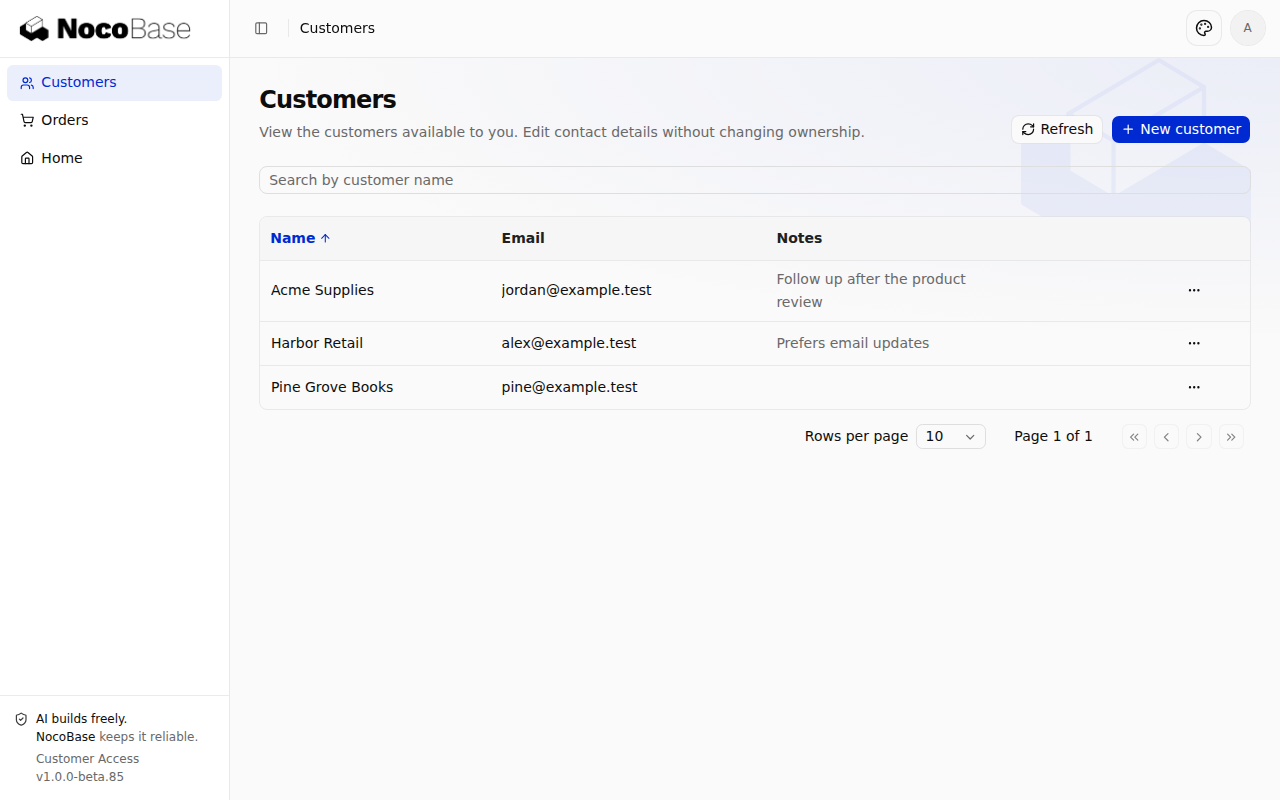
Choose New customer in Customers, enter a name and email, and save. The new record should appear in the current user's list.
Updates apply the policy to both the lookup and write:
await this.get(policy, id, transaction);
const result = await transaction.repository('accessCustomers')
  .withPolicy(policy)
  .updateOne({ filter: { id }, values: { ...values } });
values is validated business input. The strict input schema rejects extra fields such as ownerId and internalNote; Repository independently restricts writable fields. The browser does not need the internal note to decide whether to hide it.
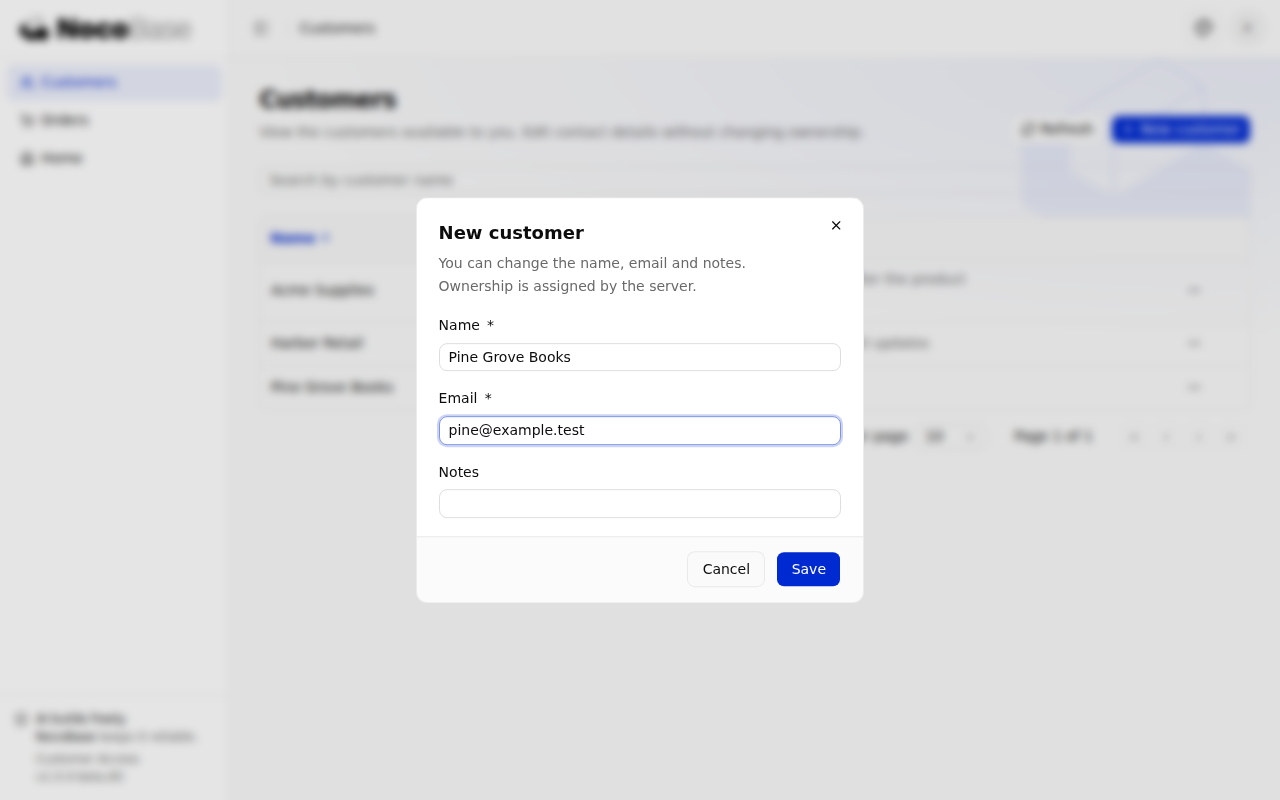
Choose Edit customer, change the notes and save. Reloading should preserve the change. The form fetches the current record through the editCustomer action instead of treating old list data as proof of edit access.
Source: Create and update service, customer form.
Check access to associated records
The assignment service checks the order and target customer in the same transaction before writing customerId:
const orders = transaction.repository('accessOrders').withPolicy(policies.orders);
await this.getOrder(policies.orders, id, transaction);
const customer = await transaction.repository('accessCustomers')
  .withPolicy(policies.customers)
  .findOne({ filter: { id: customerId } });
if (!customer) {
  throw new ApiError({
    status: 'INVALID_ARGUMENT', reason: 'CUSTOMER_UNAVAILABLE',
    domain: 'customer-access', message: 'The selected customer is unavailable.',
  });
}
await orders.updateOne({ filter: { id }, values: { customerId } });
This example changes the association ID through a protected business operation; it exposes no generic order-write endpoint. The route's executeIdempotentMutation() supplies the transaction, and all service reads and writes use that connection. Bind the policy again whenever you obtain a Repository: a transaction does not inherit an external Repository's policy.
A missing or inaccessible order returns the same 404. A missing or unselectable customer returns the same 400 CUSTOMER_UNAVAILABLE, preserving the previous association. The options list helps users choose; the server checks the target again when saving.
Source: Assignment service, transaction integration. See Server-side services for service reuse and transactions across collections.
Configure roles and page access
Assign operations and record scopes
First-time initialization creates two editable roles. Sales representative includes all five operations; Read-only sales includes customer and order viewing only. Both initially use Records I own. Neither is automatically assigned to ordinary users.
As an administrator, open System settings → Permission management → Roles and permissions, edit the role's business actions and scopes, then assign it to specific people through Users. Check both order and customer scopes for Change customer. Do not add these grants to the member role inherited by all signed-in users.
Initialization uses definePermissionSet() with the shared resource declaration. For example, a customer-view grant selects its scope as follows:
import { definePermissionSet } from '@nocobase/authorization/permission-sets';
import { selection } from '@nocobase/authorization/core';

const role = definePermissionSet('customer-reader')
  .title(title('reader'))
  .grant(accessResource.reference().grant({
    viewCustomers: { customers: selection.recordAccess('customerAccess.owned') },
  }))
  .build();
This is a declaration excerpt. The role seed includes page access, other operations and persistence. It initializes configuration once; restarting does not overwrite administrator changes. Editing the seed does not update roles in an existing database.
Separate page access from endpoint access
The customer route declares its own page permission; child routes inherit it:
{
  name: 'accessCustomers',
  path: '/customers',
  auth: 'required',
  authz: { resource: { type: 'page', id: 'customerAccess.customers' }, action: 'access' },
  componentLoader: () => import('./pages/access/list.js'),
}
Buttons use useCan() to check the business action and remain unavailable while the check is pending or failed:
import { useCan } from '@nocobase/app-plugin-authorization/client';

const { can } = useCan({
  resource: { type: 'composite', id: 'customerAccess' },
  action: 'createCustomer',
});
Page access alone leaves the API returning 403. An action grant alone allows scoped API access but does not open the page. Multiple grant sources can contribute to access: unchecking an action in one role does not revoke grants from another role.
Source: Page registration, list controls. See Pages, routes and navigation for client routing.
Verify with ordinary users
Test anonymous, denied and out-of-scope requests
Use ordinary accounts so unrestricted administrator access cannot conceal mistakes. Prepare separate customers and orders for Alice and Bob. Assign Sales representative to Alice and Read-only sales to Bob.
| Operation | Expected result |
|---|---|
| Anonymous customer API request | 401 |
| No business role, or page permission only | Customer API returns 403 |
| Read-only user lists records | Only their own records and matching totals |
| Read-only user directly requests create, edit or reassignment | 403 |
| Sales user reads or edits another user's customer | The same 404 as a nonexistent record |
The endpoint tests use real login, authorization and an isolated SQLite database. A separate isolated check verifies rejection when a decision lacks required policies.
Test field limits, reassignment and revocation
- Customer responses must not include
internalNote. SupplyingownerIdorinternalNotemust fail without changing the stored values. - Assigning an allowed customer must succeed and remain visible on a subsequent read. A hidden or nonexistent target must produce the same error and preserve the association.
- Clear the assignment action's order and customer scopes independently. Access to one collection must not compensate for the other.
- Revoke an action and send another request. Neither an old session nor an idempotent retry may retain revoked access.
See the example README for endpoint and browser test commands.
Example source and setup
The complete Customer Access app uses default template 1.0.0-beta.85, Node.js 24 and pnpm 11.7.0. Its lockfile fixes dependencies, including authentication 2.0.0-beta.16, authorization 1.0.0-beta.33 and database 1.0.0-beta.24.
git clone https://github.com/nocobase/docs-examples-v3.git
cd docs-examples-v3
git checkout 5c9b1dcae021f4e4ae94416e783e3e84a71a1781
cd apps/customer-access
pnpm install --frozen-lockfile
pnpm nocobase config init --dialect sqlite
pnpm nocobase config check
pnpm dev
Before first startup, configure the administrator under users.initialAdmin in local config.yml. SQLite keeps this example self-contained; it is not a requirement of authentication or authorization. Other database engines were not verified for this app. Open the complete application URL printed at startup, including its mount path.
After an administrator creates an ordinary user and assigns a role through Users, add fictional records for that user from the application directory:
pnpm nocobase app sample-customers --email alice@example.test --dry-run
pnpm nocobase app sample-customers --email alice@example.test
Replace the email with that of an existing user. The command adds customers and an order only: it creates no accounts or role assignments. Records persist, and rerunning does not duplicate the named sample records. Run it for a second user to compare their access scopes.
See the README for configuration, the usage-to-source map, test commands and the verified scope.