
A workflow uses a state machine to define the states of a business record, the allowed transitions and the conditions that trigger them. It suits long-running business processes that span multiple requests and involve human actions, automated processing or external systems. For example, an order can wait for a customer to pay, receive a payment callback and then wait for someone to confirm shipment. While waiting, only the current state needs to be stored; no task needs to keep running. @nocobase/lifecycle declares these rules in code, while the application supplies storage, APIs and pages.
The example is Order payment: a user starts payment, the system opens a checkout and waits for the payment callback. Paid orders can be shipped or refunded. Unpaid orders close after a timeout, and payments arriving after cancellation are refunded. For multi-stage approvals, countersigning or added reviewers, see the Approval plugin.
States and transitions
A state represents the record's current stage. A transition is a named change, such as starting payment, cancelling or shipping. The order's status is the workflow state, without a separate process-instance state. Transition history records the actor, time and state change; effect records preserve post-commit execution outcomes.
Use defineLifecycle() to declare the initial state, allowed transitions and final states. This excerpt from server/lifecycles/order.ts omits parameter configuration and uses orderTransitions and orderTriggers to stand for its transitions and timeout rules. OrderTypes and orderProblems are the example's types and creation validator.
export const orderLifecycle = defineLifecycle<OrderTypes>({
  name: 'orders',
  collection: LIFECYCLE_EXAMPLE_COLLECTIONS.orders,
  initial: 'draft',
  create: { validate: orderProblems },
  states: [
    'draft', 'creatingCheckout', 'awaitingPayment', 'paymentFailed',
    'paid', 'cancelled', 'refunding', 'refundNeedsAttention',
    { name: 'fulfilled', final: true },
    { name: 'refunded', final: true },
  ],
  parameters: { paymentWindowMinutes: 3 },
  transitions: orderTransitions,
  onEnter: { creatingCheckout: [createCheckout], refunding: [refund] },
  triggers: orderTriggers,
});
Starting payment moves an order from draft through opening checkout to awaiting payment. A payment callback marks it paid, after which it can be shipped or refunded. fulfilled (Shipped) and refunded are final states. cancelled is not final: a payment arriving after cancellation starts a refund.
Create records with runtime.create('orders', values, { actor }), letting the runtime write the initial state and $create history entry. actor comes from the server's verified identity, and values contains only permitted business fields. Subsequent state changes go through transitions, not generic update endpoints.
Actions, conditions and branches
Actions map to named transitions. from and to constrain their source and destination. set updates business fields in the same transaction, and accept saves allowed inputs. These two entries start payment and record successful checkout creation:
checkout: {
  from: ['draft', 'paymentFailed'],
  to: 'creatingCheckout',
  set: ({ record }) => ({
    paymentAttempt: record.paymentAttempt + 1,
    paymentSessionId: null,
    checkoutUrl: null,
    lastError: null,
  }),
},
checkoutCreated: {
  manual: false,
  from: 'creatingCheckout',
  to: 'awaitingPayment',
  accept: ['paymentSessionId', 'checkoutUrl'],
},
Clicking Pay fires checkout, increments the payment round and clears the previous checkout details. After the effect succeeds, checkoutCreated saves the session and URL. On creation, create.validate checks the customer, order name and positive amount. The general guard, transition validate and route APIs support conditions, input checks and destination selection; this example expresses branches through separate transitions for payment outcomes and current states.
A declined payment enters paymentFailed, where the user can start payment again. A successful payment enters paid, offering ship or refundOrder. Failed refunds enter refundNeedsAttention; retryRefund starts refunding again.
cancel allows cancellation from draft, awaitingPayment and paymentFailed, and schedules checkout closure. Payment callbacks and effect outcomes use transitions marked manual: false. Human action endpoints pass manual: true so users cannot directly select payment success. API authorization still checks roles and record scopes.
Application integration and access control
Prepare tables for orders, transition history and effect runs. Alongside business fields, orders store status, statusChangedAt and lifecycleVersion for state, waiting deadlines and concurrency checks. The package does not run migrations automatically. Follow the version's storage requirements for fields and indexes; see Data models and migrations for application integration.
A Provider assembles the shared runtime, store and executors; workflow rules stay in the definition. Here, database and executors come from the application's databaseManagerToken and jobExecutorServiceToken. flowServices implements the example's FlowServices, including the payment sandbox and simulated failures:
import {
  LifecycleRuntime,
  createRepositoryLifecycleStore,
} from '@nocobase/lifecycle';
import { createLifecycleJobs } from '@nocobase/lifecycle/jobs';

const jobs = createLifecycleJobs({
  jobs: executors.getJobExecutor('app/orders'),
  schedule: executors.getScheduleExecutor('app/orders'),
  jobName: 'app/orders/effect',
  sweepEveryMs: 5_000,
});

const runtime = new LifecycleRuntime({
  store: createRepositoryLifecycleStore(database),
  dispatcher: jobs,
});
runtime.register(orderLifecycle, { services: flowServices });
Register the runtime in the container through a service Token and append the Provider to server/providers/index.ts. Call jobs.start(runtime) in start() and jobs.shutdown() in shutdown(). Routes reuse that runtime. See Server-side services for registration and Background jobs and scheduled execution for backends and multiple instances.
A transition writes record changes, history and queued work in one transaction; external calls run after commit. If guards need other tables, obtain connections through a services factory bound to the current transaction. See Transactions and data consistency.
The application provides creation, read and action endpoints. Authenticate, authorize and validate input before calling the runtime:
const result = await runtime.fire('orders', orderId, body.transition, {
  actor: { id: String(signedInUserId) },
  manual: true,
  input: body.input,
  requestId: body.requestId,
  expect: { version: body.expectVersion },
});

const view = await runtime.view('orders', orderId, {
  id: String(signedInUserId),
});
return c.json({ data: { ...view, replayed: result.replayed === true } });
body is validated input and the user ID comes from a trusted session. Check record scopes, authorize reads, transitions and recovery separately, and verify that a run belongs to the order before operating on it. The store does not inherit request policies. See Authentication, permissions and data scopes and Request validation and error handling.
Reuse requestId when resending the same action after a network problem; changed input or a new decision needs a new identifier. Replaying a successful action creates no additional transition. Pass the displayed version as expectVersion; stale actions receive CONFLICT and require a refresh and a new decision. Request identifiers deduplicate actions; versions prevent old decisions from overwriting newer progress.
Effects, waiting and recovery
An effect is work performed after a transition commits. Entering creatingCheckout opens a checkout. Success fires checkoutCreated to await payment; exhausted retries fire checkoutFailed to enter paymentFailed.
import { defineEffect } from '@nocobase/lifecycle';

const createCheckout = defineEffect<OrderTypes>({
  name: 'orders.createCheckout',
  retry: { attempts: 3, backoffMs: 2_000, factor: 2, maxMs: 10_000 },
  timeoutMs: 10_000,
  onSuccess: 'checkoutCreated',
  onFailure: 'checkoutFailed',
  async run({ record, services }) {
    if (services.shouldFail(`order-checkout:${record.id}`, record.failCheckouts)) {
      throw new Error('The payment provider is unavailable (simulated).');
    }
    const session = await services.sandbox.createCheckout({
      idempotencyKey: `order-checkout:${record.id}:${record.paymentAttempt}`,
      orderId: String(record.id),
      amountCents: record.amountCents,
    });
    return { paymentSessionId: session.sessionId, checkoutUrl: session.url };
  },
});
services.sandbox.createCheckout is the example's payment sandbox API, not a real payment call. failCheckouts controls simulated failures. Retries within one payment round reuse an idempotency key; a user starting payment again increments paymentAttempt and opens a new session. attempts: 3 includes the first attempt.
Waiting for an external result only requires stored state, not a continuously running job. Opening checkout does not mean an order is paid; the provider's callback confirms payment. This call advances an order that has not been cancelled, after the receiver verifies the callback:
import { SYSTEM_ACTOR } from '@nocobase/lifecycle';

// After verifying the payment callback, for an order still awaiting payment.
await runtime.fire('orders', orderId, 'paymentSucceeded', {
  actor: SYSTEM_ACTOR,
  input: { paymentRef },
  requestId: `payments:${eventId}`,
});
SYSTEM_ACTOR does not verify the sender; the receiver first checks the signature and event format. Redeliveries use the same event identifier. paymentSucceeded accepts both creatingCheckout and awaitingPayment, handling payment that arrives before the checkout result is recorded. For a cancelled order, the receiver instead uses paidAfterCancel to start a refund. Database errors and conflicts still require redelivery.
Waiting deadlines use triggers. The example defaults to three minutes. This orderTriggers entry fires expire after an order has stayed in awaitingPayment or paymentFailed for the configured period, moving it to cancelled:
expireUnpaid: {
  transition: 'expire',
  when: ['awaitingPayment', 'paymentFailed'],
  after: ({ paymentWindowMinutes }) => paymentWindowMinutes * 60_000,
},
The sweep interval should be shorter than the waiting period; overdue records are discovered during a check. expire records the timeout reason and schedules checkout closure. If payment has already happened but its callback arrives late, paidAfterCancel starts a refund.
Recovery depends on whether external work has already completed:
| Situation | Handling |
|---|---|
| Transient checkout creation error | Retry by policy, reusing the payment round's idempotency key |
| Checkout retries exhausted | Enter paymentFailed; the user can click Pay again |
| Refund retries exhausted | Enter refundNeedsAttention; Retry refund starts another run, deduplicated by order and payment reference |
| Other executions eligible for retry | Authorize runtime.retryRun(runId); do not force a retry by default after RUN_SETTLED |
| External processing succeeded but the next transition is blocked | Remove the blocker and call runtime.continueRun(runId) to apply the existing outcome without resending the request |
| Application restart or interrupted execution | The Jobs adapter and sweeps resume eligible work |
Persistent storage retains queued work and recorded results. Recovery may repeat an external call, so idempotency remains necessary. Keep lifecycle, effect and job names stable so new processes recognize existing work. Connect execution errors to logging and prune eligible records according to retention policy.
Progress and history
Reuse the application's shadcn components. The endpoint backed by runtime.view() supplies the record, version, candidate actions and history. On the client:
import { useApiClient } from '@nocobase/app-client';
import { createLifecycleHook } from '@nocobase/lifecycle/react';

export const useOrderLifecycle = createLifecycleHook({
  useTransport: useApiClient,
  basePath: 'lifecycleExample',
});

// Inside the order detail component:
const { view, busy, fire } = useOrderLifecycle('orders', orderId);
This configuration requires GET /lifecycleExample/orders/lifecycle, GET /lifecycleExample/orders/:id and POST /lifecycleExample/orders/:id/fire beneath the application's API prefix, with results wrapped in { data }. The Hook does not generate endpoints.
The server filters or annotates view.available using the user's permissions. The page uses allowed and blockers for buttons and explanations, and busy during submission. Pay calls fire('checkout'); Retry refund calls fire('retryRefund'). Show field errors beside inputs and prompt a refresh after version conflicts. The endpoint still authorizes the actual action.
Show the current stage, transition timeline and effect outcomes separately, including attempts, errors and pending continuations. The Hook polls by default to pick up external results. Workflow management in system settings can consolidate definitions and executions while restricting retries and continuation actions.
Reuse LifecycleDiagram from the template or UI Library with the definition, current state and actual history. The diagram is for inspection, not visual workflow design. Clicking it cannot bypass action endpoints to advance a record.
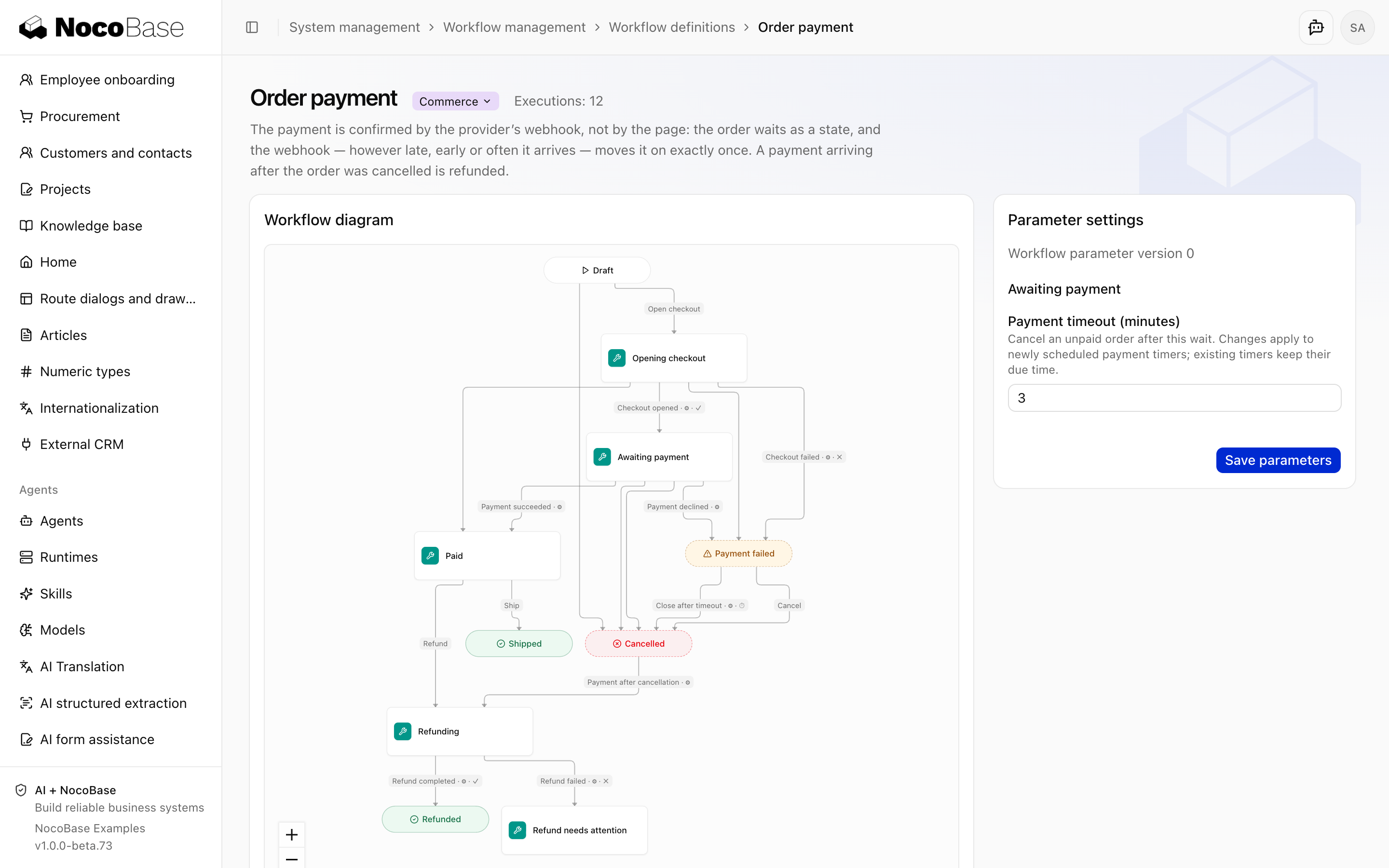
Example and verification
Open Order payment in the example project. Create an order and click Pay, then simulate payment or decline in Payment provider (sandbox). Demo options controls intentional checkout and refund failures. Hold the webhook pauses delivery; Deliver sends the event and Deliver again redelivers it.
| Action | Expected result |
|---|---|
| Start payment, pay in the sandbox, then click Ship | Awaiting payment → Paid → Shipped |
| Set checkout failures to 2, then start payment | The third attempt succeeds and the order awaits payment |
| Leave the order unpaid past its deadline | The order closes and becomes Cancelled |
| Hold the payment callback, cancel the order, then deliver it | Cancelled → Refunding → Refunded |
| Set refund failures to 3, pay, then request a refund | Refund needs attention; Retry refund can complete it |
| Redeliver the same payment callback | Replayed, without advancing the order again |
Payments, refunds and callbacks use the example sandbox, with no real funds involved. Authorization, concurrency, transaction rollback and restart recovery still require application integration tests. See Testing.
Implementation references: order definitions and effects, callback receiver, and recovery tests.