
Introduction
When you let an agent vibe-code a business system, the first version usually comes quickly, and then these problems show up:
- Permissions, workflows, approvals and other underlying capabilities have to be built from scratch, and they may not be reliable or may break easily.
- A new model, a new person or a new session brings a new way of writing code, and the architecture slowly gets out of control.
- With many issues running in parallel, people can't keep up with confirming the agents' messages and changes.
- Requirement context, business rules and lessons learned are scattered across sessions, and they are lost when people or agents change.
To address these problems, NocoBase 3 introduces NocoBase Core and NocoBase Studio. They let companies develop their own enterprise apps quickly in the age of AI agents while solving the problems above. Using IT asset management as the example, this tutorial shows how to build reliable enterprise apps with NocoBase 3.
Core: the open-source foundation for developing and running business systems with AI
Common capabilities don't have to be built and verified from scratch. More than 20 common capabilities, including users and permissions, data and files, workflows and approvals, messaging, and AI and agents, are ready to use, and NocoBase keeps maintaining and upgrading them. For the list of capabilities, see NocoBase Core.
One architecture and one set of conventions. A new app comes with a fixed layout, where pages, APIs, migrations and tests each have their place. AGENTS.md and the skills shipped with packages say where business code goes and which capabilities to use as they are. Whoever the person, model or session, the agent develops the same way. See Project structure.
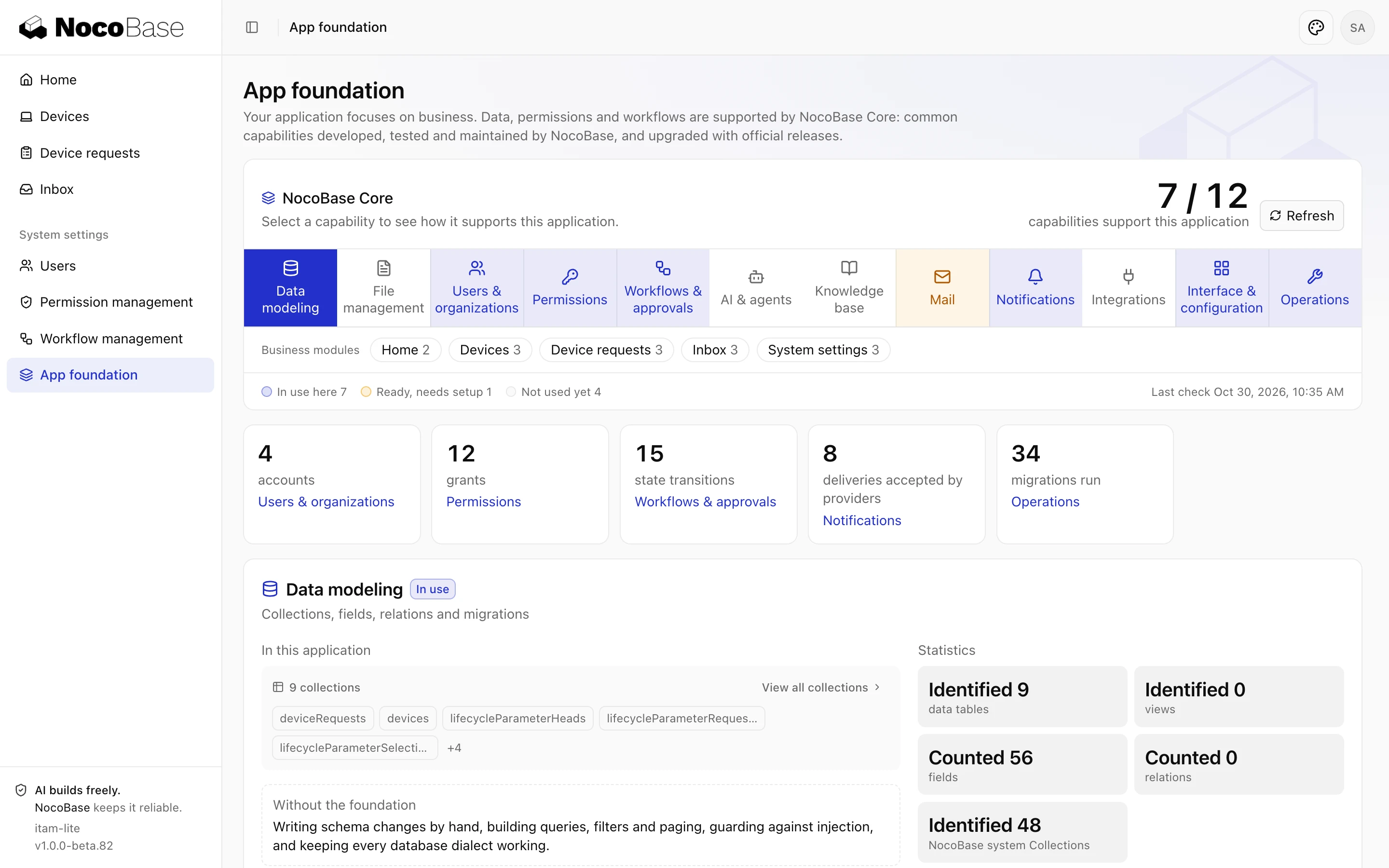
You can see which Core capabilities an app uses in System settings › App foundation. See App foundation.
Studio: the governance platform where people and agents develop together
The agent team moves work forward on its own. Claude Code, Codex and other coding tools join Studio as an agent team. The lead agent assigns design, development, testing and review by each agent's strengths, and several issues move forward at once, each on its own branch. For every issue you can see at a glance how far it has got, who is working on it and what comes next.
People make the key decisions. Work reaches a person only after it passes testing and review. People read the report, screenshots and preview, then accept it or send it back. Business experts who don't code can also raise requests, make decisions and accept results directly.
Methods and experience stay with the team. Skills hold how work gets done, the knowledge base holds business documents, and project memory holds what agents learn, so the next person or agent can pick up the work. See What is Studio.
Core alone is enough to develop and ship a complete app. Bring in Studio when your team runs several projects at once, or when business colleagues want to take part directly.
Studio is available only in the NocoBase Professional and Enterprise editions. See Pricing.
The tutorial's example: IT asset management
Called ITAM below. The company gives employees laptops and monitors, needs to know where each device is, who has it and what state it is in, and device requests need approval. There are three roles:
| Role | What they do in the system |
|---|---|
| Employee | Views the devices assigned to them and submits device requests |
| IT support | Handles device requests, issues and collects devices, and keeps device status up to date |
| Asset manager | Maintains the device register, approves requests and organizes stocktakes |
Part 1 builds the device register, device requests and approval, and permissions for the three roles. Part 2 has the agent team build device stocktaking and invites the asset manager to take part directly.
The tutorial's code is in nocobase/docs-examples-v3. For a fuller IT asset management system, see the NocoITAM online demo.
Tutorial roadmap
Getting started
- Build reliable enterprise apps with NocoBase 3: this page.
- Prepare your development environment: install Node.js, pnpm and Git.
- Choose an agent and a model: pick a coding tool and a model.
Part 1: Build an app with Core
- Create the app: have the agent create the app, start it, sign in and make the first commit.
- Write a system design document first: talk through what ITAM should do with the agent and write it up as a design document.
- First feature: the device register: entering, searching and tracking the status of devices.
- Device requests and approval: employees submit device requests, and devices are issued after approval.
- Roles and permissions: what each of the three roles can see and do.
- Accept the agent's work: check what the agent delivers and have it make changes.
- Deploy the app: deploy the app to a server.
Part 2: Use Studio in a team
- Bring the project into Studio: connect the ITAM code repository to a Studio project.
- Hand a request to the agent team: have the agent team build device stocktaking.
- Bring business colleagues in: invite the asset manager to raise requests, answer questions and accept results.
- Capture methods and experience: keep methods and business knowledge in skills, the knowledge base and project memory.
- Release to production: deploy to a test environment, tag a release and deploy to your own servers.
Best practices
- Best practices: lessons and tips for developing with Core and Studio.
Appendix
- Common prompts: the prompts used in the tutorial, in one place.
- Upgrade NocoBase Core: upgrade Core to the latest version with the upgrade skill.