
Releases brings together delivery progress by project. Select a project to view previews, staging applications, versions, and recorded production deployments.
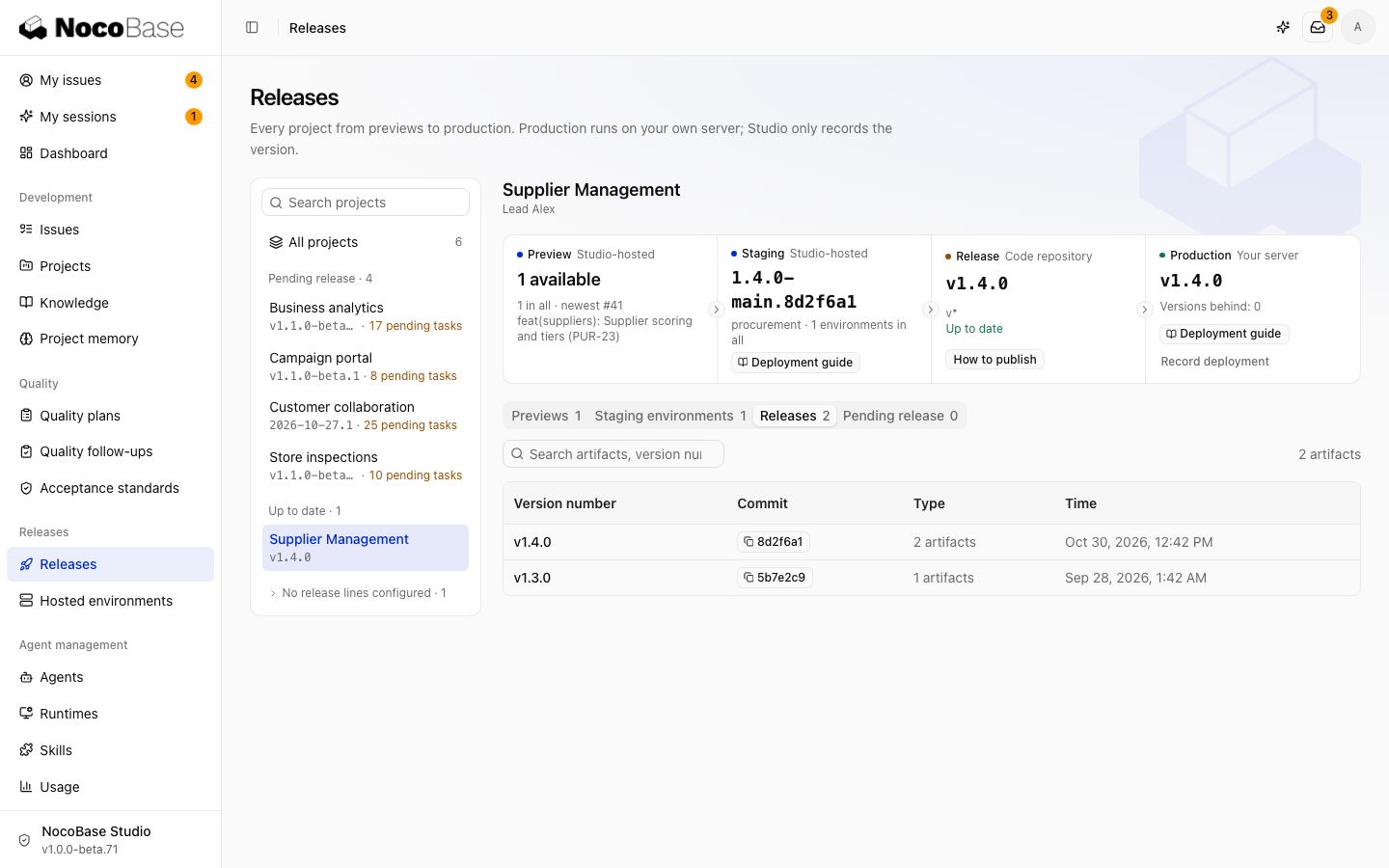
| Stage | What it shows | Next action |
|---|---|---|
| Preview | A PR's isolated application and build status | Verify the change |
| Staging | The commit or version running in a test application | Check merged changes |
| Release | Versions identified by Git tags and their artifacts | Choose a version to deliver |
| Production | The version recorded by the team | Update the record after deploying on your infrastructure |
Studio can host previews and test applications. The team deploys production with its own images or an installer; Studio does not manage production deployment.
Review pending work
Pending release lists completed tasks that have not reached production and indicates whether they are in testing. Check which tasks a version contains before releasing and deploying it.
Testing and production marks on tasks are calculated from commit relationships. Production marks use the version recorded by the lead. Recording an older version removes marks for changes it no longer contains.
Continue delivery
- Verify before merging: PR previews.
- Manage test applications: Hosted environments.
- Prepare versions and artifacts: Versions and releases.
- Deploy and record production: Production delivery.
Project leads receive reminders about pending work. Deployment failures and approval requests for protected test environments appear in the Inbox.