

CRM 2.0 System Detailed Design
1. System Overview and Design Philosophy
1.1 System Positioning
This system is a CRM 2.0 Sales Management Platform built on the NocoBase no-code platform. The core objective is:
The system automates routine tasks through workflows and utilizes AI to assist with lead scoring, opportunity analysis, and other tasks, helping sales teams improve efficiency.
1.2 Design Philosophy
Philosophy 1: Complete Sales Funnel
End-to-end Sales Process:

Why design it this way?
Philosophy 2: Configurable Sales Pipeline

Different industries can customize sales pipeline stages without modifying code.
Philosophy 3: Modular Design
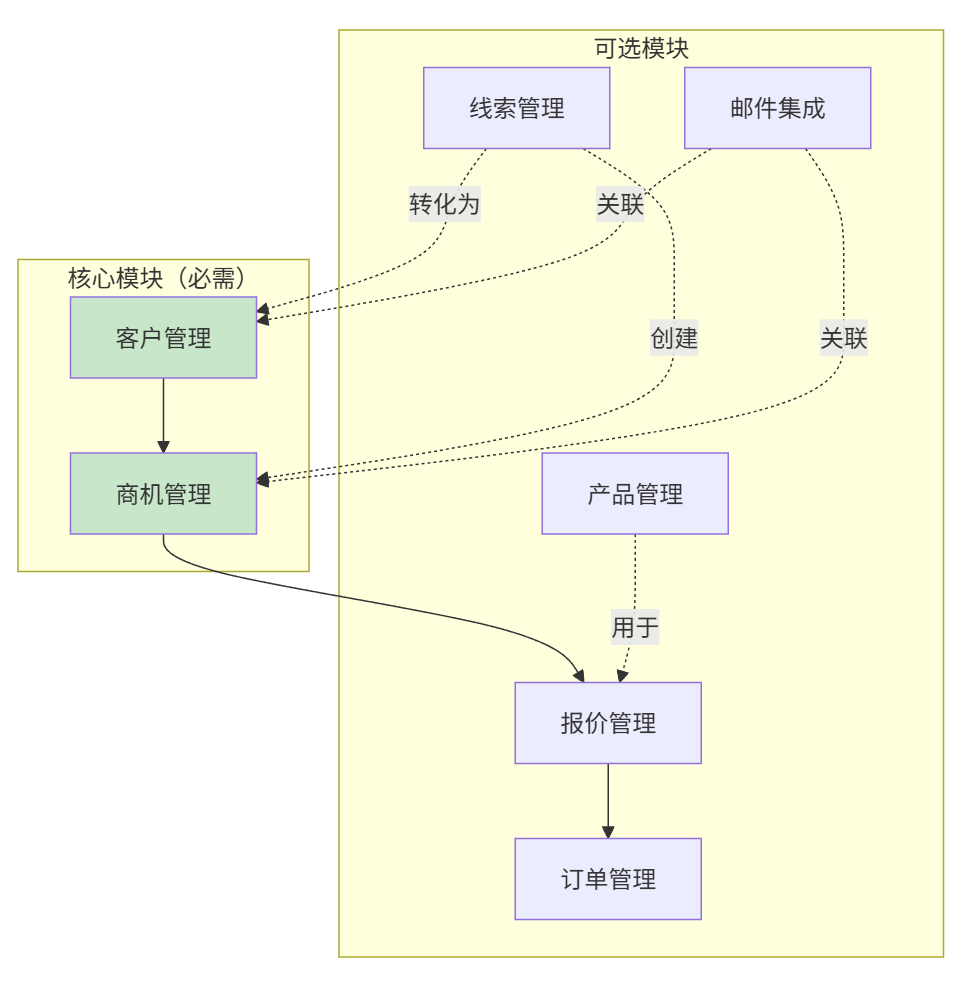
- Core modules (Customers + Opportunities) are mandatory; other modules can be enabled as needed.
- Disabling modules does not require code changes; it is done via NocoBase interface configuration.
- Each module is designed independently to reduce coupling.
2. Module Architecture and Customization
2.1 Module Overview
The CRM system adopts a modular architecture design—each module can be independently enabled or disabled based on business requirements.
2.2 Module Dependencies
2.3 Pre-configured Versions
2.4 Module-to-Collection Mapping
Core Module Collections (Always Required)
2.5 How to Disable Modules
Simply hide the menu entry for the module in the NocoBase administration interface; there is no need to modify code or delete collections.
3. Core Entities and Data Model
3.1 Entity Relationship Overview
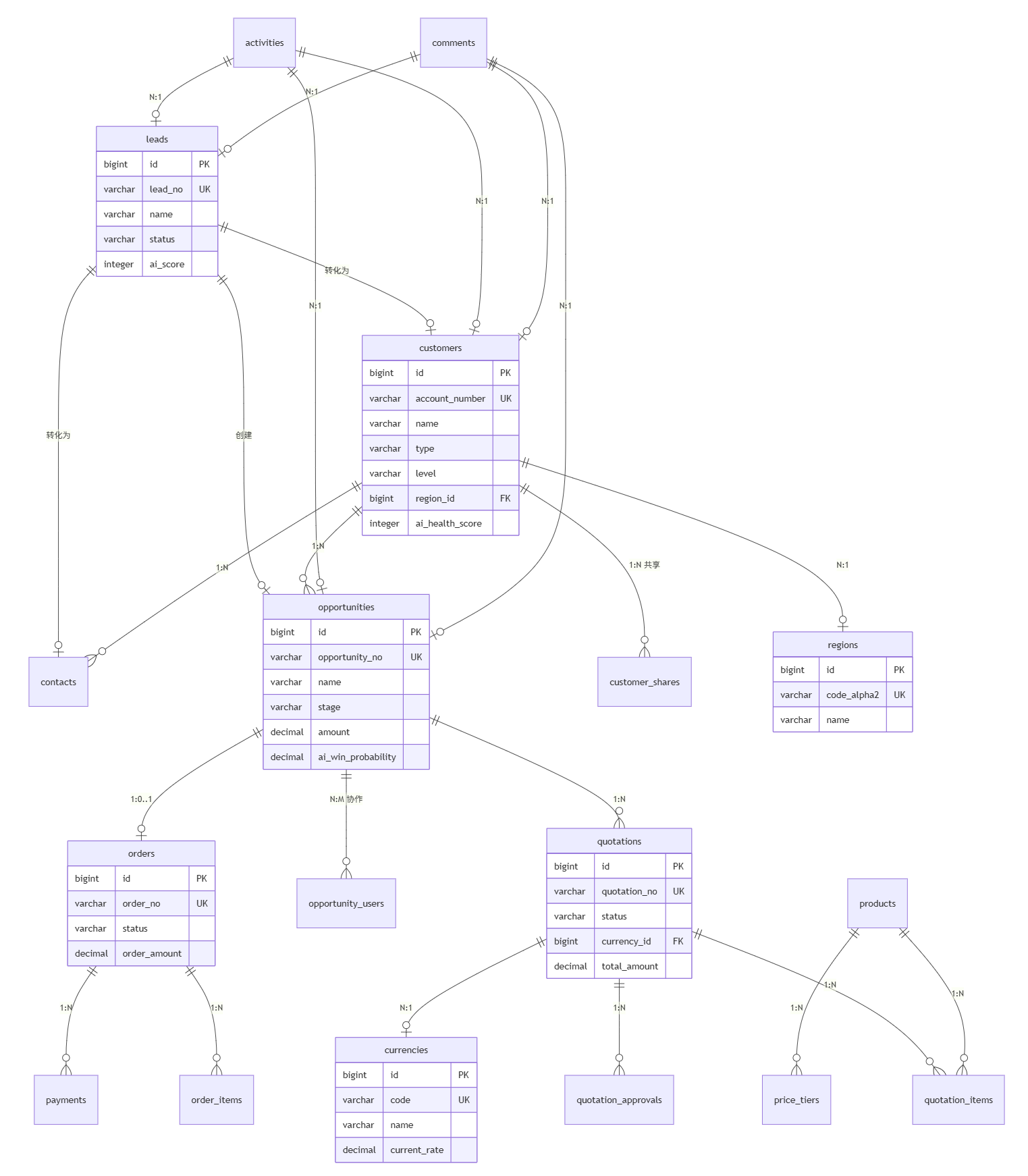
3.2 Core Collection Details
3.2.1 Leads (nb_crm_leads)
Lead management using a simplified 4-stage workflow.
Stage Process:
Key Fields:
3.2.2 Customers (nb_crm_customers)
Customer/Company management supporting international business.
Key Fields:
3.2.3 Opportunities (nb_crm_opportunities)
Sales opportunity management with configurable pipeline stages.
Key Fields:
3.2.4 Quotations (nb_crm_quotations)
Quotation management supporting multi-currency and approval workflows.
Status Flow:
Key Fields:
3.2.5 Orders (nb_crm_orders)
Order management including payment tracking.
Key Fields:
3.3 Collection Summary
CRM Business Collections
Foundation Data Collections (Common Modules)
3.4 Auxiliary Collections
3.4.1 Comments (nb_crm_comments)
Generic comments/notes collection that can be associated with various business objects.
3.4.2 Customer Shares (nb_crm_customer_shares)
Enables multi-person collaboration and permission sharing for customers.
3.4.3 Opportunity Collaborators (nb_crm_opportunity_users)
Supports sales team collaboration on opportunities.
3.4.4 Regions (nb_cbo_regions)
Country/Region foundation data dictionary.
4. Lead Lifecycle
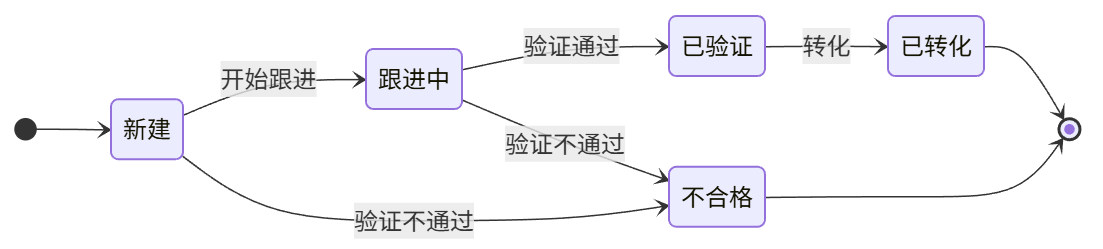
Lead management uses a simplified 4-stage workflow. When a new lead is created, a workflow can automatically trigger AI scoring to help sales quickly identify high-quality leads.
4.1 Status Definitions
4.2 Status Flowchart
4.3 Lead Conversion Process
The conversion interface provides three options simultaneously; users can choose to create or associate:
- Customer: Create a new customer OR associate with an existing customer.
- Contact: Create a new contact (associated with the customer).
- Opportunity: An opportunity must be created.
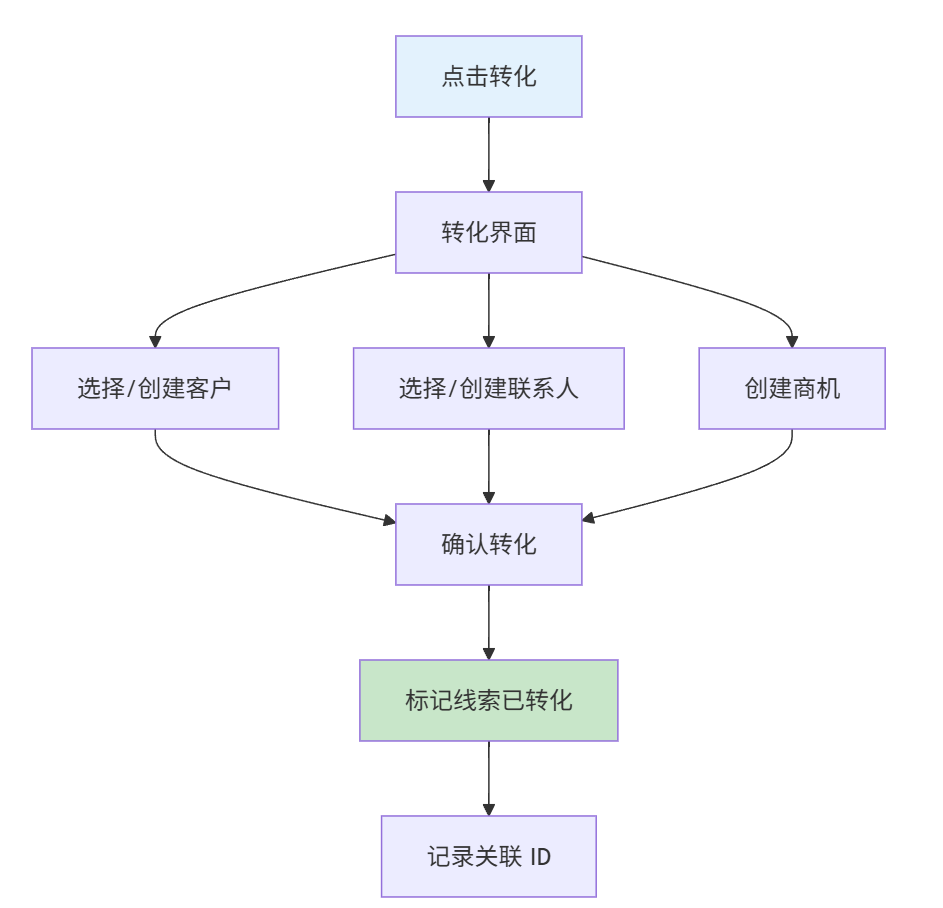
Post-conversion Records:
converted_customer_id: Associated Customer IDconverted_contact_id: Associated Contact IDconverted_opportunity_id: Created Opportunity ID
5. Opportunity Lifecycle
Opportunity management uses configurable sales pipeline stages. When an opportunity stage changes, it can automatically trigger AI win probability prediction to help sales identify risks and opportunities.
5.1 Configurable Stages
Stages are stored in the nb_crm_opportunity_stages collection and can be customized:
5.2 Pipeline Flow
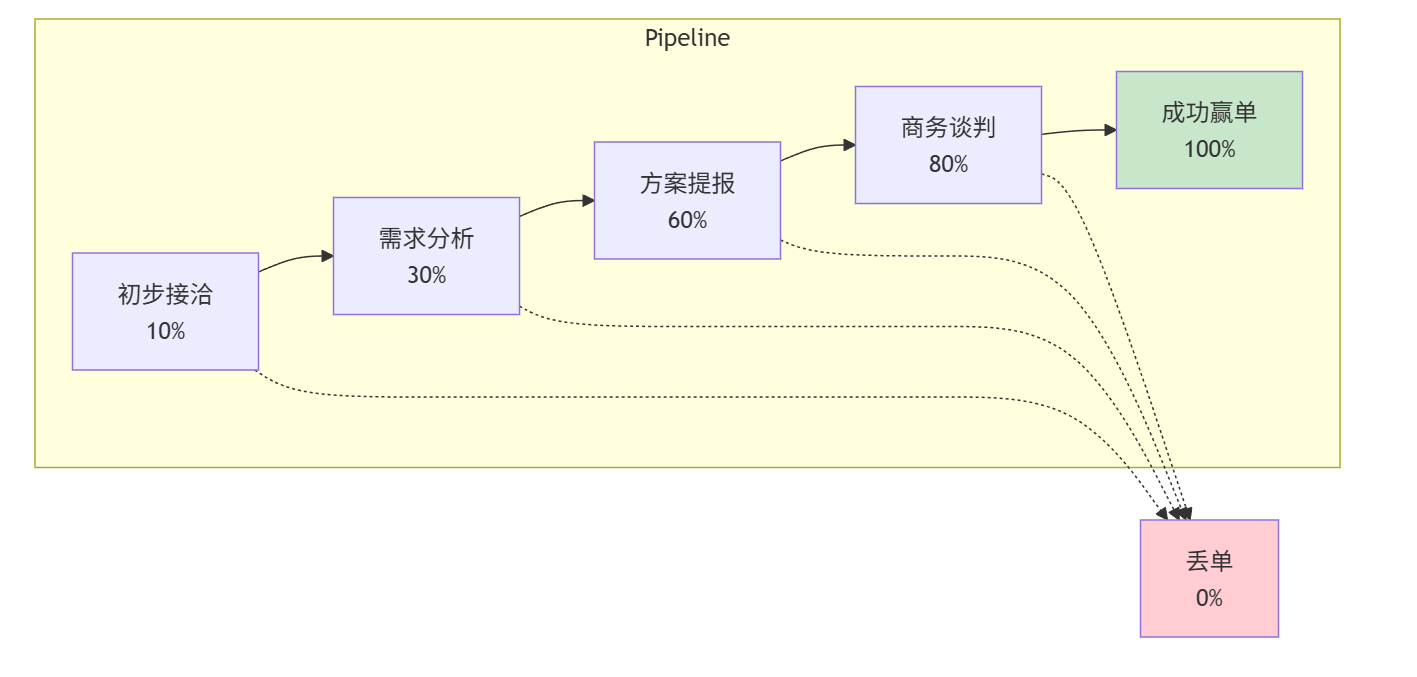
5.3 Stagnation Detection
Opportunities without activity will be flagged:
5.4 Win/Loss Handling
When Won:
- Update stage to 'won'.
- Record actual close date.
- Update customer status to 'active'.
- Trigger order creation (if a quotation was accepted).
When Lost:
- Update stage to 'lost'.
- Record loss reason.
- Record competitor ID (if lost to a competitor).
- Notify manager.
6. Quotation Lifecycle
6.1 Status Definitions
6.2 Approval Rules (To be finalized)
Approval workflows are triggered based on the following conditions:
6.3 Multi-currency Support
Design Philosophy
Use USD as the unified base currency for all reports and analysis. Each amount record stores:
- Original currency and amount (what the customer sees)
- Exchange rate at the time of transaction
- USD equivalent amount (for internal comparison)
Currency Dictionary (nb_cbo_currencies)
Currency configuration uses a common foundation data collection, supporting dynamic management. The current_rate field stores the current exchange rate, updated by a scheduled task from the most recent record in nb_crm_exchange_rates.
Exchange Rate History (nb_crm_exchange_rates)
Records historical exchange rate data. A scheduled task syncs the latest rates to nb_cbo_currencies.current_rate.
Note: Quotations are associated with the
nb_cbo_currenciescollection via thecurrency_idforeign key, and the exchange rate is retrieved directly from thecurrent_ratefield. Opportunities and orders use acurrencyVARCHAR field to store the currency code.
Amount Field Pattern
Collections containing amounts follow this pattern:
Applied to:
nb_crm_opportunities.amount→amount_usdnb_crm_quotations.total_amount→total_amount_usd
Workflow Integration
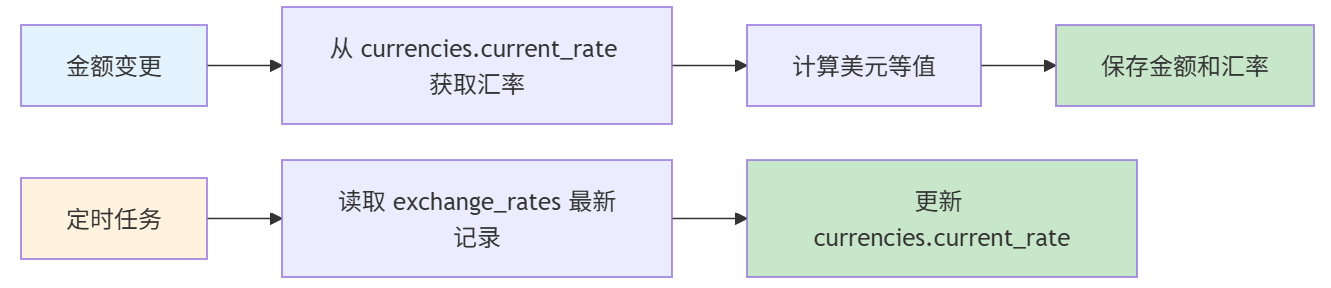
Exchange Rate Retrieval Logic:
- Retrieve exchange rate directly from
nb_cbo_currencies.current_rateduring business operations. - USD Transactions: Rate = 1.0, no lookup required.
current_rateis synced by a scheduled task from the latestnb_crm_exchange_ratesrecord.
6.4 Version Management
When a quotation is rejected or expired, it can be duplicated as a new version:
7. Order Lifecycle
7.1 Order Overview
Orders are created when a quotation is accepted, representing a confirmed business commitment.
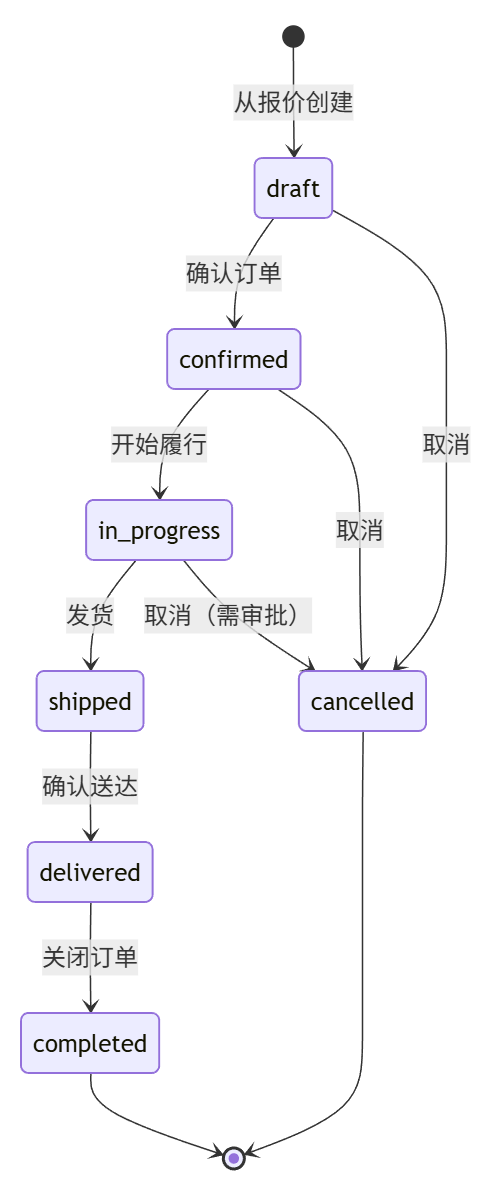
7.2 Order Status Definitions
7.3 Order Data Model
nb_crm_orders
nb_crm_order_items
7.4 Payment Tracking
nb_crm_payments
8. Customer Lifecycle
8.1 Customer Overview
Customers are created during lead conversion or when an opportunity is won. The system tracks the complete lifecycle from acquisition to advocacy.
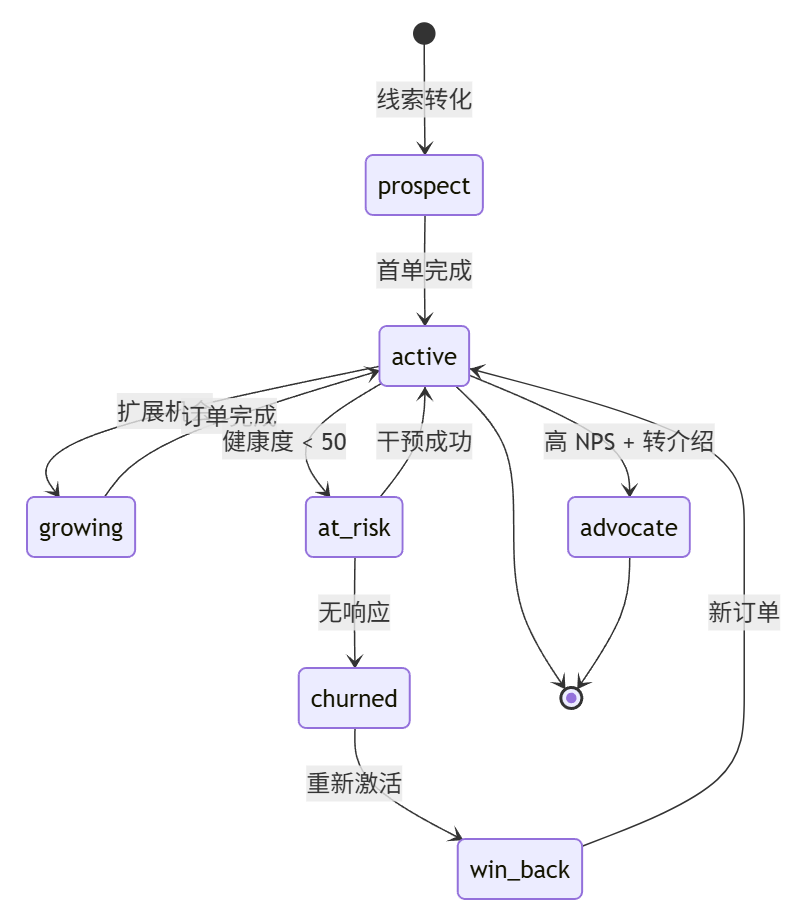
8.2 Customer Status Definitions
8.3 Customer Health Scoring
Customer health is calculated based on multiple factors:
Health Thresholds:
8.4 Customer Segmentation
Automated Segmentation
9. Email Integration
9.1 Overview
NocoBase provides a built-in email integration plugin supporting Gmail and Outlook. Once emails are synced, workflows can automatically trigger AI analysis of email sentiment and intent, helping sales quickly understand customer attitudes.
9.2 Email Syncing
Supported Providers:
- Gmail (via OAuth 2.0)
- Outlook/Microsoft 365 (via OAuth 2.0)
Sync Behavior:
- Bi-directional sync of sent and received emails.
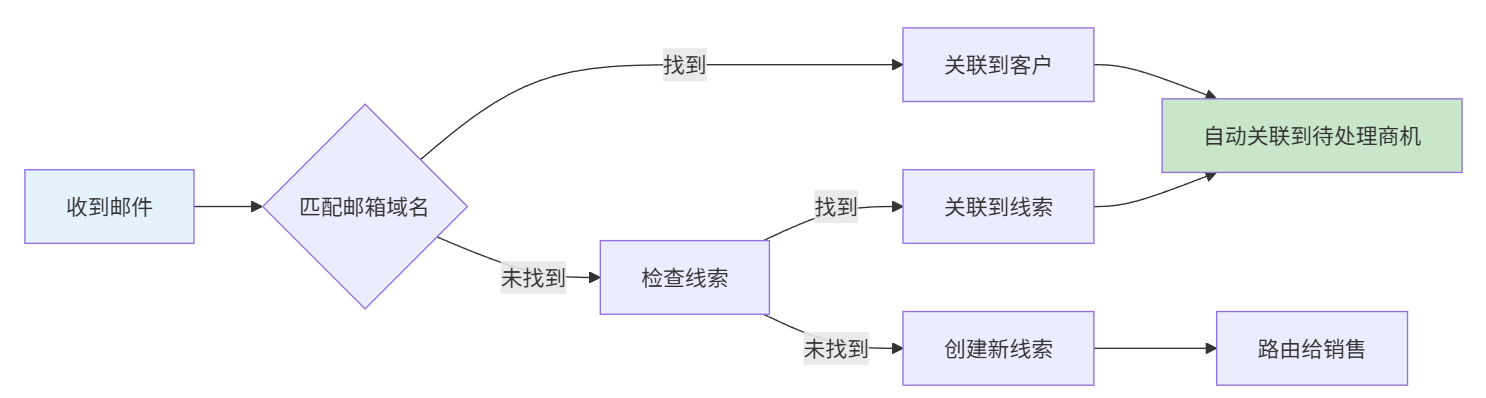
- Automatic association of emails to CRM records (Leads, Contacts, Opportunities).
- Attachments stored in the NocoBase file system.
9.3 Email-CRM Association (To be finalized)
9.4 Email Templates
Sales can use preset templates:
10. AI-Assisted Capabilities
10.1 AI Employee Team
The CRM system integrates the NocoBase AI plugin, utilizing the following built-in AI employees configured with CRM-specific tasks:
10.2 AI Task List
AI capabilities are divided into two independent categories:
I. AI Employees (Frontend Block Triggered)
Users interact directly with AI through frontend AI Employee blocks to obtain analysis and suggestions.
II. Workflow LLM Nodes (Backend Automated Execution)
LLM nodes nested within workflows, triggered automatically by collection events, action events, or scheduled tasks, independent of AI Employees.
Note: Workflow LLM nodes use prompts and Schema output for structured JSON, which is parsed and written to business data fields without user intervention.
10.3 AI Fields in Database
11. Workflow Engine
11.1 Implemented Workflows
11.2 To-be-implemented Workflows
12. Menu and Interface Design
12.1 Admin Structure
12.2 Dashboard Views
Sales Manager View
Sales Rep View
Executive View
Document Version: v2.0 | Updated: 2026-02-06