

Extending Node Types
A node's type is essentially an operational instruction. Different instructions represent different operations executed in the workflow.
Similar to triggers, extending node types is also divided into two parts: server-side and client-side. The server-side needs to implement the logic for the registered instruction, while the client-side needs to provide the interface configuration for the parameters of the node where the instruction is located.
Server-side
The Simplest Node Instruction
The core content of an instruction is a function, meaning the run method in the instruction class must be implemented to execute the instruction's logic. Any necessary operations can be performed within the function, such as database operations, file operations, calling third-party APIs, etc.
All instructions need to be derived from the Instruction base class. The simplest instruction only needs to implement a run function:
And register this instruction with the workflow plugin:
The status value (status) in the instruction's return object is mandatory and must be a value from the JOB_STATUS constant. This value determines the flow of subsequent processing for this node in the workflow. Typically, JOB_STATUS.RESOVLED is used, indicating that the node has executed successfully and the execution will continue to the next nodes. If there is a result value that needs to be saved in advance, you can also call the processor.saveJob method and return its return object. The executor will generate an execution result record based on this object.
Node Result Value
If there is a specific execution result, especially data prepared for use by subsequent nodes, it can be returned through the result property and saved in the node's job object:
Here, node.config is the node's configuration item, which can be any required value. It will be saved as a JSON type field in the corresponding node record in the database.
Instruction Error Handling
If exceptions may occur during execution, you can catch them in advance and return a failed status:
If predictable exceptions are not caught, the workflow engine will automatically catch them and return an error status to prevent uncaught exceptions from crashing the program.
Asynchronous Nodes
When a node needs to wait for an external operation to complete before continuing the workflow (such as HTTP requests, third-party payment callbacks, or other time-consuming or non-immediately-returning operations), the task should first be saved with JOB_STATUS.PENDING status to suspend the current execution, then resumed via resume once the operation completes. Any instruction that uses suspension logic must also implement the resume method; otherwise, the workflow cannot be resumed.
The recommended implementation pattern is as follows:
There are several key details to note:
Why call processor.exit() explicitly instead of returning the pending task object?
return { status: PENDING } immediately ends the run function, making it impossible to execute any code afterwards. Calling await processor.exit() only commits the transaction and exits the database context, while the function itself continues executing. This allows you to await a time-consuming operation within the same function body and then call resume when it completes. If you skip exit() and directly await a long operation before returning, it both holds the database transaction open for a long time causing lock contention, and the task record will not be persisted until the transaction commits after the operation finishes.
Why re-query the task instead of using the object returned by saveJob?
The object returned by saveJob is an in-memory model instance bound to the original transaction. After processor.exit() is called, that transaction has been committed and closed. Directly modifying this instance and calling resume will cause ORM state anomalies (stale transaction references, state inconsistencies, etc.). Re-querying from the database by id ensures you get a clean instance unbound to any transaction.
Why does the run function return nothing (void)?
processor.exit() has already been called manually. When the executor receives void, it calls exit(true) and exits immediately without any redundant processing. If an IJob were returned at this point, the executor would attempt to save and commit again, causing errors. See the run/resume return value types section for details.
For scenarios requiring external callbacks (e.g., payment results notified via webhook), the same approach applies: call processor.exit() before registering the callback to ensure the task record is in the database before the external system calls back. In the callback, re-query the task by id and then call this.workflow.resume(job).
For a complete real-world example, refer to: RequestInstruction.ts (HTTP request node, which uses this pattern in the async workflow branch)
Node Result Status
The execution status of a node affects the success or failure of the entire workflow. Typically, without branches, the failure of a node will directly cause the entire workflow to fail. The most common scenario is that if a node executes successfully, it proceeds to the next node in the node table until there are no more subsequent nodes, at which point the entire workflow completes with a successful status.
If a node returns a failed execution status during execution, the engine will handle it differently depending on the following two situations:
-
The node that returns a failed status is in the main workflow, meaning it is not within any branch workflow opened by an upstream node. In this case, the entire main workflow is judged as failed, and the process exits.
-
The node that returns a failed status is within a branch workflow. In this case, the responsibility for determining the next state of the workflow is handed over to the node that opened the branch. The internal logic of that node will decide the state of the subsequent workflow, and this decision will recursively propagate up to the main workflow.
Ultimately, the next state of the entire workflow is determined at the nodes of the main workflow. If a node in the main workflow returns a failure, the entire workflow ends with a failed status.
If any node returns a "pending" status after execution, the entire execution process will be temporarily interrupted and suspended, waiting for an event defined by the corresponding node to trigger the resumption of the workflow. For example, the Manual Node, when executed, will pause at that node with a "pending" status, waiting for manual intervention to decide whether to approve. If the manually entered status is approval, the subsequent workflow nodes will continue; otherwise, it will be handled according to the failure logic described earlier.
For more instruction return statuses, please refer to the Workflow API Reference section.
run/resume Return Value Types and Executor Behavior
The complete return type definition for run and resume methods is:
After the executor (Processor) calls an instruction, it executes different processing logic based on the return value type. There are three cases.
1. Returning a Task Object IJob
This is the most common case. Return an object containing a mandatory status field and an optional result field. The executor saves it as the node's task record and determines the subsequent flow based on the status value:
JOB_STATUS.RESOLVED: Node executed successfully; continues to the next node if one exists, otherwise the workflow endsJOB_STATUS.PENDING: Node enters a suspended state; the current execution context stops, waiting for an external event to triggerresume- Other failure statuses (
FAILED,ERROR, etc.): Propagated up to the branch parent node or directly terminates the entire workflow
This path is the complete transaction commit path — the executor saves the task record, writes to the database, and commits the transaction.
Example: ConditionInstruction.ts (returns a job object directly when there is no branch; see the void case below when there is a branch)
2. Returning null
When null is returned, the executor calls processor.exit() (with no argument), with the effect of: flushing the currently pending tasks to the database and committing the transaction, but not updating the overall execution status.
This usage is common in the resume method of branch control nodes: a branch has completed and the parent node's task status needs to be updated and saved (e.g., recording "branch N has completed"), but other branches are still running, and the overall execution should remain in STARTED status waiting for the remaining branches — returning null exits the current resume context without affecting the overall execution status.
Example: ParallelInstruction.ts
- Line 117: The parallel node has already completed early (resolved/rejected); ignores subsequent branch resumes and returns
nulldirectly - Line 135: Some branches are still incomplete (
PENDING); saves current progress and returnsnullto continue waiting for other branches
3. Returning void (no return, i.e., implicit undefined)
When void is returned (the function has no explicit return statement, or the execution path ends with no return value), the executor calls processor.exit(true), with the effect of returning immediately without performing any database operations.
This pattern is exclusively for scenarios where the instruction has taken over execution scheduling: the instruction manually starts a sub-workflow via processor.run(), and the sub-workflow's execution chain will handle database writes and transaction commits when it completes. The executor should not process again.
Typical examples:
- ConditionInstruction.ts#L67: When a branch exists, manually calls
processor.run(branchNode, savedJob)then the function ends, implicitly returningvoid - ParallelInstruction.ts#L108: Iterates through all branches and calls
processor.run(branch, job)for each, then the function ends, implicitly returningvoid
:::warn{title=Note}
If processor.saveJob() was called before returning void, those task records will not be written to the database by the current executor. They are temporarily stored in the executor's task list (in memory) and will be flushed to the database by the exit() triggered when the sub-execution started by processor.run() completes. Therefore, when using this pattern, you must ensure that there is a sub-execution path that will complete normally to persist these records. Branch workflow scheduling has a certain complexity; it requires careful design and thorough testing.
:::
Summary comparison of the three return values:
Learn More
For the definitions of various parameters for defining node types, see the Workflow API Reference section.
Client-side
Similar to triggers, the configuration form for an instruction (node type) needs to be implemented on the client-side.
The Simplest Node Instruction
All instructions need to be derived from the Instruction base class. The related properties and methods are used for configuring and using the node.
For example, if we need to provide a configuration interface for the random number string type (randomString) node defined on the server-side above, which has a configuration item digit representing the number of digits for the random number:
Here, FieldsetLoader is a function that returns Promise<{ default: ComponentType }>, implementing lazy loading via dynamic import(). The component it points to is a standard React function component that builds the form using antd's Form.Item:
Note that the form field's name uses the nested array format ['config', 'fieldName'], which is the standard antd Form convention.
Multiple Configuration Interfaces
A node can provide multiple configuration interfaces for different scenarios:
-
FieldsetLoader— Node configuration drawer form (most commonly used)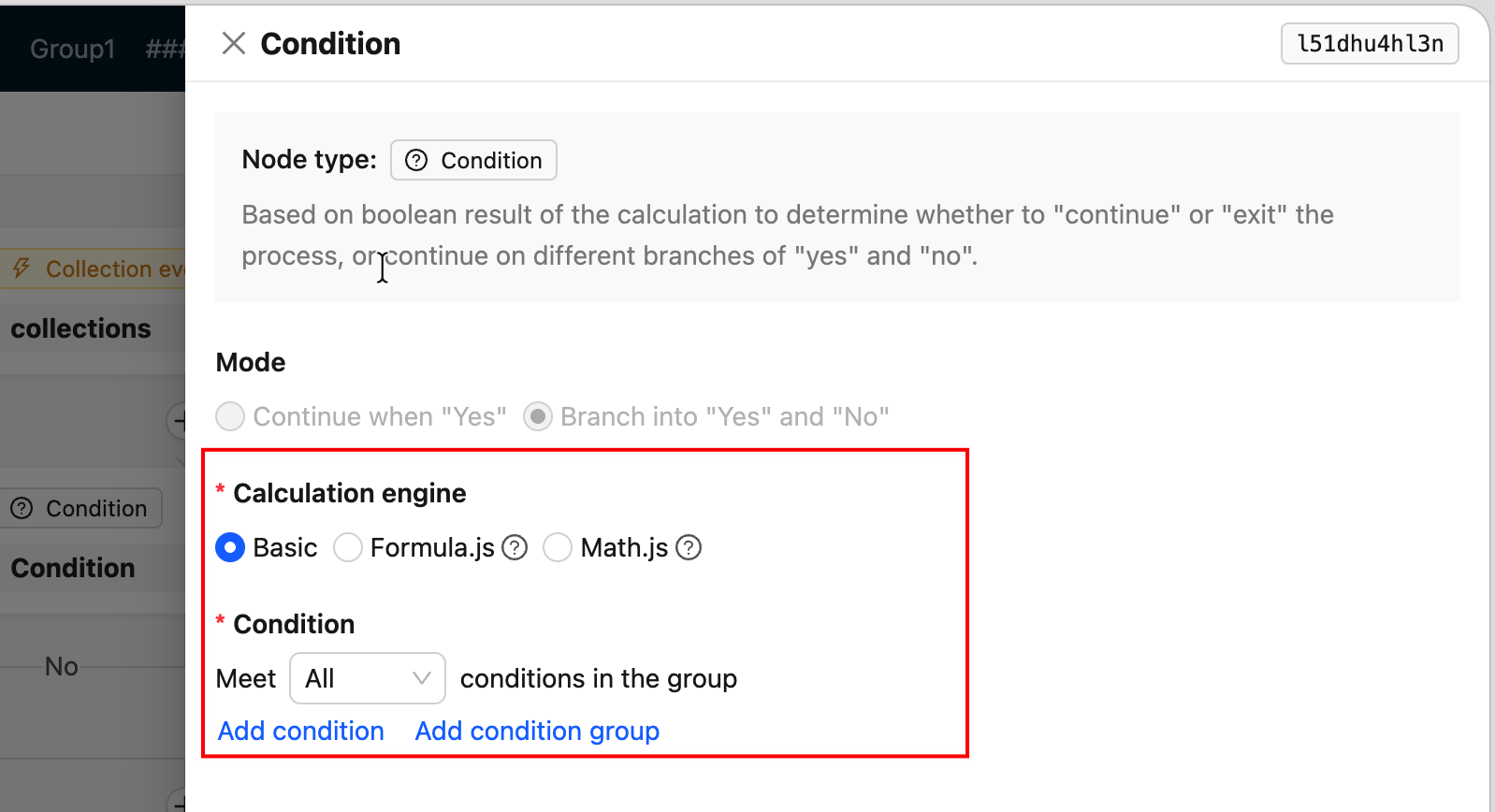
-
PresetFieldsetLoader— Preset form when creating a node (usually contains only required fields)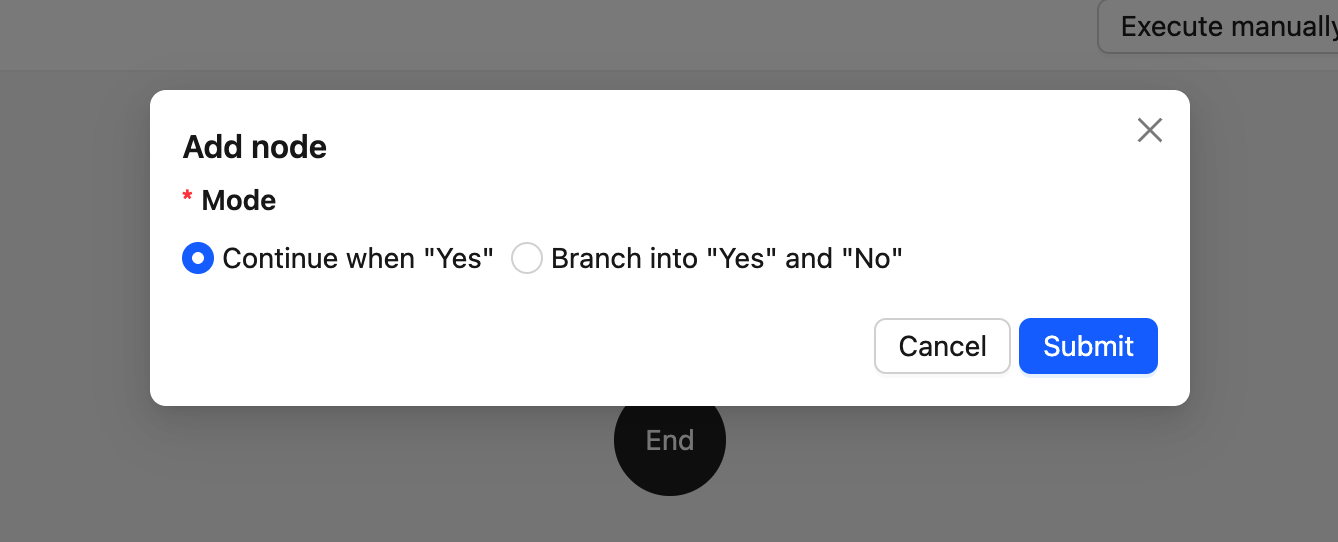
-
ComponentLoader— Custom node rendering on the canvas (used for branch nodes and other cases requiring special rendering)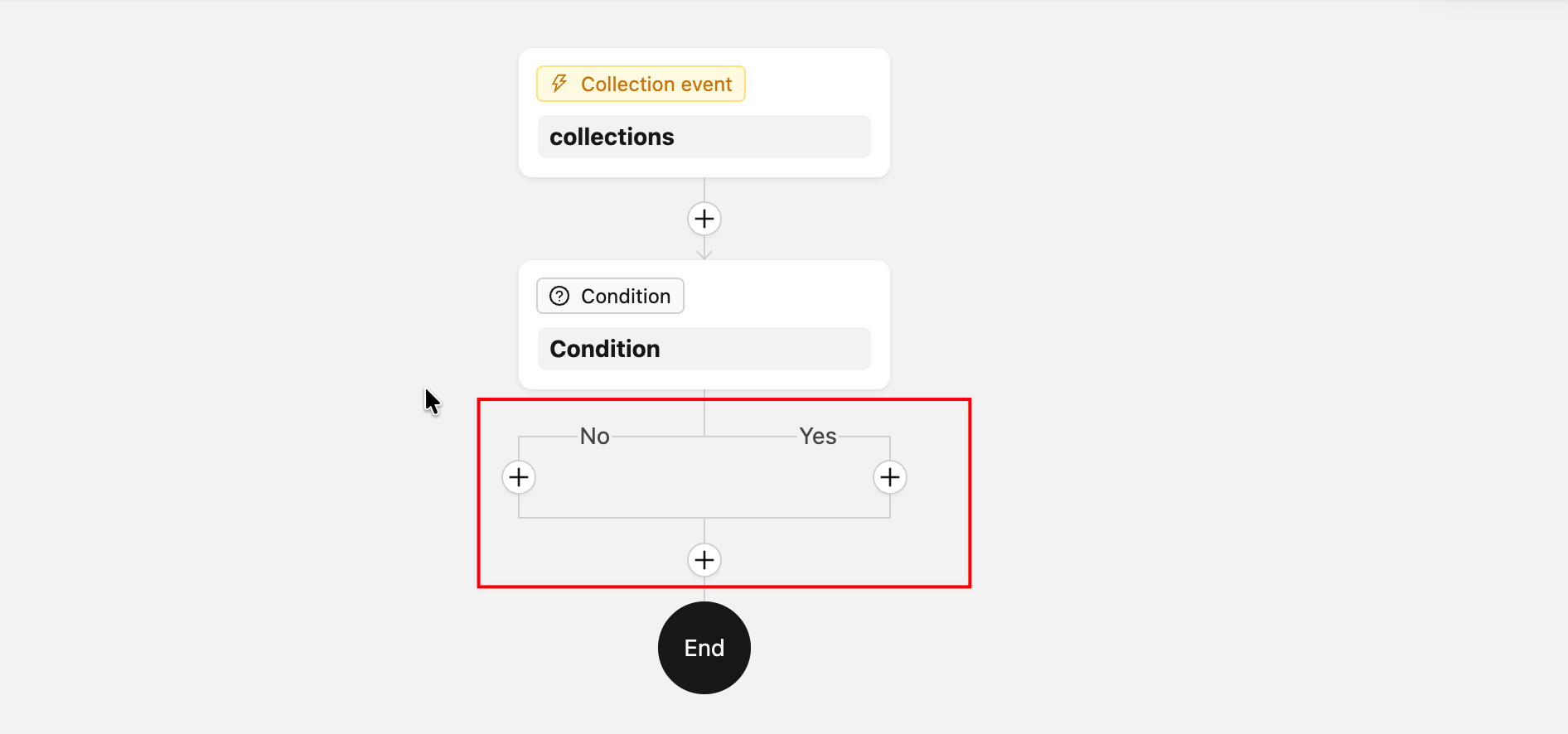
When a Loader needs to point to a named export (rather than the default export) in a file, use .then() to remap:
Register the Node
Register the node type with the workflow plugin instance within the extended plugin:
The node type identifier registered on the client-side must be consistent with the one on the server-side, otherwise it will cause errors.
Providing Node Results as Variables
You may notice the useVariables method in the example above. If you need to use the node's result (the result part) as a variable for subsequent nodes, you need to implement this method in the derived instruction class and return an object that conforms to the VariableOption type. This object serves as a structural description of the node's execution result, providing variable name mapping for selection and use in subsequent nodes.
The VariableOption type is defined as follows:
The core is the value property, which represents the segmented path value of the variable name. label is used for display on the interface, and children is used to represent a multi-level variable structure, which is used when the node's result is a deeply nested object.
A usable variable is represented internally in the system as a path template string separated by ., for example, {{$jobsMapByNodeKey.2dw92cdf.abc}}. Here, $jobsMapByNodeKey represents the result set of all nodes (internally defined, no need to handle), 2dw92cdf is the node's key, and abc is a custom property in the node's result object.
Additionally, since a node's result can also be a simple value, when providing node variables, the first level must be the description of the node itself:
That is, the first level is the node's key and title. For example, in the Calculation node's code reference, when using the result of the Calculation node, the interface options are as follows:
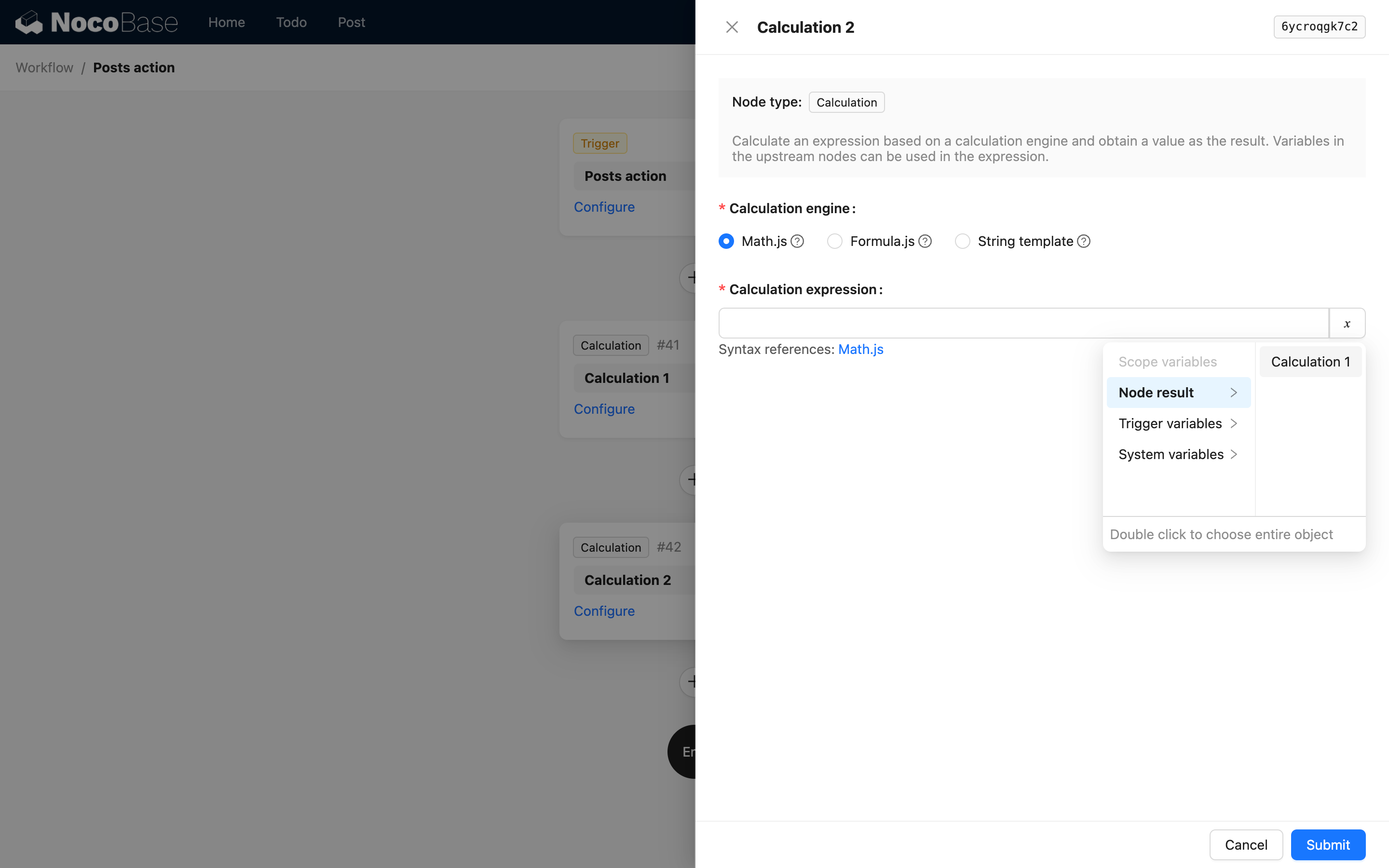
When the node's result is a complex object, you can use children to continue describing nested properties. For example, a custom instruction might return the following JSON data:
Then you can return it through the useVariables method as follows:
This way, in subsequent nodes, you can use the following interface to select variables from it:
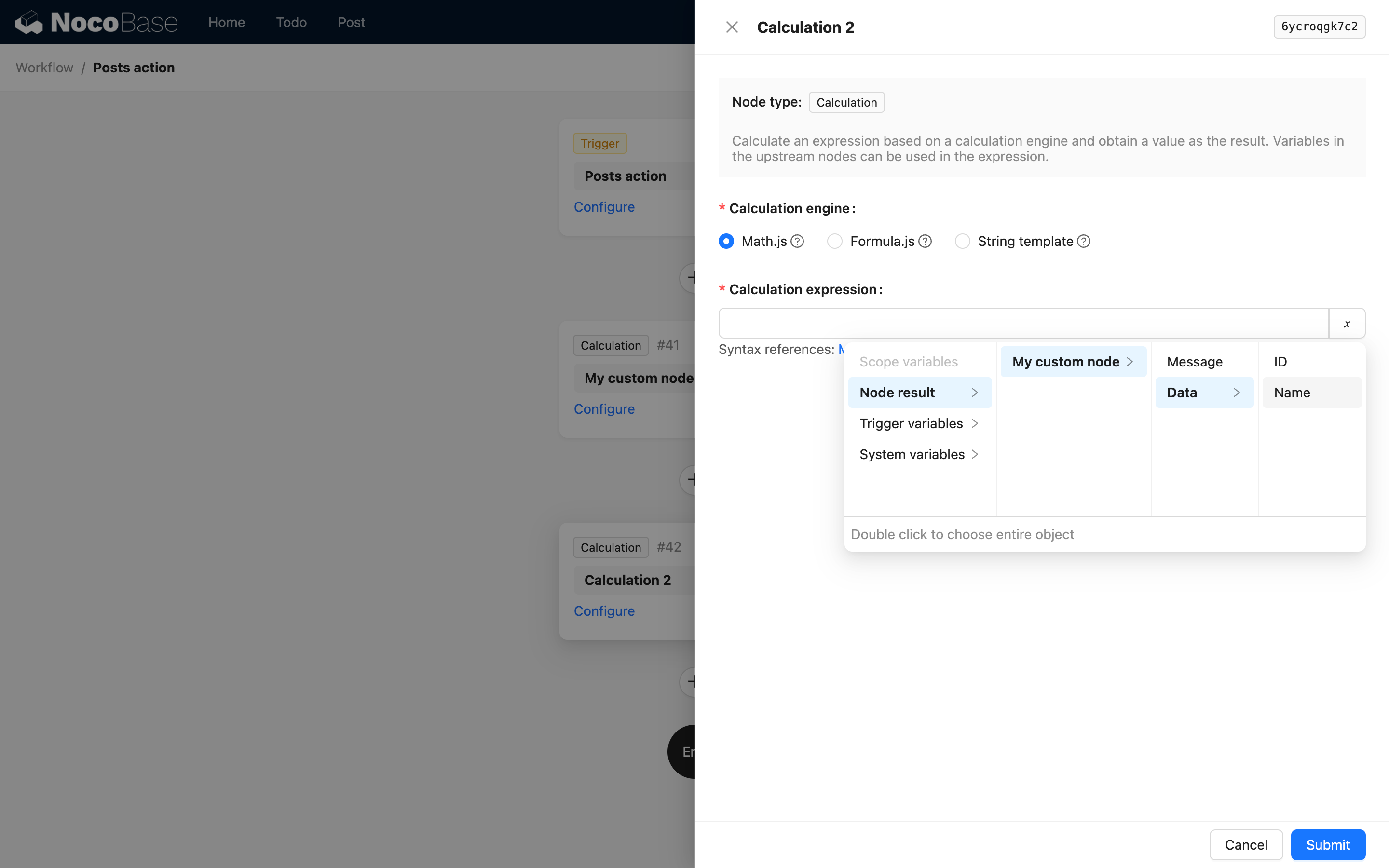
When a structure in the result is an array of deeply nested objects, you can also use children to describe the path, but it cannot include array indices. This is because in NocoBase workflow's variable handling, the variable path description for an array of objects is automatically flattened into an array of deep values when used, and you cannot access a specific value by its index.
Node Availability
By default, any node can be added to a workflow. However, in some cases, a node may not be applicable in certain types of workflows or branches. In such situations, you can configure the node's availability using isAvailable:
The isAvailable method returns true if the node is available, and false if it is not. The ctx parameter contains the context information of the current node, which can be used to determine its availability.
If there are no special requirements, you do not need to implement the isAvailable method, as nodes are available by default. The most common scenario requiring configuration is when a node might be a time-consuming operation and is not suitable for execution in a synchronous workflow. You can use the isAvailable method to restrict its use. For example:
Learn More
For a complete real-world example, refer to: CalculationInstruction source code
For the definitions of various parameters for defining node types, see the Workflow API Reference section.
If you were previously using the legacy (v1) client-side code and want to migrate to the new v2 version, refer to the v1 to v2 Migration Guide.