
Configure Main's access address
Set the browser-facing origin in Main's config.yml:
app:
  publicOrigin: https://apps.example.com
server:
  host: 0.0.0.0
  port: 13230
publicOrigin contains only the scheme, host and optional port, without /main or a child path. Main normally opens at https://apps.example.com/main/; hosted children use separate paths on the same origin. 0.0.0.0 is a bind address, not a browser address.
Choose a stable address before creating instances. Changing a domain or scheme later affects callbacks and identity bindings. Coordinate instance configuration and login integration rather than changing only the proxy.
Deployment configuration
Complete configuration example
Merge this into Main's config.yml, alongside its access address, database and encryption settings. Do not duplicate existing drive or deployment keys. This local-storage example assumes the default storage/ root; the template already supplies these defaults, so unchanged values can be omitted.
drive:
  disks:
    deploymentArtifacts:
      driver: fs
      location: storage/deployment/artifacts
      visibility: private

deployment:
  dataDir: storage/deployment
  artifacts:
    disk: deploymentArtifacts
    prefix: archives
  defaultNode: local
  nodes:
    local:
      name: Local Host
      enabled: true
      approvalRequired: false
      type: local
      local:
        host: 0.0.0.0
        port: 13231
        directory: storage/deployment/hosts/local
drive and deployment are siblings. Drive defines storage disks; Deployment selects a disk and configures local working directories and runtime nodes. The child's deploy.yml submits deployments and does not belong here; see Develop and deploy child applications.
Configuration fields
| Field | Default or requirement | Purpose |
|---|---|---|
deployment.dataDir | deployment/ under the application storage root | Node directory bindings, local artifact cache and deployment logs |
deployment.artifacts.disk | deploymentArtifacts | A configured private disk in drive.disks; independent of drive.default |
deployment.artifacts.prefix | archives | Object-key prefix; the complete key is <prefix>/<sha256>.tar.gz |
deployment.defaultNode | local | Default node ID; must identify an enabled node when any are enabled |
deployment.nodes | Includes an enabled local by default | Configuration keyed by stable node IDs |
nodes.<id>.name | Nonempty name | Display label |
nodes.<id>.enabled | Explicit boolean; true for the default node | Whether Main starts the node |
nodes.<id>.approvalRequired | Omitted or false means no approval required | Whether another authorized administrator must approve deployment operations |
nodes.<id>.type | Currently only local | Runtime node type |
nodes.<id>.local.host | 0.0.0.0 for the default node | Internal bind address, not a browser address |
nodes.<id>.local.port | 13231 for the default node | Internal service port, distinct from Main and other enabled nodes |
nodes.<id>.local.directory | deployment/hosts/local under the storage root for the default node | Code revisions, persistent data and control state |
All nodes.<id> fields are under deployment. A prefix uses letters, digits, underscores, hyphens and / between segments. It cannot start or end with / or contain ...
Store build artifacts with Drive
The default fs disk stores original archives in storage/deployment/artifacts/archives/. The selected disk must have visibility: private. Configuration objects using fs, s3 or oss are supported; missing disks, object-storage placeholders without a bucket and public disks are invalid.
To store subsequent uploads in S3, merge the following and replace the bucket and region:
drive:
  disks:
    buildObjects:
      driver: s3
      bucket: application-builds
      region: us-east-1
      visibility: private
      supportsACL: false
      credentials: {}

deployment:
  artifacts:
    disk: buildObjects
    prefix: archives
This example uses the server's AWS credential chain; credentials: {} does not mean anonymous uploading. Supply credentials through a role or private server configuration, never client code or version control. For OSS, configure a private oss disk and select it with deployment.artifacts.disk. Validate configuration and restart Main after changes.
Uploads are checked locally for size, digest and archive structure before writing to Drive. For deployment, Main reads the recorded disk and full storage key, verifies the archive and creates a local cache for the node. Object storage therefore does not eliminate the need for writable local disk space.
Changing the disk or prefix does not migrate existing artifacts. Old versions retain their disk names and keys; keep those disk configurations and objects available. Do not point an existing disk name at an empty directory or another bucket. Automatic storage migration and global artifact garbage collection are not provided.
Runtime nodes
Configure the default runtime node
Main starts the node process and registers its status at startup. After changes, run pnpm nocobase config check and restart Main. The node port handles internal control and forwarding; restrict unnecessary network access. Users access instances through Main.
APP_DEPLOYMENT_NODE_ENABLED, APP_DEPLOYMENT_NODE_PORT and APP_DEPLOYMENT_NODE_BIND override the local node's enabled state, port and bind address. They do not configure other nodes.
Configure several local runtime nodes
Add another entry under the same deployment.nodes mapping:
    local-2:
      name: Local Host 2
      enabled: true
      approvalRequired: true
      type: local
      local:
        host: 0.0.0.0
        port: 13232
        directory: storage/deployment/hosts/local-2
This entry is a sibling of local. Enabled nodes need distinct ports, different from Main's port. Their directories must neither coincide nor contain each other. defaultNode must identify an enabled node.
Configuration merges with defaults. To run only other nodes, explicitly set deployment.nodes.local.enabled: false. With approvalRequired: true, relevant deployment operations require another authorized administrator's approval.
Only type: local is supported. Several local nodes still share one machine; they do not provide cross-machine availability.
Inspect node status and runtime requirements
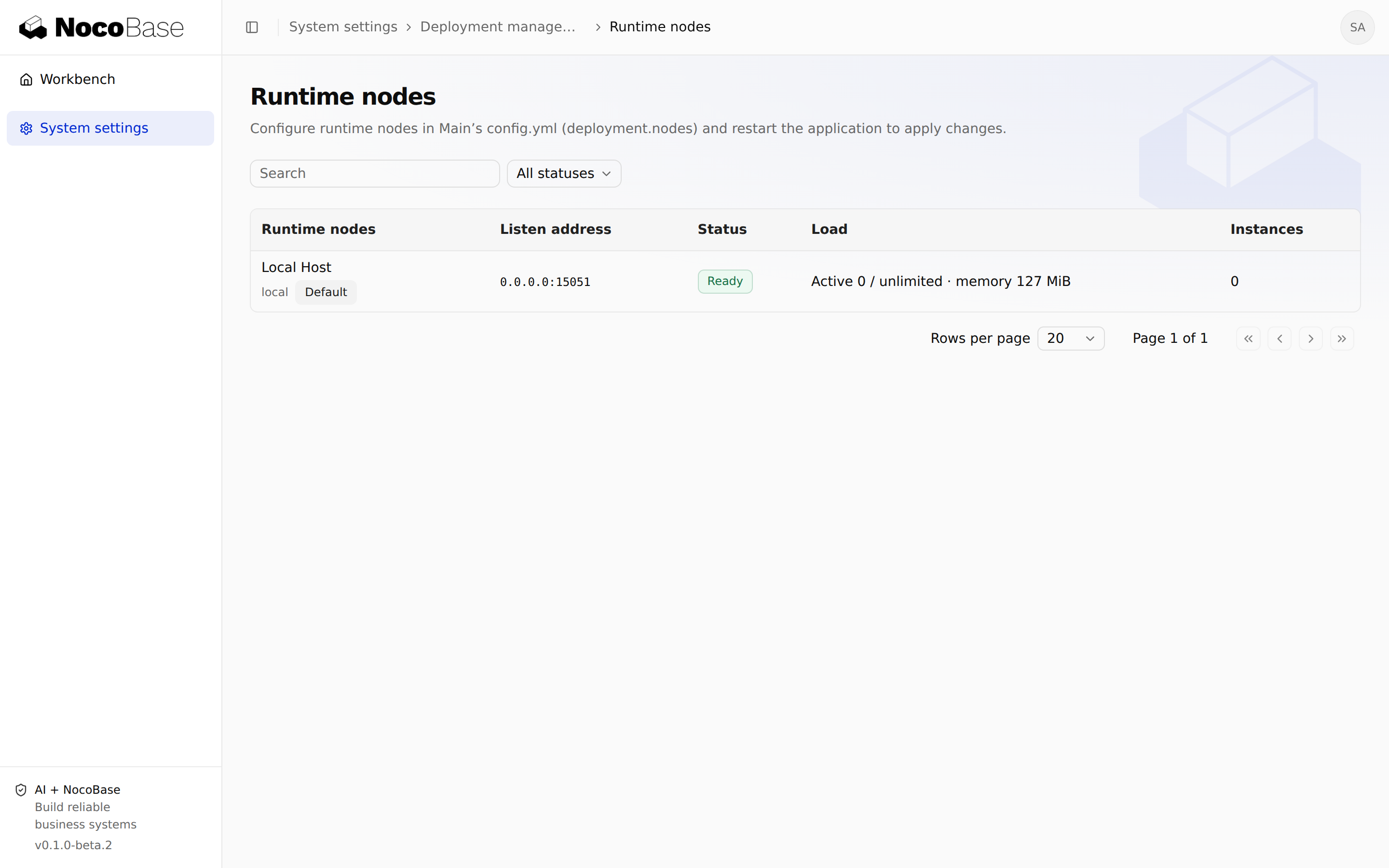
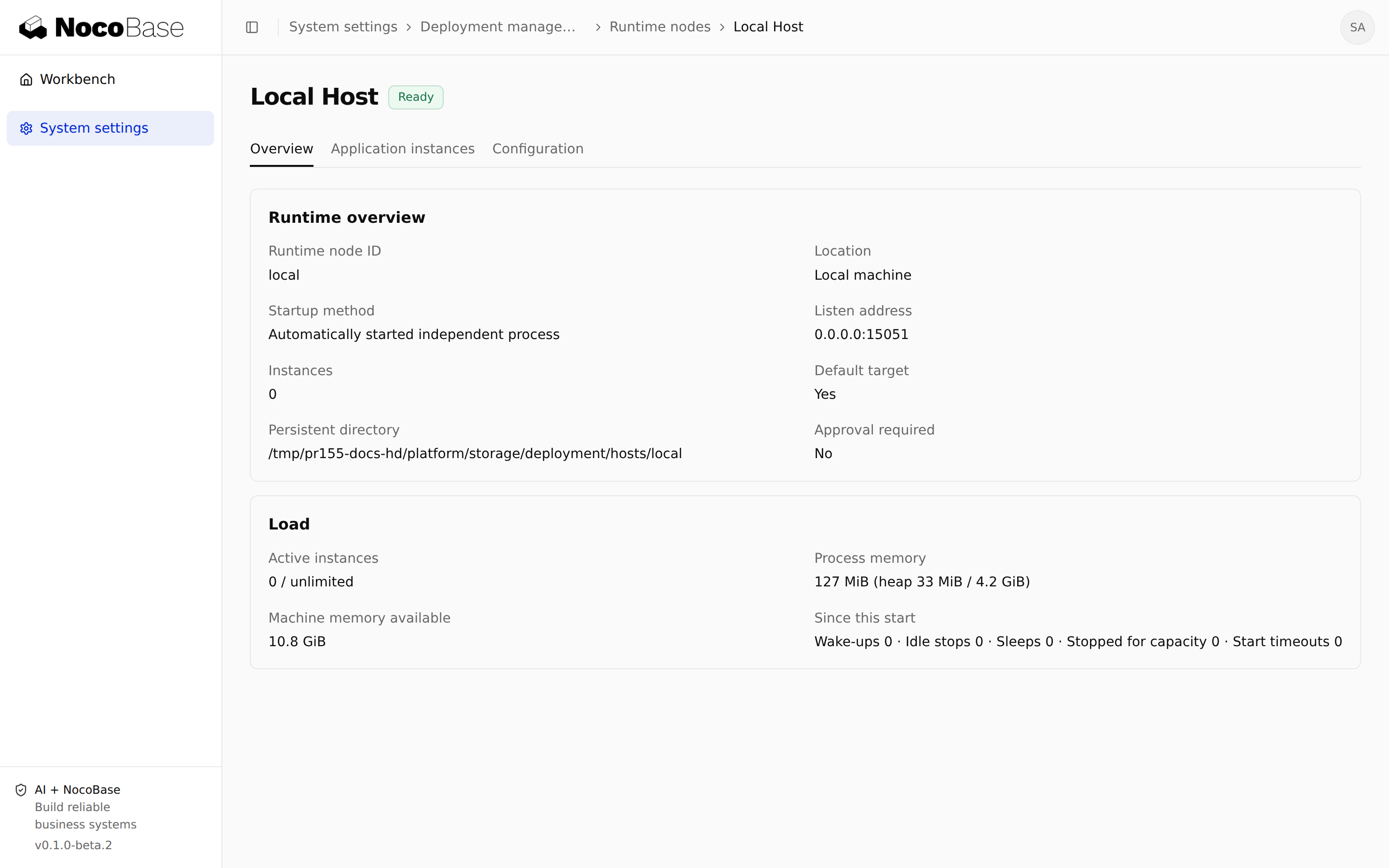
Open System settings → Deployment management → Runtime nodes to inspect configuration, connectivity and platform information. Main's configuration owns node definitions; the page and project CLI cannot create them.
Before deployment, check availability and compatibility with the version's OS, architecture, libc, Node.js and database drivers. For failures, inspect Main and node logs. Refreshing status checks the node; it does not start a failed process.
Disable a runtime node
Check which instances depend on the node and arrange maintenance and data preservation. Set its enabled to false and restart Main. Update defaultNode too if necessary.
Disabling or removing configuration neither migrates instances nor deletes records and data. A node ID is bound to its persistent directory. Do not rename the ID or reuse another node's directory as a migration shortcut. Restore a node with its original ID and directory.
Configure HTTPS and a reverse proxy
Configure DNS and a valid certificate for apps.example.com, forwarding that origin to Main on port 13230. Preserve /main/ and all child paths, and support WebSocket Upgrade.
Proxying only /main/ makes Main work while children return 404. Do not route children to arbitrary node ports: Main chooses the owning node. Forward the host and scheme consistently with app.publicOrigin and retain certificate verification.
Test Main, a child application, its SSO callback and any realtime connections after configuration.
Use HTTP in development and private networks
Add HTTP callback exceptions only for controlled development, private-network or VPN use. Set exact origins in Main's config.yml:
app:
  publicOrigin: http://192.168.1.10:13230
sso:
  insecureRedirectOrigins:
    - http://192.168.1.10:13230
Do not include paths, wildcards or 0.0.0.0. Scheme, address and port must match the actual callback. An independently hosted application on another origin needs its own entry.
Edit the YAML array directly, validate configuration and restart Main, then retry the failed creation or enrollment. This is not a child setting and does not replace exact client callback registration. HTTP also carries login and client credentials; use HTTPS for public access.
Deployment directory structure
Main deployment directory
The default layout follows. Placeholders identify a node, instance, deployment operation or artifact digest. Log marker files appear only when applicable.
storage/deployment/
├── host-directories.json
├── artifacts/
│   └── archives/<sha256>.tar.gz
├── cache/artifacts/
│   ├── incoming/
│   └── archives/<sha256>.tar.gz
├── logs/<instanceId>/
│   ├── <deploymentId>.jsonl
│   ├── <deploymentId>.jsonl.incomplete
│   └── <deploymentId>.jsonl.truncated
└── hosts/<nodeId>/
    ├── config.yml
    ├── revisions/<instanceId>/
    │   ├── .active-revision
    │   ├── .lifecycle.json
    │   └── <sha256>/
    ├── volumes/<instanceId>/
    │   ├── configs/config.<revision>.yml
    │   └── storage/
    ├── control/
    │   ├── owner.json
    │   └── operations/<scopeId>/<operationId>.json
    ├── output/
└── logs/| Location | Contents |
|---|---|
host-directories.json | Binds node IDs to persistent directories to prevent incorrect reuse |
artifacts/archives/ | Original archives on the default Drive disk; object storage keeps them in its bucket instead |
cache/artifacts/incoming/ | Temporary upload-validation files, removed when the normal operation finishes |
cache/artifacts/archives/ | Verified archives read from Drive for local nodes |
logs/<instanceId>/<deploymentId>.jsonl | Events for one deployment and its recovery attempts |
.incomplete, .truncated | Mark incomplete capture or an archive limit; do not treat those logs as complete |
Package, version, instance and operation metadata live in Main's database, not these files. Database configuration determines its location. Backing up only storage/deployment/ is insufficient.
Node directories and instance data
| Path within a node | Contents and maintenance |
|---|---|
config.yml | Generated App Host configuration; edit Main's source configuration instead |
revisions/<instanceId>/<sha256>/ | Extracted application code and runtime dependencies |
revisions/<instanceId>/.active-revision, .lifecycle.json | Active revision and lifecycle state, not disposable cache |
volumes/<instanceId>/configs/ | Revisioned instance configuration, potentially containing secrets |
volumes/<instanceId>/storage/ | Default persistent instance storage, including local databases and files; external storage follows instance configuration |
control/ | Node ownership and operation receipts for coordination and recovery; do not manually remove locks or records |
output/ | Child-process output captured by the node supervisor |
logs/ | App Host logs, distinct from Main's deployment event logs |
Code revisions and persistent data are separate. Keeping old code does not preserve a matching database snapshot or enable one-click rollback. Change instance configuration through the UI or CLI so runtime state and platform records stay consistent.
How configuration maps to directories
| Setting | Location it controls |
|---|---|
drive.disks.<disk>.location for fs | Original-archive disk root, with deployment.artifacts.prefix appended |
| Object-storage bucket and related disk settings | Remote original-archive location |
deployment.dataDir | Root for host-directories.json, cache/artifacts/ and deployment event logs/ |
deployment.nodes.<id>.local.directory | Root for that node's revisions/, volumes/, control/, output/ and logs/ |
These locations are independent. Changing dataDir does not move Drive originals or node data. Changing a disk does not move instance data either.
Template defaults use application paths, so APP_STORAGE_DIR can change the default storage root. Explicit storage/... values in this example are relative to the application process's working directory; they are not automatically rewritten for a new storage root. Use explicit absolute paths when appropriate and keep the startup directory stable.
An existing node ID is bound to its absolute directory. Changing it can produce HOST_DIRECTORY_IDENTITY_CHANGED; do not delete the binding file to bypass this check. Plan migration and validation separately. Restarting does not move files.
The child's project-local storage/deployment/ stores CLI submission receipts. It is separate from Main's directory with the same name. Preserve those project receipts when resolving an unknown deployment outcome.
Persistence and backups
Data to preserve
Back up Main's database, config.yml and encryption keys, referenced original archives in Drive, and complete persistent node directories. Preserve host-directories.json, instance configurations and control state as well as business files.
Include external databases, file services and object storage used by instances. Arrange a maintenance window or database-supported consistent backups so data, files and configuration can be restored together. Copying a directory while it is being written does not establish recoverability.
Backup acknowledgement during upgrade or configuration application does not perform a backup. Periodically verify restored data, instance state and login instead of checking only that backup files exist.
Rebuildable cache
cache/artifacts/archives/ can be downloaded and verified again while the original Drive objects and credentials remain available. Before cleanup, stop or finish relevant uploads, deployments and recovery tasks to avoid deleting active archives or incoming/ files.
Rebuilding this cache does not restore business data. If originals are lost, a cache may be the remaining copy; preserve it for recovery. Do not delete all of revisions/ as cache: it also holds the active revision and lifecycle state.
Deletion and cleanup boundaries
Remove instances through Main or the project CLI. Removal retains persistent data by default; explicit purge and confirmation remove the corresponding local data. Do not assume external databases or object-storage resources are also deleted; inspect them separately according to instance configuration.
Delete versions through artifact management, respecting instance references and retention requirements. Do not delete shared archive files directly or bypass checks through ordinary attachment management. Disabling a node does not delete its records or data.
Deployment event logs are not automatically removed with an instance. Individual archives have a size limit, but there is no automatic cross-deployment retention cleanup. Archive logs according to audit requirements before cleanup. Manage output/, node logs and deployment events separately; their cleanup policies must not be applied to control/ or instance data.