

External NocoBase
Introduction
An External NocoBase data source connects another NocoBase application to the current application, retaining metadata configured in the remote application, including collections, Field interfaces, titles, and relation fields.
Unlike an external database data source, External NocoBase normally does not require you to configure Field interfaces again or manually create relation fields. In addition to viewing, creating, editing, and deleting records, it supports file upload and preview, import and export, chart queries, and some workflow scenarios.
Add a data source
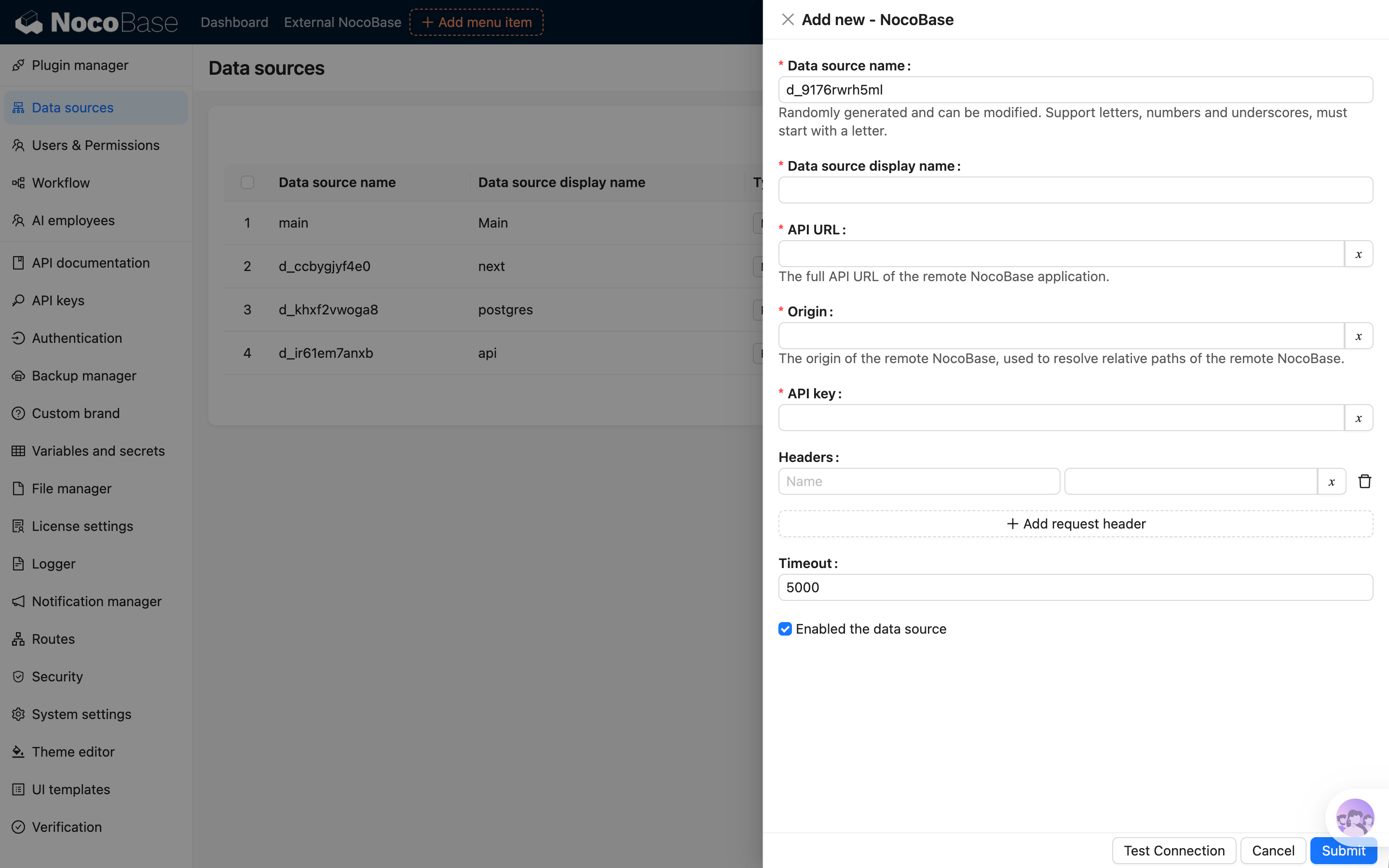
After activating the plugin, add an External NocoBase data source in Data source management and enter the remote application's access information.
After you enable the data source, the system loads collections from the remote application.
Permissions
External NocoBase data sources are affected by permissions in both the current and remote applications.
- The current application can configure access permissions for different collections and fields, as with other external data sources
- The remote application reads and operates the corresponding data according to the permissions of the configured API key
An External NocoBase data source does not return permission metadata used by the client to precisely control button visibility. Some buttons might not automatically hide according to permissions as they do for a main data source. Whether or not a button is visible, submitting an operation still passes through the current application's server-side permission check, and unauthorized operations are rejected.
Prepare a dedicated API key for the External NocoBase data source and grant only the necessary collection and action permissions. If an operation fails although the current application permits it, check the permissions of the remote API key.
Use collections
After collections are loaded, select this data source in page configuration, block configuration, charts, or workflows to use collections from the remote application.
When the remote collection structure changes, reload collections in the current application.
Capabilities
External NocoBase is mainly used to access collections and data from the remote application in the current application. The collection structure, field configuration, and actual data continue to be maintained by the remote application.
Collections and fields
The current application loads metadata from the remote application, including collections, Field interfaces, titles, and relation fields. Unlike an external database data source, you normally do not need to configure Field interfaces again or manually create relation fields in the current application.
You cannot configure fields of an External NocoBase data source directly in the current application. To add a field, adjust a Field type, or modify a relation field, make the change in the remote application, then return to the current application and reload collections.
Records and relation data
An External NocoBase data source supports viewing, creating, editing, and deleting records in page blocks, as well as viewing and maintaining relation data. The current application initiates operations and requests the remote application through the configured API key.
Files and attachments
Files are uploaded to the storage used by the remote application. The current application initiates upload, preview, and download requests, while the file itself is not stored in the current application.
Origin is primarily used to handle preview addresses for files stored locally by the remote application. When the remote application returns a relative path, the current application uses Origin to complete the file access address. Set Origin to the public access address of the remote NocoBase application, for example:
Do not use the API address as Origin.
Import and export
Import and export are operations that read and write data sources through external files, and are both proxied to the remote application. The current application receives user actions, forwards requests, and returns download results, while the remote application performs the actual data reads and writes.
- Import records: The current application receives the uploaded import file and proxies it to the remote application for import
- Export records: The current application proxies a record-export request to the remote application. In synchronous mode, the record file returned by the remote application is streamed to the browser for download. In asynchronous mode, a local asynchronous task is created; it initiates record export in the remote application, synchronizes progress, and streams the record file from the remote application when the result is downloaded
- Export attachments: The current application proxies an attachment-export request to the remote application. In synchronous mode, the attachment archive returned by the remote application is streamed to the browser for download. In asynchronous mode, a local asynchronous task is created; it initiates attachment export in the remote application, synchronizes progress, and streams the attachment archive from the remote application when the result is downloaded
Template printing
Template printing can use records from an External NocoBase data source. Print-template and print-action configurations are stored in the current application. When printing, the current application reads remote records and relation data, then generates the print file in the current application.
Charts
Query panel
An External NocoBase data source can be used in a chart query panel. The current application processes query parameters according to locally configured chart, data-source, collection, and field permissions, then requests results from the remote application.
The remote API key also needs permission to access the corresponding data, otherwise the query fails.
SQL panel
The SQL panel is the SQL query mode of charts and is used only for queries. The current application stores the SQL configuration and initiates the request; SQL is proxied to the remote application for execution.
When using the SQL panel, local users need UI-configuration permission in the current application, and the remote API key needs UI-configuration permission in the remote application. Unlike the query panel, the SQL panel does not break query parameters down by collection and field permissions. Grant UI-configuration permissions to local users and the API key carefully.
Workflows
External NocoBase data can involve two sets of workflows: one in the current application and one in the remote application. The current application handles events in local pages, buttons, and API request chains. After receiving a proxied request, the remote application processes it using its own workflow configuration.
The current application does not listen for internal create, update, or delete events from remote collections. Remote collection events are triggered only in the remote application.
Triggers
The following table describes how data-source-related triggers behave in the current and remote applications when the corresponding workflow is enabled.
Triggers that do not depend on a data source are triggered in the current and remote applications according to their own configurations.
To orchestrate workflows that operate on External NocoBase data in the current application, use before-request events, after-request events, or custom action events. Existing workflows in the remote application run independently there.
Nodes
The following table lists only data-source-related nodes. General nodes such as conditions, calculations, loops, and JSON processing do not depend on the data-source type and can be used in ordinary workflows.
FAQ
Collections do not appear
Check whether the data source is enabled and whether the API address and API key are correct. The remote application must also allow the API key to access the corresponding collections.
File upload succeeds but preview fails
When the current or remote application uses local file storage, check whether Origin is set to the public access address of the corresponding application. Origin must not be the API address.
The current application permits the operation, but it fails
Check the permissions of the API key in the remote application. An External NocoBase data source is affected by both current-application and remote-application permissions.
Collections cannot be used after a remote service failure
If the remote application returns a 502 error, restarts, or is temporarily unavailable, the current application might temporarily be unable to read remote collection metadata. After the remote service recovers, the current application automatically reloads metadata the next time a collection from the data source is accessed.
Why can't fields be configured in the current application?
An External NocoBase data source uses the collection structure and field configuration of the remote application. Adjust fields in the remote application, then return to the current application and reload collections.