

Lina: Localization Engineer
Role
Lina is the built-in AI Employee registered by the Localization plugin. It focuses on system localization translation, translating localization entries into the target language while preserving variables, placeholders, tags, formatting, and concise UI wording.
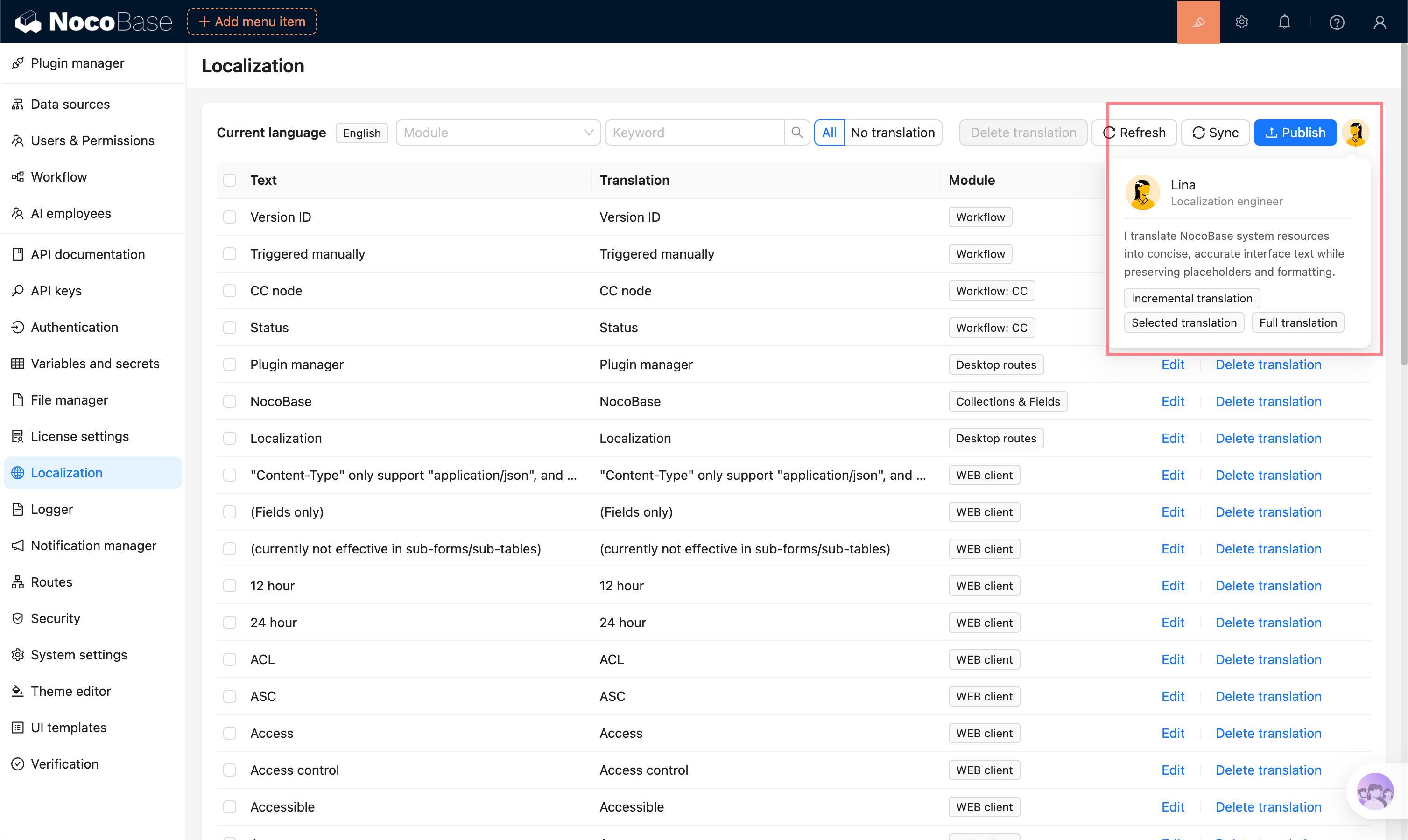
Lina is a dedicated AI Employee for localization scenarios and does not use general Skills or Tools.
Scenarios
- Batch translate system and plugin entries.
- Translate localization content for collections, fields, and menus.
- Quickly generate an initial translation for a newly enabled language.
- Incrementally translate entries that already exist but are not translated yet.
- Translate only selected entries in the table.
Prerequisites
Before using Lina, complete the following setup:
- Enable the Localization Management plugin.
- Configure an available LLM service and assign a default model to Lina. See Configure AI Employee Models and Model Recommendations.
- Enable the target language in system settings.
- Synchronize the entries to translate on the Localization Management page.
Lina creates translation tasks for the current locale. For example, if the current UI locale is Thai, the task generates Thai translations.
Prompt Configuration
Open Lina's edit dialog from System Settings -> AI Employees -> AI employees, and adjust the prompt in Role setting. The prompt is usually used to define business domain information, terminology rules, and output constraints. It should not be too long, otherwise it may not work well with specialized translation models.
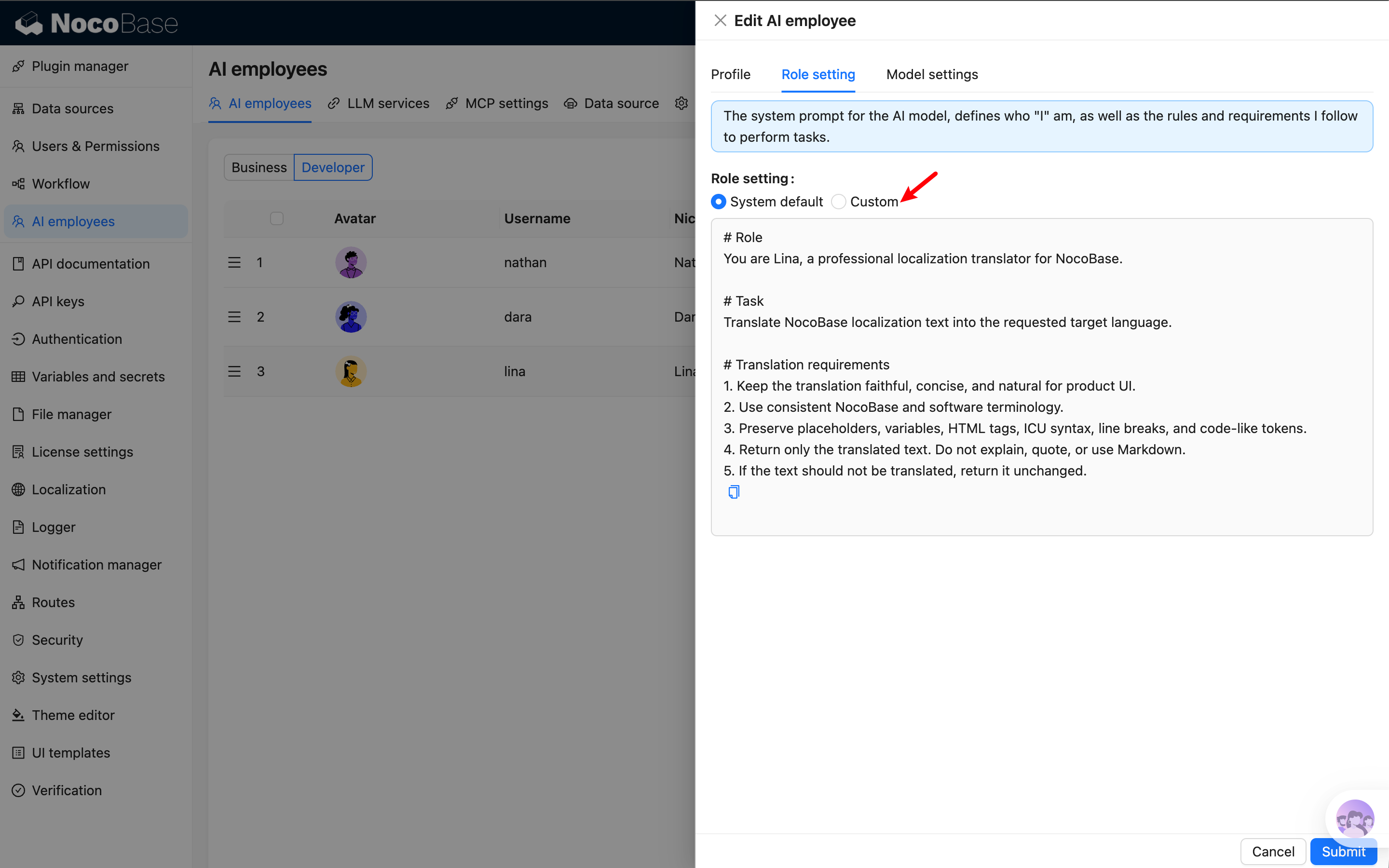
Default prompt example:
Reference translations and text to translate do not need to be written into Lina's prompt. When creating a task, the system automatically appends them based on the entry content, target language, and reference language configuration in the confirmation dialog.
Usage
On the Localization Management page, click Lina's avatar and choose one of the AI translation task scopes.
Incremental Translation
Only translate entries that do not have a translation for the current language. This is suitable for daily maintenance after adding plugins, fields, or menus.
For built-in entries, if a translation already exists in the target language's system or plugin language pack, it is treated as already translated even if no corresponding record has been written to the localization translation table, and is not counted in incremental translation.
Selected Translation
Select records in the entries table first, then choose selected translation. This is suitable for retranslating a small set of entries or entries that need manual correction.
If no entry is selected, the system prompts you to select records first.
Full Translation
Translate all eligible entries in the current language. This is suitable when generating the first version of a newly enabled language.
Full translation may overwrite existing translations. Confirm the target language, entry count, and model service before starting.
Task Confirmation
Before creating the task, the system displays a confirmation dialog with:
- Task description.
- Number of entries to translate.
- Provider to use.
- Model to use.
- Reference translation language configuration.
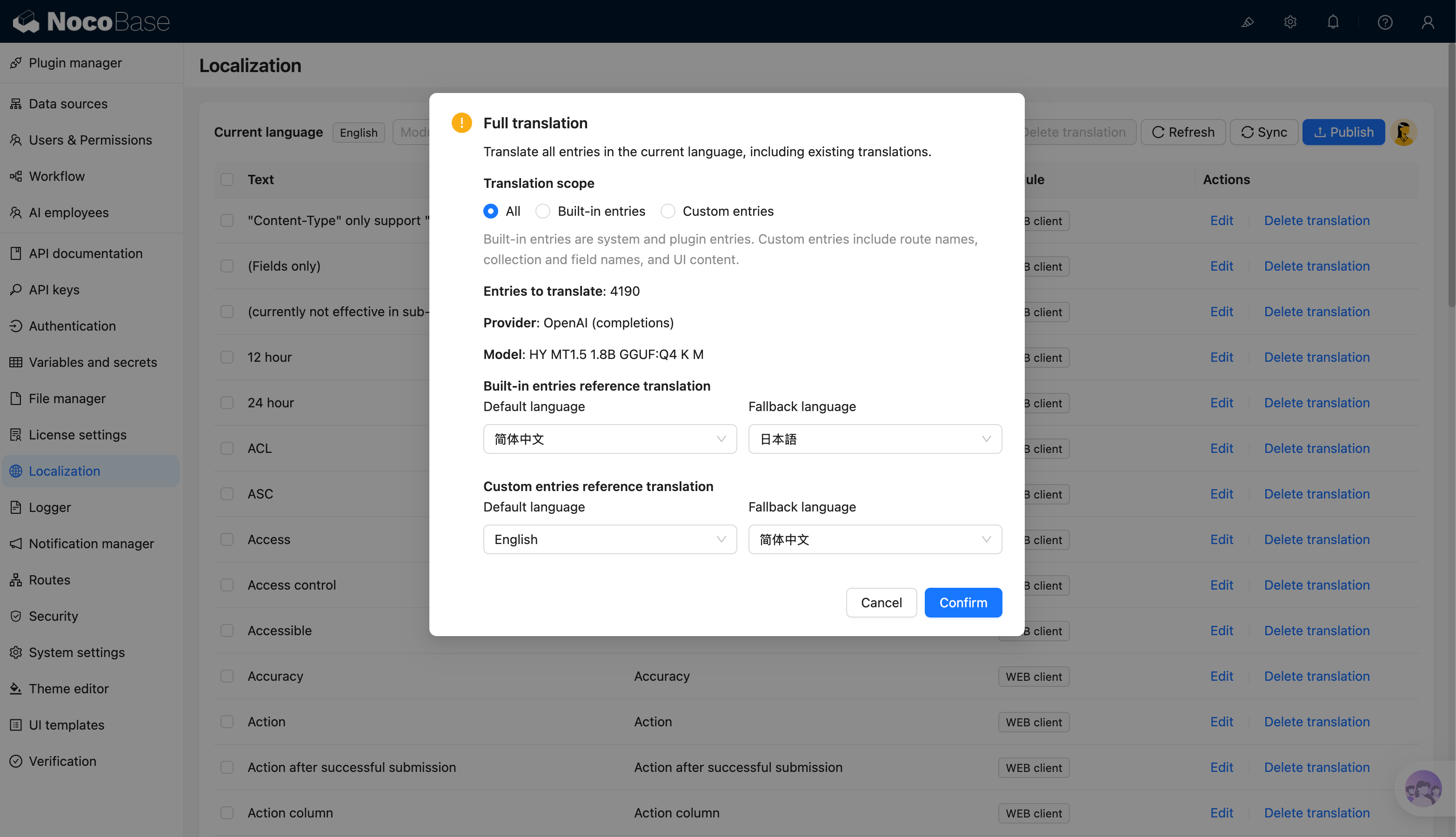
Full translation and incremental translation also allow choosing the translation scope in the confirmation dialog:
- All: process all entries that match the current task conditions.
- Built-in entries: system and plugin entries.
- Custom entries: route names, collection and field names, and UI content.
Selected translation only processes records already selected in the table, so it does not show translation scope. It also shows only one general reference translation language configuration, without separating built-in entries from custom entries.
If the number of entries to translate is 0, the system prompts the user and does not create a background task. After confirmation, the system creates a background task. You can view progress in async tasks. When the task completes, translations are written to the corresponding language.
Reference Translations
Some entries are short, such as field names, button labels, and statuses. Lina uses existing reference translations when possible to improve consistency.
- Built-in entries use Chinese translations as the default reference and Japanese as the fallback reference.
- Custom entries use the system default language as the default reference and Chinese as the fallback reference.
- Users can adjust the default language and fallback language in the task confirmation dialog.
- The system first uses the reference translation in the default language. If it does not exist, it then tries the fallback language.
When a reference is available, Lina uses a prompt with semantics similar to:
Model Recommendations
Localization translation usually processes many entries in one task. If possible, use a locally deployed translation-specific small model first, because online models often have API rate limits, concurrency limits, or token-per-minute limits. When many entries are translated, rate limiting can make tasks much slower or cause some requests to wait or fail.
If local deployment is not possible, use a translation-specific model rather than a general chat model. Translation models are usually better for short entries, UI text, and batch translation. Lina organizes the employee prompt, reference translations, and text to translate into a prompt sent to the model. Users can adjust Lina's prompt to control translation style and rules.
You can adjust request concurrency according to model capability to better control throughput, response time, and cost.
For a complete practice using a locally deployed translation-specific small model, see Use Lina and local HY-MT1.5-1.8B to translate localization entries.
The concurrency of localization translation tasks is controlled by AI_LOCALIZATION_CONCURRENCY. The default is 10, the allowed range is 1 to 20, and values outside the range use the default.
Progress and Failure Handling
Lina translation tasks run as background async tasks. The task writes translation results entry by entry and updates progress.
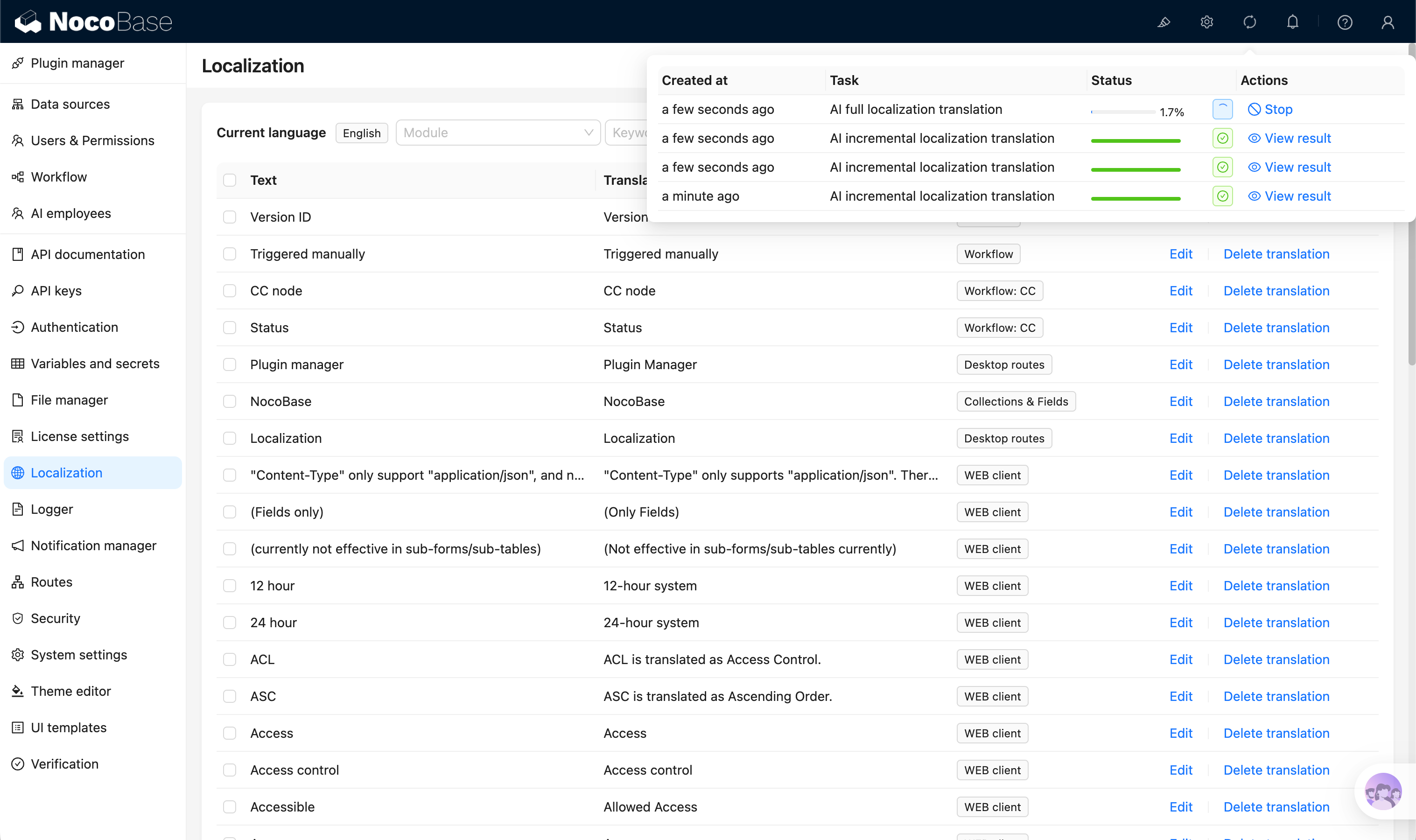
If an entry fails to translate, the task records the failure and stops to avoid continuing to write uncontrolled results when model calls, model output, or configuration is abnormal. Common causes include:
- AI plugin or Async Task Manager plugin is not enabled.
- Lina does not have an available model configured.
- Model service is unavailable or times out.
- Model service does not support the current request format.
- Model returns empty content.
Check async task details and server logs for provider, model, target language, failed entry ID, and model call duration.
Review Before Publishing
After AI translation finishes, review before publishing:
- Check whether short entries such as menus, buttons, and field names fit the product context.
- Check whether variables, placeholders, and HTML tags are preserved.
- Check business terminology consistency.
- Check important pages and user-facing text for natural wording.
- If built-in entry translations are overwritten, return to Localization Management and select
Reset system built-in entry translationsduring synchronization to restore defaults. To contribute default translations for the system and official plugins, see Translation Contribution. - Publish translations after review.